Helperbird, an advanced browser-based extension focused on accessibility and productivity, has been released in its latest version on January 24, 2026. This tool aims to enhance the online experience for all users, particularly those with dyslexia, visual stress, ADHD, or anyone seeking a more comfortable way to read, write, and browse the web.
Overview and Features
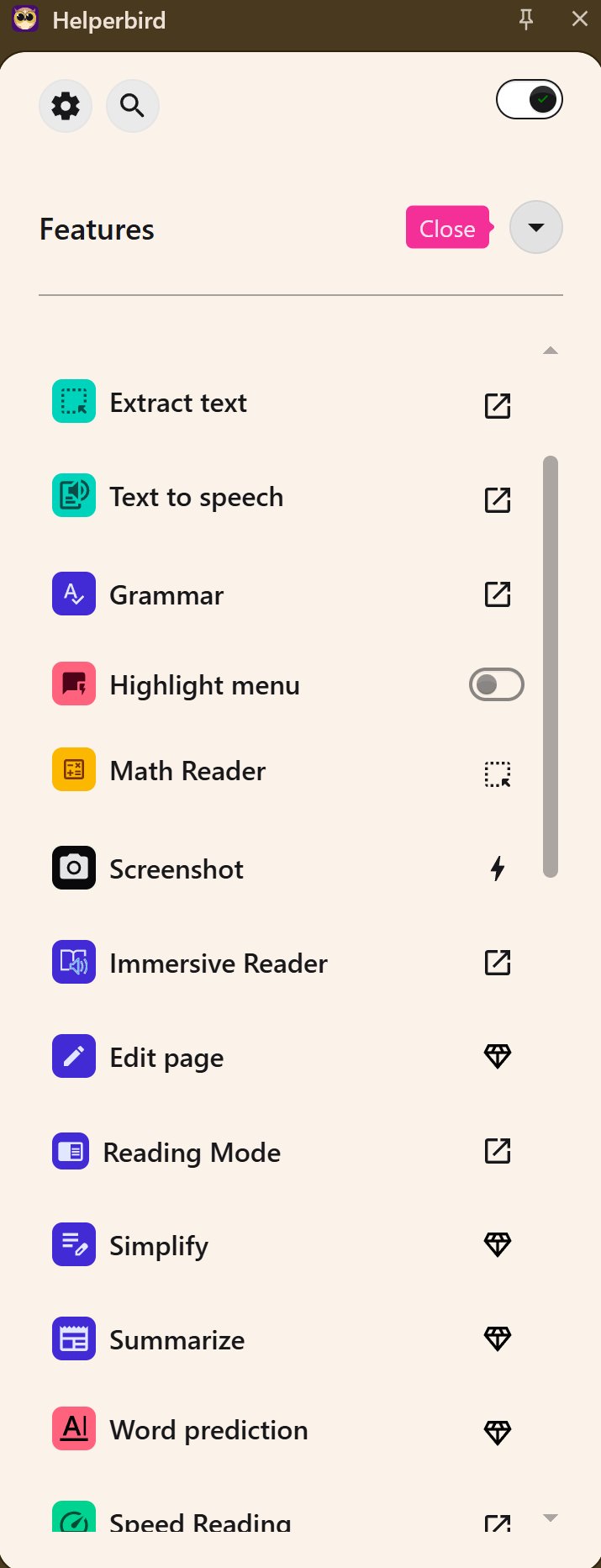
Helperbird is designed to alleviate the strain often associated with reading lengthy web pages. It provides a robust suite of customizable tools that allow users to modify the appearance and functionality of web content to better suit their individual needs. Key features include:
- Reading Tools: Distraction-free reading mode, Immersive Reader with adjustable settings, text-to-speech functionality, dyslexia-friendly fonts, high-contrast modes, and focus tools such as the dyslexia ruler and magnifier.
- Writing and Study Tools: Voice typing, word prediction, sticky notes, text statistics, and OCR capabilities for extracting text from images.
- Browser and Accessibility Tweaks: Custom cursor sizes, auto-scroll capabilities, keyboard shortcuts, and visual overlays for improved navigation and focus.
User Experience
The extension is praised for its intuitive design and effective functionality. Users can enjoy a personalized web experience as changes made within Helperbird are consistent across different sites. The dyslexia ruler and focus ruler, which help users concentrate on specific text while fading out distractions, have been particularly well-received. Furthermore, Helperbird operates smoothly across various web browsers (Chrome, Firefox, Edge, and Safari) and devices, ensuring stability without consuming excessive system resources.
Pricing and Availability
Helperbird offers a free version with essential features, while the Pro version expands customization options for a subscription fee starting at $30 per year, with discounts available for students and educational institutions.
Conclusion
Helperbird is a comprehensive accessibility suite that effectively addresses a variety of user needs, making online reading and writing significantly more manageable. Its combination of deep customization, practical tools, and cross-platform support makes it a valuable resource for anyone who finds traditional web browsing challenging. Users are encouraged to try the free version to experience the benefits firsthand, and for those seeking further assistance or alternatives, resources are available on the MajorGeeks forums.
Future Enhancements
Looking ahead, it would be beneficial for Helperbird to continue evolving by incorporating user feedback, potentially expanding its toolset to include collaborative features for educational environments, or integrating more advanced AI capabilities for personalized content delivery. Additionally, ongoing performance optimization for even faster response times and more seamless integration with a wider range of digital platforms could further enhance user satisfaction
Overview and Features
Helperbird is designed to alleviate the strain often associated with reading lengthy web pages. It provides a robust suite of customizable tools that allow users to modify the appearance and functionality of web content to better suit their individual needs. Key features include:
- Reading Tools: Distraction-free reading mode, Immersive Reader with adjustable settings, text-to-speech functionality, dyslexia-friendly fonts, high-contrast modes, and focus tools such as the dyslexia ruler and magnifier.
- Writing and Study Tools: Voice typing, word prediction, sticky notes, text statistics, and OCR capabilities for extracting text from images.
- Browser and Accessibility Tweaks: Custom cursor sizes, auto-scroll capabilities, keyboard shortcuts, and visual overlays for improved navigation and focus.
User Experience
The extension is praised for its intuitive design and effective functionality. Users can enjoy a personalized web experience as changes made within Helperbird are consistent across different sites. The dyslexia ruler and focus ruler, which help users concentrate on specific text while fading out distractions, have been particularly well-received. Furthermore, Helperbird operates smoothly across various web browsers (Chrome, Firefox, Edge, and Safari) and devices, ensuring stability without consuming excessive system resources.
Pricing and Availability
Helperbird offers a free version with essential features, while the Pro version expands customization options for a subscription fee starting at $30 per year, with discounts available for students and educational institutions.
Conclusion
Helperbird is a comprehensive accessibility suite that effectively addresses a variety of user needs, making online reading and writing significantly more manageable. Its combination of deep customization, practical tools, and cross-platform support makes it a valuable resource for anyone who finds traditional web browsing challenging. Users are encouraged to try the free version to experience the benefits firsthand, and for those seeking further assistance or alternatives, resources are available on the MajorGeeks forums.
Future Enhancements
Looking ahead, it would be beneficial for Helperbird to continue evolving by incorporating user feedback, potentially expanding its toolset to include collaborative features for educational environments, or integrating more advanced AI capabilities for personalized content delivery. Additionally, ongoing performance optimization for even faster response times and more seamless integration with a wider range of digital platforms could further enhance user satisfaction
Helperbird 2026.01.24 released
Helperbird is a browser-based accessibility and productivity extension that makes reading, writing, and browsing the web easier for everyone, especially folks with dyslexia, visual stress, ADHD, or anyone who wants a more comfortable online experience.