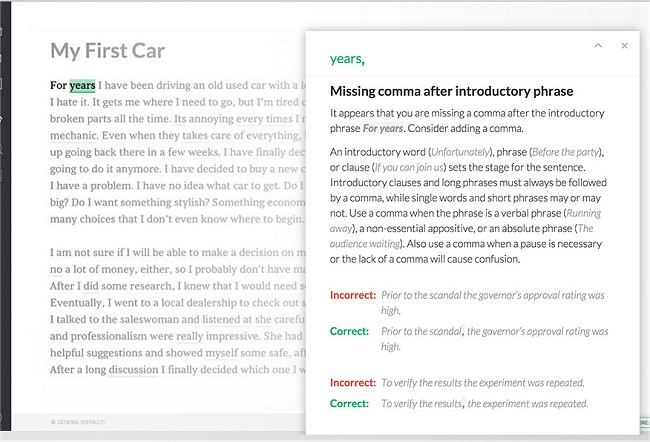
Grammarly is a writing assistant designed to enhance your writing skills by identifying and correcting errors in your text, outperforming standard word processors by addressing up to ten times more mistakes. Available as a Windows application and a browser extension for Chrome, Firefox, Edge, and Safari, Grammarly also offers a user-friendly web app that requires no installation.
The tool is particularly beneficial for individuals with learning disabilities such as dyslexia, as it not only detects mistakes but also provides explanations for corrections, fostering confidence in writing. Grammarly identifies over 250 grammatical and contextual errors, including spelling, punctuation, and vocabulary issues that other software might overlook.
Key features that set Grammarly apart include its contextual spell checker, advanced grammar checking, vocabulary enhancement options, and AI-powered analysis of tone, clarity, and flow. This makes it invaluable for a variety of writing tasks, from composing blog posts to crafting professional emails and social media content.
While the free version is suitable for general writing needs, the premium version offers advanced functionalities like tone detection, sentence rewrites, plagiarism checks, and suggestions for clarity. Furthermore, Grammarly’s AI capabilities not only improve writing quality but also enhance SEO performance by making content more engaging and easier to read, ultimately boosting its visibility in search results.
In conclusion, Grammarly is an essential tool for anyone involved in writing, whether for personal or professional purposes. Its blend of simplicity and power makes it a must-have in modern writing workflows. Adopting Grammarly can lead to improved communication skills and better discoverability in digital platforms.
For those looking for more tips on optimizing their writing experience, consider exploring features like switching spellcheckers in browsers or utilizing specific Chrome flags to enhance your browsing experience
The tool is particularly beneficial for individuals with learning disabilities such as dyslexia, as it not only detects mistakes but also provides explanations for corrections, fostering confidence in writing. Grammarly identifies over 250 grammatical and contextual errors, including spelling, punctuation, and vocabulary issues that other software might overlook.
Key features that set Grammarly apart include its contextual spell checker, advanced grammar checking, vocabulary enhancement options, and AI-powered analysis of tone, clarity, and flow. This makes it invaluable for a variety of writing tasks, from composing blog posts to crafting professional emails and social media content.
While the free version is suitable for general writing needs, the premium version offers advanced functionalities like tone detection, sentence rewrites, plagiarism checks, and suggestions for clarity. Furthermore, Grammarly’s AI capabilities not only improve writing quality but also enhance SEO performance by making content more engaging and easier to read, ultimately boosting its visibility in search results.
In conclusion, Grammarly is an essential tool for anyone involved in writing, whether for personal or professional purposes. Its blend of simplicity and power makes it a must-have in modern writing workflows. Adopting Grammarly can lead to improved communication skills and better discoverability in digital platforms.
For those looking for more tips on optimizing their writing experience, consider exploring features like switching spellcheckers in browsers or utilizing specific Chrome flags to enhance your browsing experience
Grammarly released
Grammarly helps make you a better writer by assisting in finding and correcting mistakes within a body of text, effectively fixing up to 10x more errors than your standard word processor. It's the reason anything you see on MajorGeeks makes any sense.