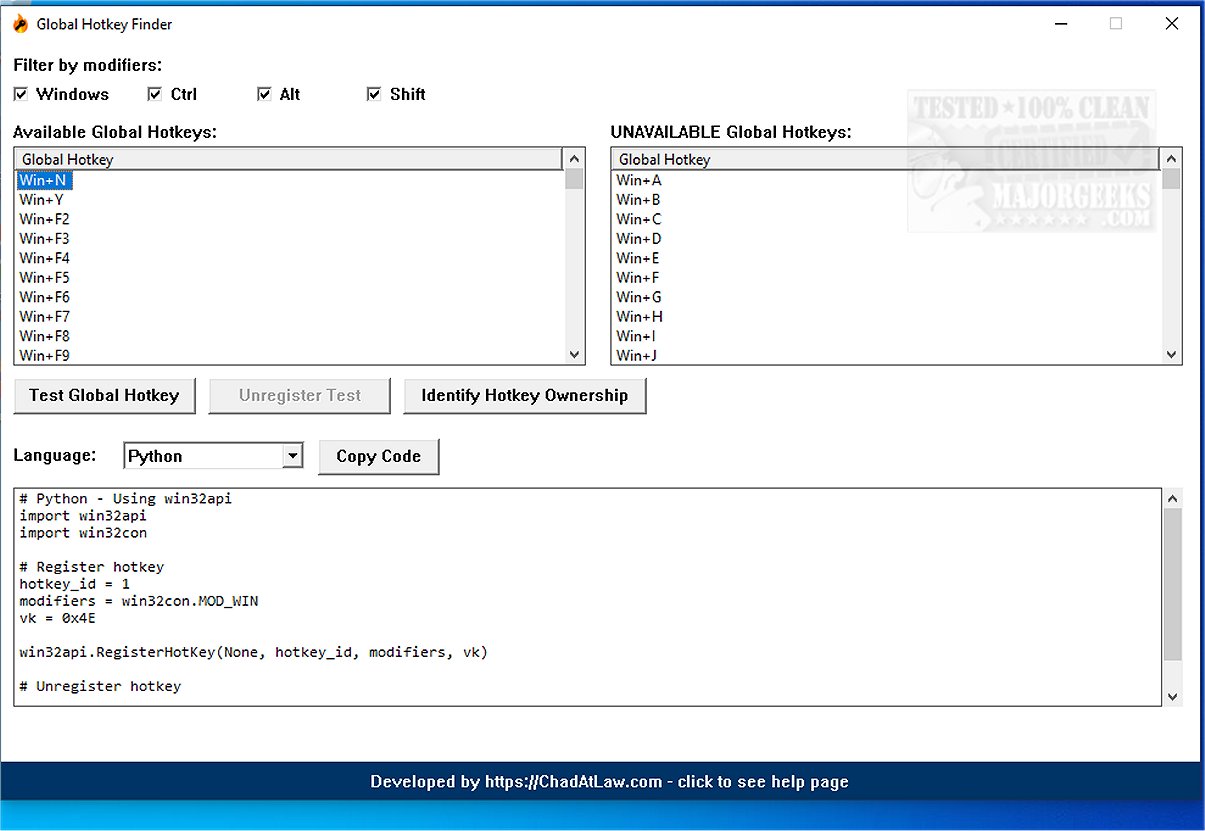
Global Hotkey Finder is an innovative software tool designed to identify and highlight keyboard shortcuts, specifically focusing on global hotkey combinations across your operating system. This application serves as a valuable resource for users looking to customize their keyboard shortcuts while avoiding conflicts with existing ones.
1. Comprehensive Hotkey Detection: The tool scans a wide range of possible global hotkey combinations by combining Windows, Control, Alt, and Shift modifier keys with letters, numbers, and function keys.
2. Filter by Modifiers: Users can easily filter results based on specific modifier keys, making it simpler to find and manage hotkeys.
3. Available vs. Unavailable Lists: The software provides a clear overview of which hotkey combinations are free for use and which ones are already assigned to applications.
4. Live Testing of Hotkeys: Users can temporarily register hotkeys to ensure they function as intended before finalizing the setup.
5. Identify Hotkey Ownership: The application can reveal which specific application is using a hotkey combination, helping to troubleshoot conflicts.
6. Code Generation: Developers can generate code snippets in popular programming languages like Python, C++, C#, Java, and JavaScript, streamlining the process of creating custom keyboard shortcuts.
Global Hotkey Finder is not only useful for creating personalized shortcuts but also plays a crucial role in preventing conflicts during the setup process. It is particularly beneficial for application developers, power users, and system administrators who need to document available hotkey combinations effectively. By optimizing workflows, the tool enhances overall productivity.
With its user-friendly interface and comprehensive features, Global Hotkey Finder 1.0.0 is an essential tool for anyone looking to maximize their efficiency through keyboard shortcuts. Whether you're a developer crafting custom commands or a power user aiming to streamline your operations, this software provides the necessary tools to navigate and optimize your global hotkey usage.
Looking ahead, future versions of Global Hotkey Finder could include additional features such as:
- Integration with Third-Party Applications: Allowing users to see hotkey conflicts across different software platforms.
- User Customization Options: Enabling users to save preferred hotkey configurations for easy access.
- Cross-Platform Compatibility: Expanding functionality to support other operating systems, such as macOS and Linux, to cater to a broader audience.
In summary, Global Hotkey Finder is an invaluable asset for maximizing productivity through efficient keyboard shortcut management
Key Features and Functionalities
1. Comprehensive Hotkey Detection: The tool scans a wide range of possible global hotkey combinations by combining Windows, Control, Alt, and Shift modifier keys with letters, numbers, and function keys.
2. Filter by Modifiers: Users can easily filter results based on specific modifier keys, making it simpler to find and manage hotkeys.
3. Available vs. Unavailable Lists: The software provides a clear overview of which hotkey combinations are free for use and which ones are already assigned to applications.
4. Live Testing of Hotkeys: Users can temporarily register hotkeys to ensure they function as intended before finalizing the setup.
5. Identify Hotkey Ownership: The application can reveal which specific application is using a hotkey combination, helping to troubleshoot conflicts.
6. Code Generation: Developers can generate code snippets in popular programming languages like Python, C++, C#, Java, and JavaScript, streamlining the process of creating custom keyboard shortcuts.
Benefits of Global Hotkey Finder
Global Hotkey Finder is not only useful for creating personalized shortcuts but also plays a crucial role in preventing conflicts during the setup process. It is particularly beneficial for application developers, power users, and system administrators who need to document available hotkey combinations effectively. By optimizing workflows, the tool enhances overall productivity.
Conclusion
With its user-friendly interface and comprehensive features, Global Hotkey Finder 1.0.0 is an essential tool for anyone looking to maximize their efficiency through keyboard shortcuts. Whether you're a developer crafting custom commands or a power user aiming to streamline your operations, this software provides the necessary tools to navigate and optimize your global hotkey usage.
Future Enhancements
Looking ahead, future versions of Global Hotkey Finder could include additional features such as:
- Integration with Third-Party Applications: Allowing users to see hotkey conflicts across different software platforms.
- User Customization Options: Enabling users to save preferred hotkey configurations for easy access.
- Cross-Platform Compatibility: Expanding functionality to support other operating systems, such as macOS and Linux, to cater to a broader audience.
In summary, Global Hotkey Finder is an invaluable asset for maximizing productivity through efficient keyboard shortcut management
Global Hotkey Finder 1.0.0 released
Global Hotkey Finder is a powerful tool that detects keyboard shortcuts and highlights the global hotkey combinations available on your operating system.