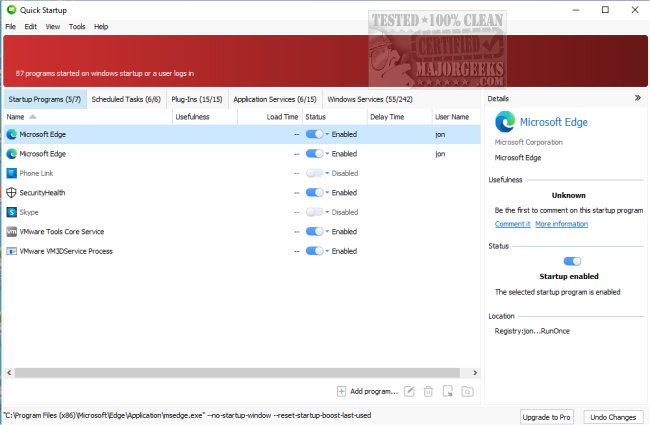
Glarysoft has released Quick Startup version 6.0.1.19, a free tool designed to help users manage their system's startup processes. This startup manager allows users to disable or delay programs that automatically launch during system boot, ultimately improving boot times and overall system performance.
Navigating startup entries can be complex, as users often wonder which programs are necessary and which can be disabled. Quick Startup simplifies this process by providing a clear interface that shows all startup items, scheduled tasks, plug-ins, application services, and Windows services. Users can enable or disable these entries, read descriptions, and leave comments, making it user-friendly for individuals of all tech skill levels.
Key features of Glarysoft Quick Startup include:
- An elegant list view for browsing all startup entries
- Security risk ratings for startup items
- Detailed information on individual entries
- Options to add, edit, or remove startup items
- Commenting capabilities for better user insights
In addition to managing startup applications, the tool is comparable to other Windows management tips, such as changing default shutdown behaviors and optimizing boot settings in Windows 10 and 11.
To extend the utility of Glarysoft Quick Startup, users can also consider integrating it with other system optimization tools, regularly reviewing their startup items for any unnecessary applications, and keeping abreast of software updates to ensure optimal performance and security
Navigating startup entries can be complex, as users often wonder which programs are necessary and which can be disabled. Quick Startup simplifies this process by providing a clear interface that shows all startup items, scheduled tasks, plug-ins, application services, and Windows services. Users can enable or disable these entries, read descriptions, and leave comments, making it user-friendly for individuals of all tech skill levels.
Key features of Glarysoft Quick Startup include:
- An elegant list view for browsing all startup entries
- Security risk ratings for startup items
- Detailed information on individual entries
- Options to add, edit, or remove startup items
- Commenting capabilities for better user insights
In addition to managing startup applications, the tool is comparable to other Windows management tips, such as changing default shutdown behaviors and optimizing boot settings in Windows 10 and 11.
To extend the utility of Glarysoft Quick Startup, users can also consider integrating it with other system optimization tools, regularly reviewing their startup items for any unnecessary applications, and keeping abreast of software updates to ensure optimal performance and security
Glarysoft Quick Startup 6.0.1.19 released
Glarysoft Quick Startup is a free startup manager designed to disable or delay auto-start programs to speed up system boot times.