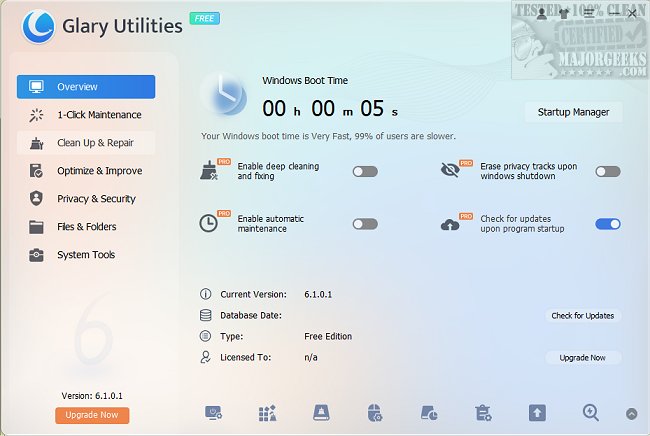
Glary Utilities is a versatile suite of free system tools and utilities designed to optimize, maintain, and safeguard your PC. The latest version, 6.45.0.50, continues to uphold its reputation as a user-friendly and powerful toolkit for users looking to enhance their computer's performance. It even offers a portable version, allowing you to take the software with you on a USB drive for use on different machines.
Why Choose Glary Utilities?
If your computer feels slow or cluttered, Glary Utilities may be the efficient remedy it requires. This free software package is equipped with a variety of features aimed at cleaning, speeding up, and protecting your system through a streamlined interface that is easy to navigate.
Features and Benefits
Glary Utilities is more than just a typical PC cleaner; it serves as a complete maintenance kit, effectively removing junk files, invalid registry entries, and browsing history. It can identify and eliminate unnecessary browser add-ons, duplicate files, and help manage disk space. Users can also access advanced features like file encryption, file splitting, and merging.
Performance Enhancements
The utility includes several performance-boosting tools:
- Memory Optimizer: Frees up RAM resources in real-time.
- Shortcut Fixer: Resolves broken Windows shortcuts.
- Startup Manager: Enables users to control which programs launch at startup.
- Uninstall Manager: Effortlessly removes unwanted applications.
Advanced tools such as the Disk Analyzer and Duplicate Files Finder allow users to reclaim hard drive space, while the File Shredder ensures sensitive information is permanently deleted.
Privacy and Security Features
Glary Utilities emphasizes user privacy and security by providing tools like the Tracks Eraser, which clears cookies and browser history, and the File Encrypter for keeping private files secure. Additional features like the Empty Folders Finder and Process Manager help maintain system integrity.
Conclusion
In summary, Glary Utilities is a robust tool that effectively combines cleaning, optimization, and security features into one accessible package. Its ability to make significant improvements to system performance while remaining user-friendly makes it an essential tool for anyone looking to rejuvenate their PC. If your computer feels sluggish or cluttered, Glary Utilities is definitely worth trying out. It’s free and portable, promising to give your machine a new lease on life.
Further Exploration
For users looking to dive deeper into PC maintenance, comparisons between Glary Utilities and other cleaning tools like CCleaner, Wise Disk Cleaner, and PrivaZer can provide valuable insights. Additionally, exploring Windows 10's built-in Storage Sense feature for automatic junk file deletion and learning how to manage the Recycle Bin can complement the usage of Glary Utilities for a comprehensive cleaning strategy
Why Choose Glary Utilities?
If your computer feels slow or cluttered, Glary Utilities may be the efficient remedy it requires. This free software package is equipped with a variety of features aimed at cleaning, speeding up, and protecting your system through a streamlined interface that is easy to navigate.
Features and Benefits
Glary Utilities is more than just a typical PC cleaner; it serves as a complete maintenance kit, effectively removing junk files, invalid registry entries, and browsing history. It can identify and eliminate unnecessary browser add-ons, duplicate files, and help manage disk space. Users can also access advanced features like file encryption, file splitting, and merging.
Performance Enhancements
The utility includes several performance-boosting tools:
- Memory Optimizer: Frees up RAM resources in real-time.
- Shortcut Fixer: Resolves broken Windows shortcuts.
- Startup Manager: Enables users to control which programs launch at startup.
- Uninstall Manager: Effortlessly removes unwanted applications.
Advanced tools such as the Disk Analyzer and Duplicate Files Finder allow users to reclaim hard drive space, while the File Shredder ensures sensitive information is permanently deleted.
Privacy and Security Features
Glary Utilities emphasizes user privacy and security by providing tools like the Tracks Eraser, which clears cookies and browser history, and the File Encrypter for keeping private files secure. Additional features like the Empty Folders Finder and Process Manager help maintain system integrity.
Conclusion
In summary, Glary Utilities is a robust tool that effectively combines cleaning, optimization, and security features into one accessible package. Its ability to make significant improvements to system performance while remaining user-friendly makes it an essential tool for anyone looking to rejuvenate their PC. If your computer feels sluggish or cluttered, Glary Utilities is definitely worth trying out. It’s free and portable, promising to give your machine a new lease on life.
Further Exploration
For users looking to dive deeper into PC maintenance, comparisons between Glary Utilities and other cleaning tools like CCleaner, Wise Disk Cleaner, and PrivaZer can provide valuable insights. Additionally, exploring Windows 10's built-in Storage Sense feature for automatic junk file deletion and learning how to manage the Recycle Bin can complement the usage of Glary Utilities for a comprehensive cleaning strategy
Glary Utilities 6.45.0.50 released
Glary Utilities offers free, powerful, and easy-to-use system tools and utilities to help fix, speed up, maintain, and protect your PC. Video tutorial available. Available as a portable app as well.