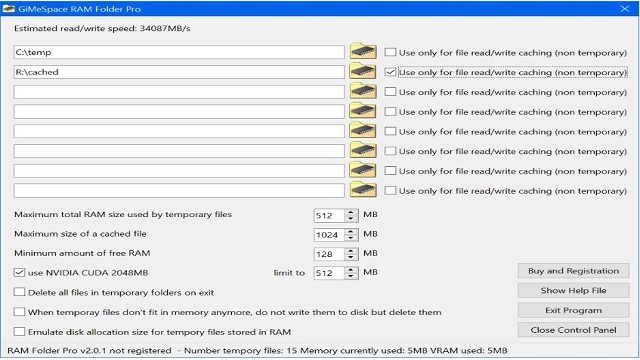
GiMeSpace has released version 2.4.1 of its RAM Folder, a lightweight utility designed for Windows operating systems that creates a virtual folder directly in the computer's RAM. This tool provides incredibly fast access to files, making it an excellent choice for users who frequently work with temporary files, large datasets, or applications that require quick data retrieval. The software is compatible with Windows XP through Windows 11 and is available for free for personal use.
One of the standout features of GiMeSpace RAM Folder is its ability to outperform traditional hard drives and even solid-state drives (SSDs) in terms of speed. By utilizing RAM, users can load files almost instantaneously, making it especially beneficial for tasks such as video editing, 3D rendering, and software testing. The setup process is straightforward; once installed, it creates a RAM-backed folder that functions like any regular folder, allowing users to easily drop files into it. Furthermore, the tool has the capability to back up and restore the RAM folder's contents between sessions, which can be done either manually or automatically.
While GiMeSpace RAM Folder excels in performance, it does have a few limitations. The user interface is quite basic, lacking advanced features or aesthetics. Additionally, the free version is limited to non-commercial use, and users with low-RAM machines need to be cautious about how much they allocate to the RAM folder, as it can affect overall system performance.
In summary, GiMeSpace RAM Folder is a valuable utility for power users, creators, and developers who require a fast and efficient workspace. Its ease of use and speed make it a hidden gem among software tools. However, users should remember to save their work before shutting down, as the contents of the RAM folder are temporary and will be lost upon reboot.
Extension: As technology continues to evolve, tools like GiMeSpace RAM Folder could pave the way for more sophisticated applications that harness the speed of RAM for various tasks. Future iterations might include enhanced user interfaces, support for collaborative environments, or integration with cloud services to facilitate the easy transfer of files between local and remote systems. As users increasingly demand faster performance and efficiency in their workflows, utilities like GiMeSpace will likely remain relevant, evolving to meet the needs of modern computing
One of the standout features of GiMeSpace RAM Folder is its ability to outperform traditional hard drives and even solid-state drives (SSDs) in terms of speed. By utilizing RAM, users can load files almost instantaneously, making it especially beneficial for tasks such as video editing, 3D rendering, and software testing. The setup process is straightforward; once installed, it creates a RAM-backed folder that functions like any regular folder, allowing users to easily drop files into it. Furthermore, the tool has the capability to back up and restore the RAM folder's contents between sessions, which can be done either manually or automatically.
While GiMeSpace RAM Folder excels in performance, it does have a few limitations. The user interface is quite basic, lacking advanced features or aesthetics. Additionally, the free version is limited to non-commercial use, and users with low-RAM machines need to be cautious about how much they allocate to the RAM folder, as it can affect overall system performance.
In summary, GiMeSpace RAM Folder is a valuable utility for power users, creators, and developers who require a fast and efficient workspace. Its ease of use and speed make it a hidden gem among software tools. However, users should remember to save their work before shutting down, as the contents of the RAM folder are temporary and will be lost upon reboot.
Extension: As technology continues to evolve, tools like GiMeSpace RAM Folder could pave the way for more sophisticated applications that harness the speed of RAM for various tasks. Future iterations might include enhanced user interfaces, support for collaborative environments, or integration with cloud services to facilitate the easy transfer of files between local and remote systems. As users increasingly demand faster performance and efficiency in their workflows, utilities like GiMeSpace will likely remain relevant, evolving to meet the needs of modern computing
GiMeSpace RAM Folder Pro 2.4.1 released
GiMeSpace RAM Folder is a lightweight Windows tool that creates a super-fast virtual folder right in your PC's RAM.