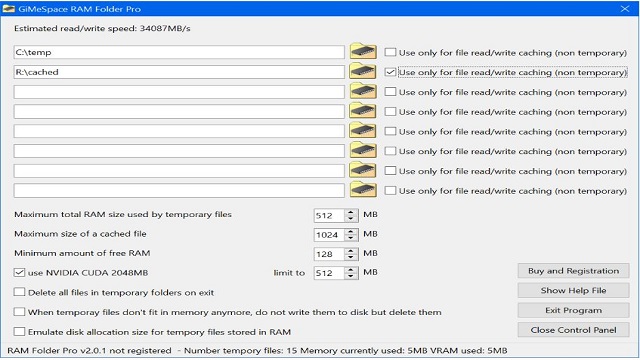
GiMeSpace RAM Folder is a lightweight utility designed for Windows operating systems that creates a high-speed virtual folder directly in your computer's RAM. This tool is particularly useful for users who require rapid access to temporary files, extensive datasets, or frequently utilized applications. Compatible with Windows XP through Windows 11, the software is free for personal use, making it accessible for a wide range of users.
Performance Enhancement for File Management
The main advantage of GiMeSpace RAM Folder lies in its ability to leverage the speed of RAM, which far surpasses that of conventional hard drives or even solid-state drives (SSDs). By establishing a folder in system memory, files placed within can be accessed almost instantaneously. This feature is especially beneficial for activities such as video editing, software testing, or managing temporary files, allowing users to work without the delays typically associated with disk storage.
The setup process is straightforward. Upon installation, the application creates a virtual folder that operates like any standard folder, but with the added benefit of RAM speed. Users can easily drag and drop files into the folder, and the software also offers an option to automatically save contents to disk, ensuring that important data isn't lost after a system shutdown or restart.
Why GiMeSpace RAM Folder is Essential
For tasks that require fast read and write speeds—like video encoding, 3D rendering, software development, and data analysis—this tool significantly enhances performance. It provides a clean and temporary workspace, allowing users to manipulate large files without the risk of cluttering their primary storage. For instance, transferring several gigabytes of temporary files into a RAM folder can make access and editing feel almost instantaneous, and once the work is complete, users can simply discard the data without any residual mess.
Key Features:
- Creates a persistent RAM folder that is available upon booting up.
- Offers manual or automatic backup to disk for user convenience.
- Compatible with all modern Windows versions.
- Lightweight design with minimal CPU or memory usage.
Considerations for Improvement:
- Lacks a sophisticated user interface, focusing instead on functionality.
- Usage limited to personal, non-commercial purposes unless a fee is paid.
- Consumes RAM resources, which could hinder performance on machines with limited memory.
Final Thoughts
GiMeSpace RAM Folder is a valuable tool for those who prioritize speed and efficiency in their file management. It serves as an effective temporary workspace that is easy to manage and ideal for power users, creators, and software developers looking for a seamless experience. However, users must remember that because the data is stored in RAM, it is essential to save any critical work before shutting down to prevent data loss. This utility represents a great addition for anyone seeking to enhance their workflow while maintaining an organized digital environment.
Future Updates and Enhancements
Looking ahead, users can anticipate potential updates that could introduce a more user-friendly interface, enhanced features for commercial use, and optimizations to minimize RAM usage while maximizing performance. These enhancements could further solidify GiMeSpace RAM Folder's position as a go-to solution for high-speed file management
Performance Enhancement for File Management
The main advantage of GiMeSpace RAM Folder lies in its ability to leverage the speed of RAM, which far surpasses that of conventional hard drives or even solid-state drives (SSDs). By establishing a folder in system memory, files placed within can be accessed almost instantaneously. This feature is especially beneficial for activities such as video editing, software testing, or managing temporary files, allowing users to work without the delays typically associated with disk storage.
The setup process is straightforward. Upon installation, the application creates a virtual folder that operates like any standard folder, but with the added benefit of RAM speed. Users can easily drag and drop files into the folder, and the software also offers an option to automatically save contents to disk, ensuring that important data isn't lost after a system shutdown or restart.
Why GiMeSpace RAM Folder is Essential
For tasks that require fast read and write speeds—like video encoding, 3D rendering, software development, and data analysis—this tool significantly enhances performance. It provides a clean and temporary workspace, allowing users to manipulate large files without the risk of cluttering their primary storage. For instance, transferring several gigabytes of temporary files into a RAM folder can make access and editing feel almost instantaneous, and once the work is complete, users can simply discard the data without any residual mess.
Key Features:
- Creates a persistent RAM folder that is available upon booting up.
- Offers manual or automatic backup to disk for user convenience.
- Compatible with all modern Windows versions.
- Lightweight design with minimal CPU or memory usage.
Considerations for Improvement:
- Lacks a sophisticated user interface, focusing instead on functionality.
- Usage limited to personal, non-commercial purposes unless a fee is paid.
- Consumes RAM resources, which could hinder performance on machines with limited memory.
Final Thoughts
GiMeSpace RAM Folder is a valuable tool for those who prioritize speed and efficiency in their file management. It serves as an effective temporary workspace that is easy to manage and ideal for power users, creators, and software developers looking for a seamless experience. However, users must remember that because the data is stored in RAM, it is essential to save any critical work before shutting down to prevent data loss. This utility represents a great addition for anyone seeking to enhance their workflow while maintaining an organized digital environment.
Future Updates and Enhancements
Looking ahead, users can anticipate potential updates that could introduce a more user-friendly interface, enhanced features for commercial use, and optimizations to minimize RAM usage while maximizing performance. These enhancements could further solidify GiMeSpace RAM Folder's position as a go-to solution for high-speed file management
GiMeSpace RAM Folder Pro 2.3.2 released
GiMeSpace RAM Folder is a lightweight Windows tool that creates a super-fast virtual folder right in your PC's RAM.