FxSound has released version 1.2.14.0 of its free audio enhancement application, designed to elevate the sound quality on computers for activities like gaming, movie watching, and music listening. This software aims to improve sound performance, especially for users relying on standard onboard sound cards like Realtek, which, while functional, may not deliver optimal audio experiences.
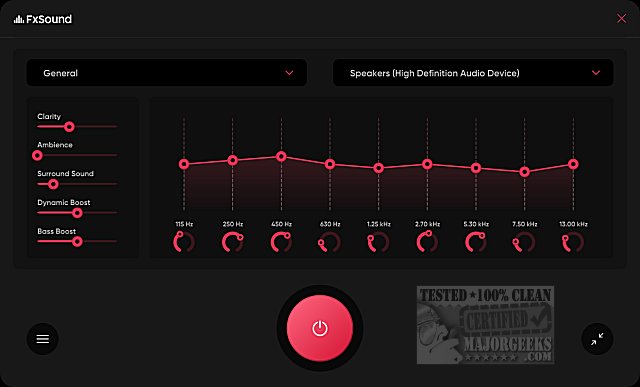
The application features a user-friendly interface characterized by a sleek black-and-red theme. Users can easily select their sound device, which is automatically detected, and choose from various sound categories. The equalizer is a key feature, allowing for adjustments to clarity, ambiance, surround sound, dynamic boost, and bass boost by using simple sliders or selecting from default settings tailored for general use.
In addition to the equalizer, FxSound offers several other features including:
- Visualizer: This element enhances the audio experience by blending it with visual effects, allowing users to "feel" the music.
- Sound Effects: Users can amplify the bass and apply other effects to customize their listening experience.
- Presets: The app comes with specially designed presets that cater to different listening scenarios, such as music, gaming, and video.
While some sound enhancement applications may cater primarily to audiophiles, FxSound is designed for everyday users, making it easy for anyone to notice immediate improvements in sound quality. The application has transitioned from shareware to freeware, allowing users to download it at no cost, with an option to support the developers through donations via PayPal.
In summary, FxSound provides a comprehensive suite of audio enhancement tools that cater to a broad user base, making it a valuable addition for anyone looking to improve their computer's sound quality. The continued evolution of such applications points to an increasing demand for better audio experiences in both personal and professional settings
The application features a user-friendly interface characterized by a sleek black-and-red theme. Users can easily select their sound device, which is automatically detected, and choose from various sound categories. The equalizer is a key feature, allowing for adjustments to clarity, ambiance, surround sound, dynamic boost, and bass boost by using simple sliders or selecting from default settings tailored for general use.
In addition to the equalizer, FxSound offers several other features including:
- Visualizer: This element enhances the audio experience by blending it with visual effects, allowing users to "feel" the music.
- Sound Effects: Users can amplify the bass and apply other effects to customize their listening experience.
- Presets: The app comes with specially designed presets that cater to different listening scenarios, such as music, gaming, and video.
While some sound enhancement applications may cater primarily to audiophiles, FxSound is designed for everyday users, making it easy for anyone to notice immediate improvements in sound quality. The application has transitioned from shareware to freeware, allowing users to download it at no cost, with an option to support the developers through donations via PayPal.
In summary, FxSound provides a comprehensive suite of audio enhancement tools that cater to a broad user base, making it a valuable addition for anyone looking to improve their computer's sound quality. The continued evolution of such applications points to an increasing demand for better audio experiences in both personal and professional settings
FxSound 1.2.14.0 released
FxSound is a free app to improve the sound on your computer, whether you are gaming, watching movies, listening to music, and more.