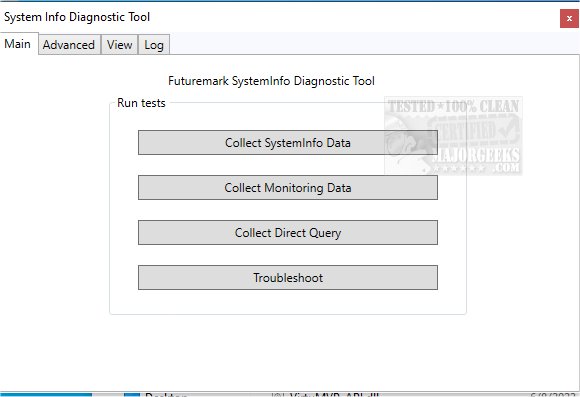
Futuremark SystemInfo has recently released version 5.91.1460, a free utility designed to identify and provide detailed information about the hardware in your computer. This tool is integral to many of Futuremark's benchmarking applications, although it's important to note that updates to SystemInfo do not impact benchmark scores directly; however, using the latest version is necessary for obtaining valid results.
The primary function of Futuremark SystemInfo is diagnostic; it scans your system and compiles comprehensive data on various hardware components, including services, processes, and performance metrics. Users can easily export these findings into an XML file, which contains critical information such as the operating system version, user profile, storage capacity, memory specifications, and motherboard details. It also gathers statistics on Windows Management Instrumentation (WMI), Setup APIs, power supplies, DirectX, and performance metrics for both single and multi-threaded activities.
Installation of Futuremark SystemInfo is straightforward, and the user interface is designed for easy navigation, featuring multiple tabs for efficient access to different functionalities. The Log tab allows users to monitor ongoing tasks, and the results are conveniently saved for later review.
For advanced users seeking more granular information, the Advanced tab offers filtering options to narrow down specific categories of interest. Users can perform detailed queries about CPU specifications, integrated clock speed, GPU details, and much more, enabling the identification of potential performance bottlenecks.
Overall, Futuremark SystemInfo is highly regarded for its precision, low resource consumption, and strong privacy commitment, as it does not collect personally identifiable information. It is an invaluable resource for anyone looking to enhance their system evaluations or optimize performance.
Extension:
To further explore the capabilities of Futuremark SystemInfo, users might consider integrating its data with performance tuning software or hardware monitoring tools to gain even deeper insights into system performance and efficiency. Additionally, as technology continues to evolve, Futuremark could enhance SystemInfo with features such as real-time monitoring, cloud-based reporting, or integration with gaming performance metrics to cater to the growing demand for gamers seeking optimized setups. Futuremark SystemInfo is not just a diagnostic tool but could potentially evolve into a comprehensive performance management suite, empowering users to maintain peak system performance in an increasingly demanding digital landscape
The primary function of Futuremark SystemInfo is diagnostic; it scans your system and compiles comprehensive data on various hardware components, including services, processes, and performance metrics. Users can easily export these findings into an XML file, which contains critical information such as the operating system version, user profile, storage capacity, memory specifications, and motherboard details. It also gathers statistics on Windows Management Instrumentation (WMI), Setup APIs, power supplies, DirectX, and performance metrics for both single and multi-threaded activities.
Installation of Futuremark SystemInfo is straightforward, and the user interface is designed for easy navigation, featuring multiple tabs for efficient access to different functionalities. The Log tab allows users to monitor ongoing tasks, and the results are conveniently saved for later review.
For advanced users seeking more granular information, the Advanced tab offers filtering options to narrow down specific categories of interest. Users can perform detailed queries about CPU specifications, integrated clock speed, GPU details, and much more, enabling the identification of potential performance bottlenecks.
Overall, Futuremark SystemInfo is highly regarded for its precision, low resource consumption, and strong privacy commitment, as it does not collect personally identifiable information. It is an invaluable resource for anyone looking to enhance their system evaluations or optimize performance.
Extension:
To further explore the capabilities of Futuremark SystemInfo, users might consider integrating its data with performance tuning software or hardware monitoring tools to gain even deeper insights into system performance and efficiency. Additionally, as technology continues to evolve, Futuremark could enhance SystemInfo with features such as real-time monitoring, cloud-based reporting, or integration with gaming performance metrics to cater to the growing demand for gamers seeking optimized setups. Futuremark SystemInfo is not just a diagnostic tool but could potentially evolve into a comprehensive performance management suite, empowering users to maintain peak system performance in an increasingly demanding digital landscape
Futuremark SystemInfo 5.91.1460 released
Futuremark SystemInfo is a freeware utility used to identify the hardware in your system and is used for many of Futuremark's benchmarks.