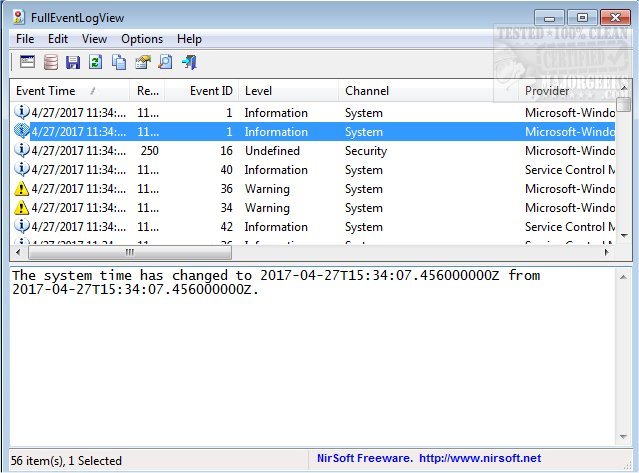
FullEventLogView is a free application designed to provide users with access to detailed information from Windows event logs. The latest version, 1.81, enhances its user-friendly interface, allowing for easy navigation and understanding of event descriptions. Users can view logs from both local and remote PCs, making it a versatile tool for system administrators and tech enthusiasts alike.
One of the standout features of FullEventLogView is its export functionality, which enables users to save event log details in various formats, including text, CSV, tab-delimited, HTML, and XML. This can be done through the graphical user interface or via command line, providing flexibility for different user preferences.
Additionally, FullEventLogView keeps users informed of warnings, errors, and notifications generated within the Windows log, ensuring that important system events are not overlooked. The application's portability means it can be launched on any machine without installation, making it an essential addition to any tech toolbox.
Extended Features and Use Cases
In addition to its core functionalities, FullEventLogView can be particularly useful for troubleshooting system issues, monitoring security events, and maintaining system health by keeping track of recurring errors or warnings. It can serve as a vital resource for IT professionals conducting audits or compliance checks, as well as for developers looking to debug applications by reviewing relevant event logs.
The application supports integration with other system management tools and can be scripted for automated log analysis, enhancing its value in larger IT environments. With ongoing updates and community support, FullEventLogView continues to evolve, providing users with the necessary tools to effectively manage and analyze event logs in Windows systems.
Overall, FullEventLogView 1.81 stands out as a robust, efficient, and portable solution for anyone needing to monitor Windows event logs comprehensively
One of the standout features of FullEventLogView is its export functionality, which enables users to save event log details in various formats, including text, CSV, tab-delimited, HTML, and XML. This can be done through the graphical user interface or via command line, providing flexibility for different user preferences.
Additionally, FullEventLogView keeps users informed of warnings, errors, and notifications generated within the Windows log, ensuring that important system events are not overlooked. The application's portability means it can be launched on any machine without installation, making it an essential addition to any tech toolbox.
Extended Features and Use Cases
In addition to its core functionalities, FullEventLogView can be particularly useful for troubleshooting system issues, monitoring security events, and maintaining system health by keeping track of recurring errors or warnings. It can serve as a vital resource for IT professionals conducting audits or compliance checks, as well as for developers looking to debug applications by reviewing relevant event logs.
The application supports integration with other system management tools and can be scripted for automated log analysis, enhancing its value in larger IT environments. With ongoing updates and community support, FullEventLogView continues to evolve, providing users with the necessary tools to effectively manage and analyze event logs in Windows systems.
Overall, FullEventLogView 1.81 stands out as a robust, efficient, and portable solution for anyone needing to monitor Windows event logs comprehensively
FullEventLogView 1.81 released
FullEventLogView is a free system app that enables you to view all event details from the Windows event logs.