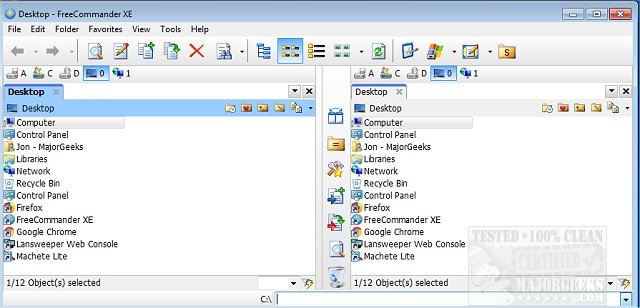
FreeCommander XE 2026 Build 940 has been released as a versatile and user-friendly alternative to the default Windows file manager. This program is designed to streamline daily file management tasks, providing a wealth of features for efficient data handling. Users can easily transport FreeCommander XE by copying its installation directory onto a CD or USB stick, allowing for use on various computers without installation hassles.
Key features of FreeCommander XE include:
- Dual-panel technology: Users can choose between horizontal and vertical layouts for improved file navigation.
- Tabbed interface: This enhances multitasking by allowing multiple folders to be open simultaneously.
- Tree view: An optional feature for each panel that simplifies file navigation.
- Built-in file viewer: Capable of displaying files in hex, binary, text, or image formats, including content within archives.
- Archive handling: Supports ZIP (read/write), CAB (read/write), and RAR (read) formats with nested archive management.
- FTP client: Facilitates easy file transfers over the internet.
- Quick access: Users can quickly navigate to system folders, the control panel, desktop, and start menu.
- Comprehensive file management: Features include copying, moving, deleting, renaming files and folders, with additional tools for renaming and wiping files.
- Checksum verification: Users can create and verify MD5 checksums for file integrity.
- File splitting and detailed properties: Includes folder size calculations, file attribute modifications, and a file search function that extends to archive contents.
- Customization options: Users can define columns for detailed views and utilize file filters for improved display.
- Command line access: A DOS command line interface is available for advanced users.
- Multi-language support: Ensures accessibility for users in different regions.
In addition to its core functionalities, FreeCommander XE is often compared to other tools that assist with file management and system organization, such as managing default apps, resetting folder view settings in Windows 10 and 11, and displaying file name extensions.
As technology continues to evolve, FreeCommander XE serves as a robust solution for users seeking enhanced file management capabilities in their Windows environment. Its combination of portability, extensive features, and ease of use makes it a valuable tool for both casual and power users alike. The ongoing updates and enhancements ensure that it remains competitive and relevant in the realm of file management software
Key features of FreeCommander XE include:
- Dual-panel technology: Users can choose between horizontal and vertical layouts for improved file navigation.
- Tabbed interface: This enhances multitasking by allowing multiple folders to be open simultaneously.
- Tree view: An optional feature for each panel that simplifies file navigation.
- Built-in file viewer: Capable of displaying files in hex, binary, text, or image formats, including content within archives.
- Archive handling: Supports ZIP (read/write), CAB (read/write), and RAR (read) formats with nested archive management.
- FTP client: Facilitates easy file transfers over the internet.
- Quick access: Users can quickly navigate to system folders, the control panel, desktop, and start menu.
- Comprehensive file management: Features include copying, moving, deleting, renaming files and folders, with additional tools for renaming and wiping files.
- Checksum verification: Users can create and verify MD5 checksums for file integrity.
- File splitting and detailed properties: Includes folder size calculations, file attribute modifications, and a file search function that extends to archive contents.
- Customization options: Users can define columns for detailed views and utilize file filters for improved display.
- Command line access: A DOS command line interface is available for advanced users.
- Multi-language support: Ensures accessibility for users in different regions.
In addition to its core functionalities, FreeCommander XE is often compared to other tools that assist with file management and system organization, such as managing default apps, resetting folder view settings in Windows 10 and 11, and displaying file name extensions.
As technology continues to evolve, FreeCommander XE serves as a robust solution for users seeking enhanced file management capabilities in their Windows environment. Its combination of portability, extensive features, and ease of use makes it a valuable tool for both casual and power users alike. The ongoing updates and enhancements ensure that it remains competitive and relevant in the realm of file management software
FreeCommander XE 2026 Build 940 released
FreeCommander XE is an easy-to-use alternative to the standard windows file manager.