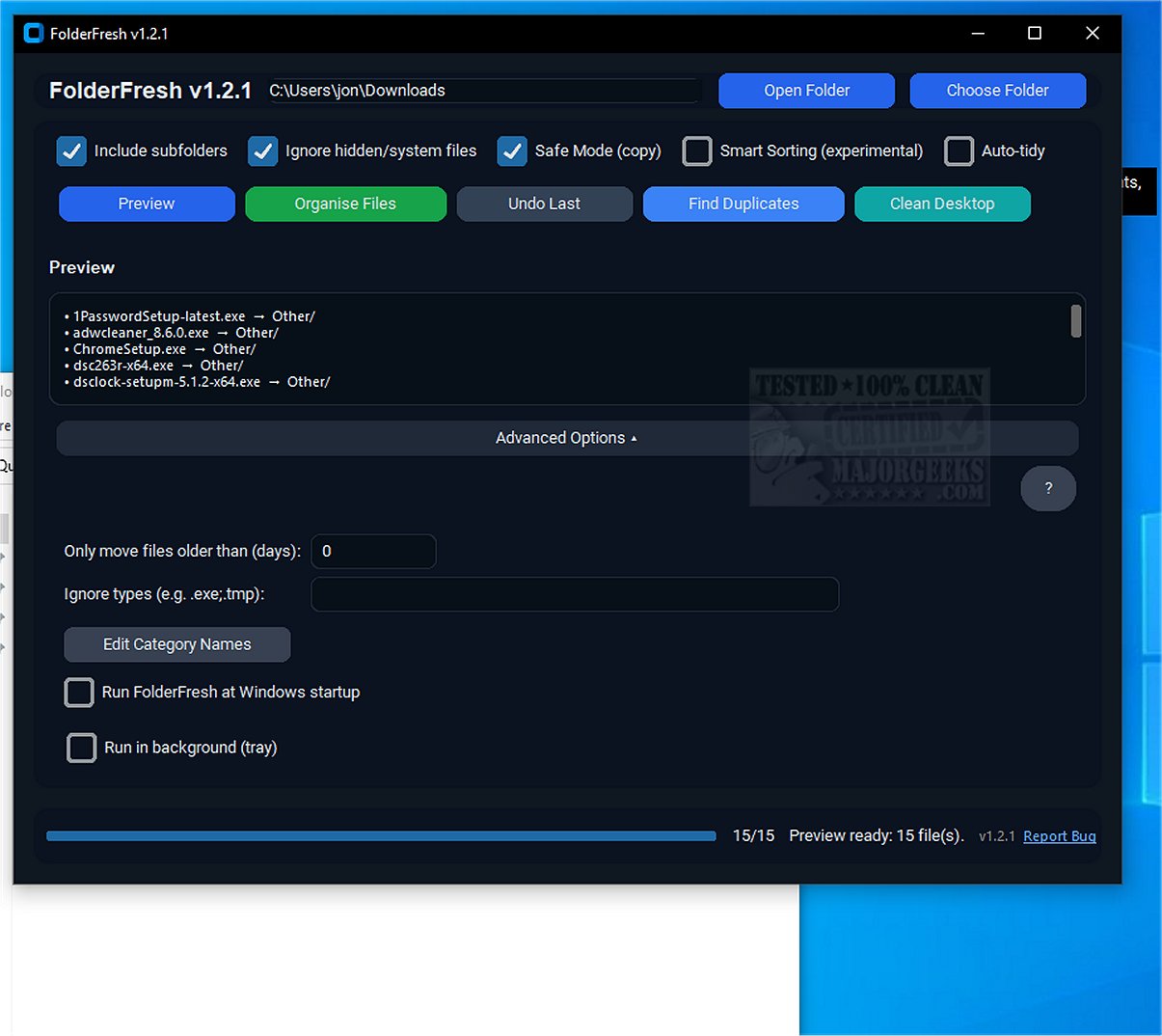
FolderFresh is a cutting-edge application designed to streamline file organization, automatically sorting them into well-defined folders as they are created or downloaded. The latest versions, 3.0.0 Beta and 2.0.0, bring enhanced features that make file management more efficient and user-friendly.
What is FolderFresh?
FolderFresh is an innovative tool that simplifies the task of organizing files by categorizing them into folders. Key functionalities include a preview mode, an undo option, Smart Sorting capabilities, Auto-tidy features, and customizable category names, all coupled with robust safety measures to protect users' data.
What Does FolderFresh Do?
The application allows users to quickly declutter their folders with a single click, sorting files into organized categories without the risk of losing data. Users can select a directory and its sub-folders, after which a preview of the proposed folder structure is displayed. FolderFresh automatically categorizes files by type, ensuring that everything is sorted correctly. To enhance safety, the application creates copies of files before moving them, thus shielding against accidental loss.
FolderFresh Features:
- Automatic Sorting: Files are sorted into predefined categories such as Documents, Images, Videos, Audio, Archives, Code, and Others.
- Preview Mode: Users can see exactly how files will be rearranged before confirming changes.
- Undo Functionality: A simple click can revert all files to their original locations.
- Safe Mode: Files are copied rather than moved to enhance safety.
- Smart Sorting: The application intelligently identifies file types, including screenshots and invoices.
- Auto-tidy: Monitors a folder to automatically sort new incoming files.
- Duplicate Finder: Quickly identifies duplicate files using advanced partial hashing techniques.
- Age & Ignore Filters: Users can choose to move only older files or exclude certain file types from sorting.
- Run at Startup: Option to enable or disable the application’s autostart functionality.
- Custom Category Names: Allows users to rename built-in categories for personalized sorting.
Why You'd Need FolderFresh
The application is particularly beneficial for users who frequently deal with unstable internet connections, as its duplicate finder feature helps identify and eliminate redundant files, optimizing disk space and enhancing system performance.
Geek Verdict: FreshFolder
FolderFresh presents a straightforward yet effective solution for managing disorganized files, making it an essential tool for anyone who feels overwhelmed by clutter on their desktop or within their downloads folder. By generating sub-folders and automating the sorting process, FolderFresh enables users to maintain a clean and organized digital workspace.
Future Enhancements
Looking ahead, further improvements could focus on integrating AI-driven recommendations for file organization, expanding the range of customizable sorting options, and enhancing user interface elements for an even more intuitive experience. Additionally, the potential for collaborative features could allow multiple users to manage shared folders effectively, making FolderFresh even more versatile in diverse usage scenarios
What is FolderFresh?
FolderFresh is an innovative tool that simplifies the task of organizing files by categorizing them into folders. Key functionalities include a preview mode, an undo option, Smart Sorting capabilities, Auto-tidy features, and customizable category names, all coupled with robust safety measures to protect users' data.
What Does FolderFresh Do?
The application allows users to quickly declutter their folders with a single click, sorting files into organized categories without the risk of losing data. Users can select a directory and its sub-folders, after which a preview of the proposed folder structure is displayed. FolderFresh automatically categorizes files by type, ensuring that everything is sorted correctly. To enhance safety, the application creates copies of files before moving them, thus shielding against accidental loss.
FolderFresh Features:
- Automatic Sorting: Files are sorted into predefined categories such as Documents, Images, Videos, Audio, Archives, Code, and Others.
- Preview Mode: Users can see exactly how files will be rearranged before confirming changes.
- Undo Functionality: A simple click can revert all files to their original locations.
- Safe Mode: Files are copied rather than moved to enhance safety.
- Smart Sorting: The application intelligently identifies file types, including screenshots and invoices.
- Auto-tidy: Monitors a folder to automatically sort new incoming files.
- Duplicate Finder: Quickly identifies duplicate files using advanced partial hashing techniques.
- Age & Ignore Filters: Users can choose to move only older files or exclude certain file types from sorting.
- Run at Startup: Option to enable or disable the application’s autostart functionality.
- Custom Category Names: Allows users to rename built-in categories for personalized sorting.
Why You'd Need FolderFresh
The application is particularly beneficial for users who frequently deal with unstable internet connections, as its duplicate finder feature helps identify and eliminate redundant files, optimizing disk space and enhancing system performance.
Geek Verdict: FreshFolder
FolderFresh presents a straightforward yet effective solution for managing disorganized files, making it an essential tool for anyone who feels overwhelmed by clutter on their desktop or within their downloads folder. By generating sub-folders and automating the sorting process, FolderFresh enables users to maintain a clean and organized digital workspace.
Future Enhancements
Looking ahead, further improvements could focus on integrating AI-driven recommendations for file organization, expanding the range of customizable sorting options, and enhancing user interface elements for an even more intuitive experience. Additionally, the potential for collaborative features could allow multiple users to manage shared folders effectively, making FolderFresh even more versatile in diverse usage scenarios
FolderFresh 3.0.0 Beta / 2.0.0 released
FolderFresh is an innovative application designed to efficiently organize files into neatly categorized folders as they appear.