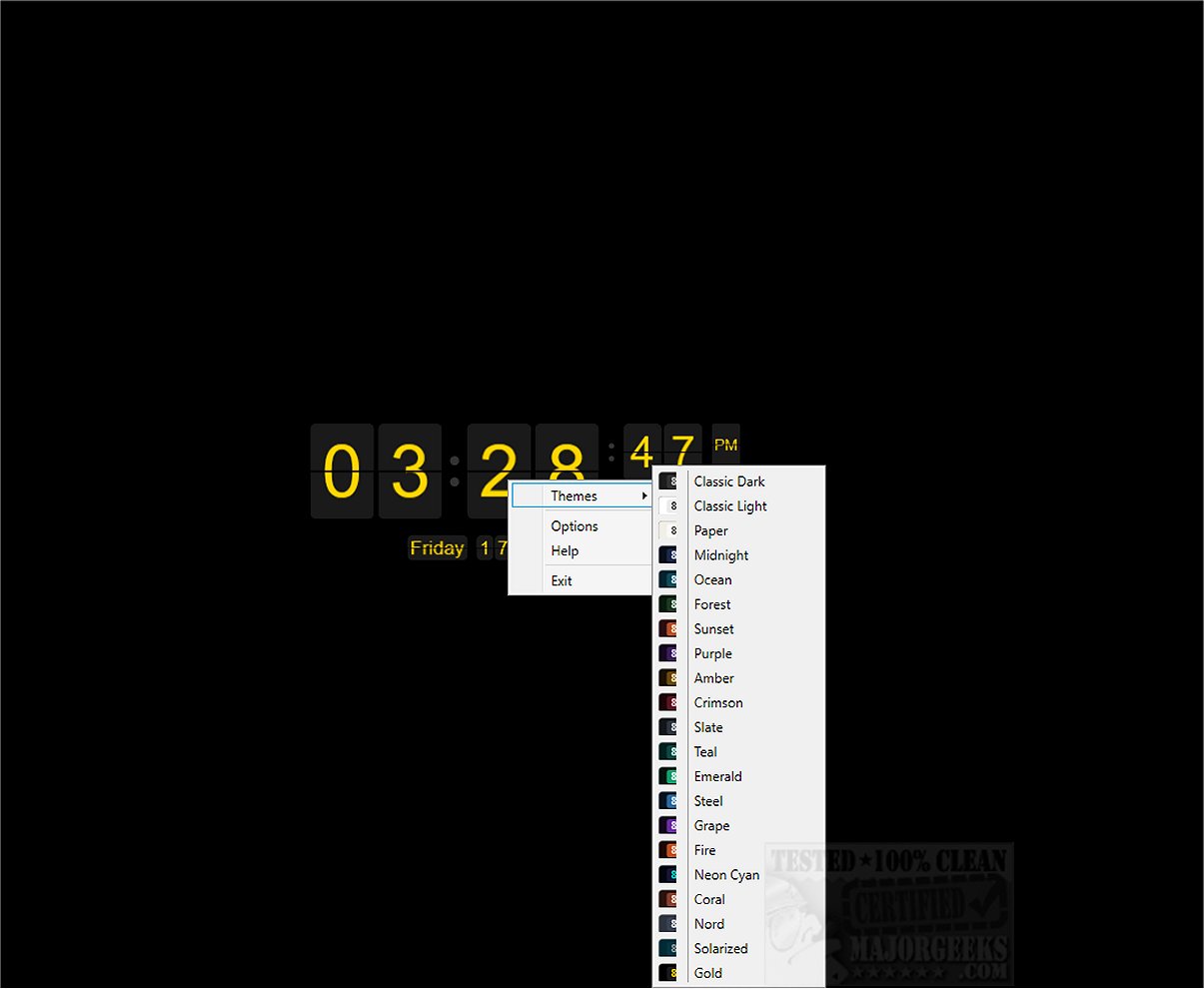
Flip Clock is an engaging desktop clock application that creatively displays time through animated split-flap cards, harking back to the classic airport information boards. The latest version, Flip Clock 1.2, enhances user experience by allowing extensive customization in terms of colors, fonts, and languages.
Features and Functionality
The application presents hours and minutes, with options to include seconds and localized date formats. Users can choose between 12-hour (AM/PM) and 24-hour formats, customize the visibility of separators, and display either two digits per card or split cards. It synchronizes with the Windows system clock and can showcase an optional date display, making it both functional and aesthetically pleasing.
User-Friendly Design
One of the standout features of Flip Clock is its borderless window design, which allows users to position the clock anywhere on their screen. The full-screen mode and desktop widget option ensure that it remains visible above other applications. The clock’s rounded corners harmonize with the Windows 11 aesthetic, and it remembers its size and position, enhancing convenience.
Customization and Themes
With 21 built-in color themes and options for a custom background color, users can select from flat or gradient card faces and adjust gradient angles from 0° to 360°. The application automatically adjusts text color for readability, providing a visually appealing experience.
Installation and Accessibility
Flip Clock can be easily installed as a Windows screensaver without needing administrator rights, covering all monitors in full-screen mode. It operates offline, supports 10 interface languages, and includes keyboard shortcuts for easy navigation. Settings are automatically saved, and users have the option to reset to defaults anytime. An optional background update feature keeps the application current.
Requirements
To run Flip Clock, Microsoft .NET 8.x is required, but the application can assist in downloading it if necessary.
Conclusion
Overall, Flip Clock transforms your desktop experience into a delightful one, blending nostalgia with modern functionality. With its captivating animated display, extensive customization options, and versatile formats, it’s an ideal choice for anyone looking to elevate their workspace. Embrace the charm of traditional timekeeping with a contemporary twist by integrating Flip Clock into your daily routine.
Related Resources:
- How to Show Multiple Clocks on Windows
- How to Fix Incorrect Date or Time With Windows Clock
- How to Show Time Only on the Windows 10 & 11 Taskbar
- How to Remove the Clock From Windows 10 & 11 Taskbar
With its unique design and practical features, Flip Clock is more than just a timekeeping tool; it's a stylish addition to any desktop setup. Don't miss the opportunity to personalize your workspace with this fun and functional application
Features and Functionality
The application presents hours and minutes, with options to include seconds and localized date formats. Users can choose between 12-hour (AM/PM) and 24-hour formats, customize the visibility of separators, and display either two digits per card or split cards. It synchronizes with the Windows system clock and can showcase an optional date display, making it both functional and aesthetically pleasing.
User-Friendly Design
One of the standout features of Flip Clock is its borderless window design, which allows users to position the clock anywhere on their screen. The full-screen mode and desktop widget option ensure that it remains visible above other applications. The clock’s rounded corners harmonize with the Windows 11 aesthetic, and it remembers its size and position, enhancing convenience.
Customization and Themes
With 21 built-in color themes and options for a custom background color, users can select from flat or gradient card faces and adjust gradient angles from 0° to 360°. The application automatically adjusts text color for readability, providing a visually appealing experience.
Installation and Accessibility
Flip Clock can be easily installed as a Windows screensaver without needing administrator rights, covering all monitors in full-screen mode. It operates offline, supports 10 interface languages, and includes keyboard shortcuts for easy navigation. Settings are automatically saved, and users have the option to reset to defaults anytime. An optional background update feature keeps the application current.
Requirements
To run Flip Clock, Microsoft .NET 8.x is required, but the application can assist in downloading it if necessary.
Conclusion
Overall, Flip Clock transforms your desktop experience into a delightful one, blending nostalgia with modern functionality. With its captivating animated display, extensive customization options, and versatile formats, it’s an ideal choice for anyone looking to elevate their workspace. Embrace the charm of traditional timekeeping with a contemporary twist by integrating Flip Clock into your daily routine.
Related Resources:
- How to Show Multiple Clocks on Windows
- How to Fix Incorrect Date or Time With Windows Clock
- How to Show Time Only on the Windows 10 & 11 Taskbar
- How to Remove the Clock From Windows 10 & 11 Taskbar
With its unique design and practical features, Flip Clock is more than just a timekeeping tool; it's a stylish addition to any desktop setup. Don't miss the opportunity to personalize your workspace with this fun and functional application
Flip Clock 1.2 released
Flip Clock is a cool little desktop clock application that showcases the time using animated split-flap cards, reminiscent of traditional airport information displays.