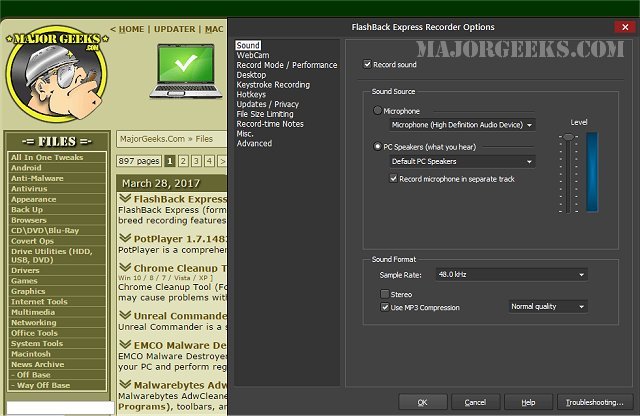
FlashBack Express 7.11.0.561 has been released, providing users with a powerful, free screen and video recording tool. This updated version, formerly known as BB FlashBack Express, retains the top-tier recording features of its predecessor. One of its standout capabilities is the advanced 'capture driver' technology, which allows for the creation of high-quality videos at impressive frame rates without compromising the performance of even lower-powered computers.
The software also supports webcam recordings, enabling users to add a personal touch to their videos with picture-in-picture functionality. FlashBack Express allows for simultaneous recording from the webcam, screen, and audio sources, including commentary, microphone input, and PC speakers. This versatility makes it ideal for creating tutorials, gaming videos, or personal vlogs.
FlashBack Express is designed for convenience; it can be accessed easily from the taskbar, system tray, or as a floating window on the desktop. Users can initiate recordings with a simple click, guided by an intuitive wizard that facilitates a smooth recording experience. Once a recording is complete, users can publish their videos online effortlessly, with options to upload directly to platforms like YouTube, Blip.tv, Viddler, or Revver, or simply share the video URL.
In addition to these features, future updates could further enhance user experience by integrating more editing tools, improving export options, and expanding compatibility with various operating systems and devices. As video content continues to rise in popularity, tools like FlashBack Express will be essential for creators looking to produce high-quality videos efficiently
The software also supports webcam recordings, enabling users to add a personal touch to their videos with picture-in-picture functionality. FlashBack Express allows for simultaneous recording from the webcam, screen, and audio sources, including commentary, microphone input, and PC speakers. This versatility makes it ideal for creating tutorials, gaming videos, or personal vlogs.
FlashBack Express is designed for convenience; it can be accessed easily from the taskbar, system tray, or as a floating window on the desktop. Users can initiate recordings with a simple click, guided by an intuitive wizard that facilitates a smooth recording experience. Once a recording is complete, users can publish their videos online effortlessly, with options to upload directly to platforms like YouTube, Blip.tv, Viddler, or Revver, or simply share the video URL.
In addition to these features, future updates could further enhance user experience by integrating more editing tools, improving export options, and expanding compatibility with various operating systems and devices. As video content continues to rise in popularity, tools like FlashBack Express will be essential for creators looking to produce high-quality videos efficiently
FlashBack Express 7.11.0.561 released
FlashBack Express (formerly BB FlashBack Express) is a free screen and video recorder with the best-of-breed recording features of FlashBack.