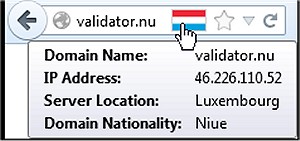
The recent release of Flagfox version 6.1.97 for Firefox enhances the browsing experience by displaying a flag icon that represents the physical location of the web server you are connected to. This feature not only boosts user awareness but also adds a layer of security by indicating potential language and legal jurisdiction implications tied to the server's location. Users can access a wealth of information through various external tools, including a detailed map of the server's location and insights into local time and ISP details.
Flagfox is equipped with numerous features aimed at improving user experience and safety, such as site safety checks for malware, automatic translation services, and SEO research tools. Users can also perform diagnostics like pings and traceroutes, retrieve Whois and DNS information, validate page code, and shorten URLs. Furthermore, the add-on allows for the customization of actions directly from the flag icon’s context menu, enabling keyboard shortcuts for efficiency.
In addition to these functionalities, Flagfox emphasizes website reviews and the discovery of similar sites, making it a versatile tool for both casual users and web developers.
To further enhance your browsing experience, consider exploring tips on speeding up browsers like Firefox, Chrome, or Safari, as well as methods for repairing these browsers when issues arise. Additionally, you can learn how to mute tabs across different browsers, ensuring a more tailored and enjoyable online experience
Flagfox is equipped with numerous features aimed at improving user experience and safety, such as site safety checks for malware, automatic translation services, and SEO research tools. Users can also perform diagnostics like pings and traceroutes, retrieve Whois and DNS information, validate page code, and shorten URLs. Furthermore, the add-on allows for the customization of actions directly from the flag icon’s context menu, enabling keyboard shortcuts for efficiency.
In addition to these functionalities, Flagfox emphasizes website reviews and the discovery of similar sites, making it a versatile tool for both casual users and web developers.
To further enhance your browsing experience, consider exploring tips on speeding up browsers like Firefox, Chrome, or Safari, as well as methods for repairing these browsers when issues arise. Additionally, you can learn how to mute tabs across different browsers, ensuring a more tailored and enjoyable online experience
Flagfox for Firefox 6.1.97 released
Flagfox is a Firefox add-on that displays a flag icon indicating the current webserver's physical location.