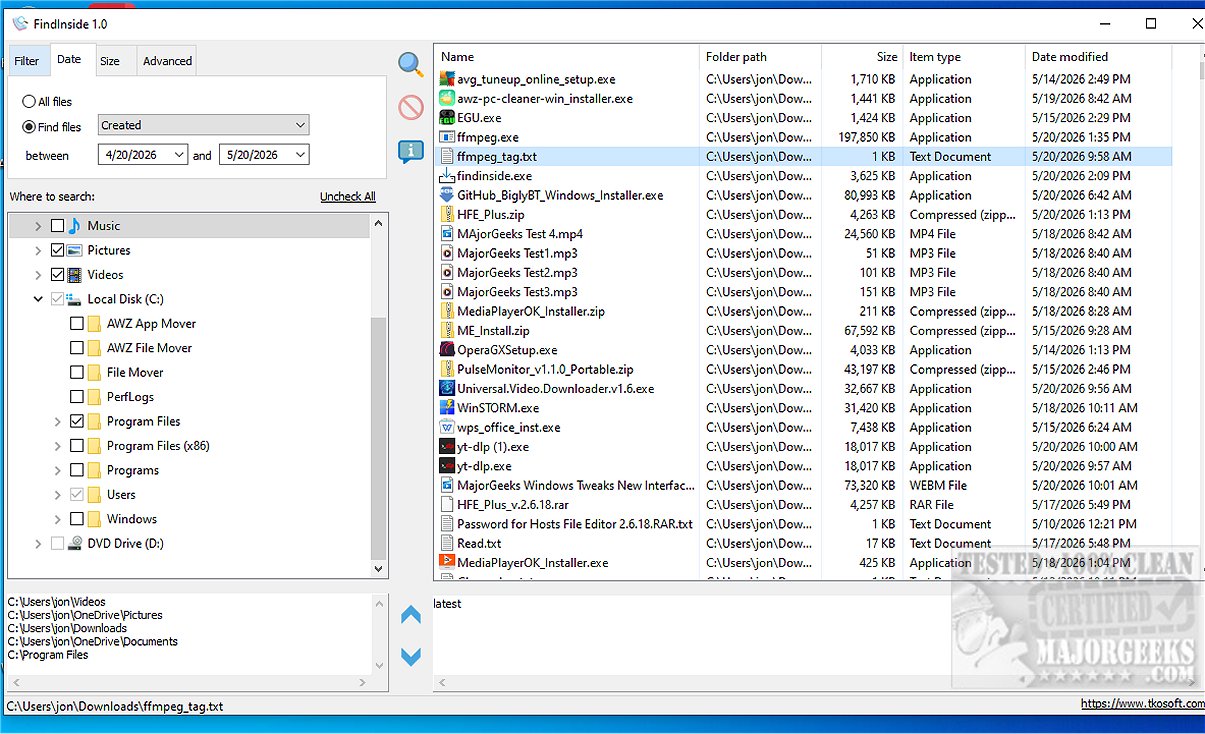
FindInside is a robust, free desktop search application designed for users who require in-depth information retrieval across various document types, moving beyond simple file name searches. This tool is particularly advantageous for those managing extensive digital document collections.
Key Functionality:
FindInside enables users to search for specific words or phrases across multiple folders and subfolders, supporting a wide range of file formats including PDFs, Microsoft Office documents (Word and Excel), plain text files, source code, logs, and configuration files. Unlike standard Windows search, FindInside excels at locating text embedded within mixed document collections.
Upon discovering a match, FindInside enhances usability by displaying the relevant content in a built-in text preview area, which automatically highlights the searched term. This feature allows users to quickly determine the relevance of each file in the search results. Navigation through results is simplified with previous and next match buttons, making it easy to cycle through occurrences of the search term within the preview.
Notable Features of FindInside:
- Free search utility for Windows
- Searches within various document types (PDFs, DOCX, text files, etc.)
- Finds content based on actual document text rather than file names
- Built-in preview feature for found documents
- Highlights search phrases in the preview area
- Navigation buttons for cycling through matches
- Customizable search options including folder selection and wildcard file name masks
- Date and file size filters
- Option to include hidden files in search results
- Recursive folder searching for nested directories
User-Friendly Interface:
FindInside provides an intuitive tree-view interface, allowing users to select one or multiple folders for searching. Users can pause or stop the search process at any time, and upon completion, results are displayed in a clear and organized list for easy access.
Conclusion:
FindInside 2.2 is an essential tool for anyone in need of an efficient method to locate content within their digital documents. Its powerful search capabilities, combined with a user-friendly interface, make it an invaluable asset for professionals and casual users alike. Experience the efficiency and simplicity of FindInside for all your document search needs.
Extended Features:
In future updates, users could benefit from enhanced integration with cloud storage systems, allowing for searches across both local and cloud-based documents seamlessly. Additionally, incorporating machine learning algorithms could improve search accuracy and provide suggestions based on previous search behaviors. Such advancements could further solidify FindInside's position as a leading document search utility
Key Functionality:
FindInside enables users to search for specific words or phrases across multiple folders and subfolders, supporting a wide range of file formats including PDFs, Microsoft Office documents (Word and Excel), plain text files, source code, logs, and configuration files. Unlike standard Windows search, FindInside excels at locating text embedded within mixed document collections.
Upon discovering a match, FindInside enhances usability by displaying the relevant content in a built-in text preview area, which automatically highlights the searched term. This feature allows users to quickly determine the relevance of each file in the search results. Navigation through results is simplified with previous and next match buttons, making it easy to cycle through occurrences of the search term within the preview.
Notable Features of FindInside:
- Free search utility for Windows
- Searches within various document types (PDFs, DOCX, text files, etc.)
- Finds content based on actual document text rather than file names
- Built-in preview feature for found documents
- Highlights search phrases in the preview area
- Navigation buttons for cycling through matches
- Customizable search options including folder selection and wildcard file name masks
- Date and file size filters
- Option to include hidden files in search results
- Recursive folder searching for nested directories
User-Friendly Interface:
FindInside provides an intuitive tree-view interface, allowing users to select one or multiple folders for searching. Users can pause or stop the search process at any time, and upon completion, results are displayed in a clear and organized list for easy access.
Conclusion:
FindInside 2.2 is an essential tool for anyone in need of an efficient method to locate content within their digital documents. Its powerful search capabilities, combined with a user-friendly interface, make it an invaluable asset for professionals and casual users alike. Experience the efficiency and simplicity of FindInside for all your document search needs.
Extended Features:
In future updates, users could benefit from enhanced integration with cloud storage systems, allowing for searches across both local and cloud-based documents seamlessly. Additionally, incorporating machine learning algorithms could improve search accuracy and provide suggestions based on previous search behaviors. Such advancements could further solidify FindInside's position as a leading document search utility
FindInside 2.2 released
FindInside is a powerful free desktop search utility designed for users who need to locate detailed information across various document types, rather than relying solely on file names.