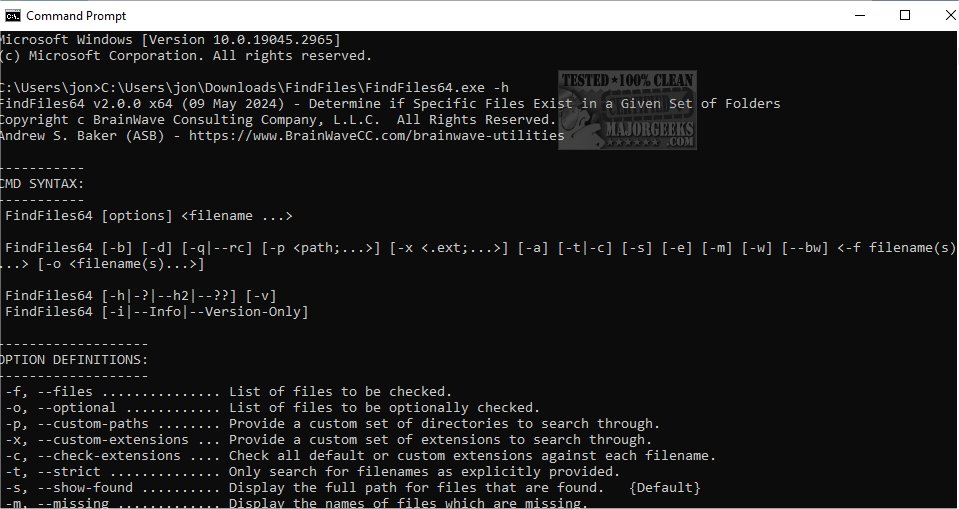
FindFiles has released version 2.2.0.270, a command-line tool designed for efficiently searching specific files across designated folders. This utility enables users to verify the presence of files quickly in specified directories, making it an excellent resource for scripts to ensure essential files are available before proceeding with further operations.
The tool operates similarly to the WHERE.EXE utility from the older Windows Resource Kit, providing familiarity for users accustomed to that environment. The command-line syntax for FindFiles is straightforward, allowing for various options to tailor the search according to user needs.
Key options include:
- `-f` to specify files to check,
- `-o` for optional files,
- `-p` to define custom search paths,
- `-x` for custom file extensions,
- `-c` to check extensions against filenames,
- `-t` to enforce strict filename searches,
- `-s` to show paths of found files, and
- `-m` to display names of missing files.
Other options allow users to manage output verbosity, control error reporting, and customize the execution environment. For instance, the `--bw` option checks for core utilities used by BWCC Scripts, while the `-v` flag provides detailed build information and exit codes.
FindFiles is an essential tool for developers and system administrators who need a reliable method for file verification across multiple directories, facilitating smoother workflow and enhanced productivity.
In future updates, the developers might consider adding features such as recursive directory searching, support for additional file types, or enhanced reporting capabilities to further improve the user experience. Moreover, integrating a graphical user interface (GUI) could attract users who prefer visual tools over command-line interfaces
The tool operates similarly to the WHERE.EXE utility from the older Windows Resource Kit, providing familiarity for users accustomed to that environment. The command-line syntax for FindFiles is straightforward, allowing for various options to tailor the search according to user needs.
Key options include:
- `-f` to specify files to check,
- `-o` for optional files,
- `-p` to define custom search paths,
- `-x` for custom file extensions,
- `-c` to check extensions against filenames,
- `-t` to enforce strict filename searches,
- `-s` to show paths of found files, and
- `-m` to display names of missing files.
Other options allow users to manage output verbosity, control error reporting, and customize the execution environment. For instance, the `--bw` option checks for core utilities used by BWCC Scripts, while the `-v` flag provides detailed build information and exit codes.
FindFiles is an essential tool for developers and system administrators who need a reliable method for file verification across multiple directories, facilitating smoother workflow and enhanced productivity.
In future updates, the developers might consider adding features such as recursive directory searching, support for additional file types, or enhanced reporting capabilities to further improve the user experience. Moreover, integrating a graphical user interface (GUI) could attract users who prefer visual tools over command-line interfaces
FindFiles 2.2.0.270 released
FindFiles is a Command Line tool for searching for specific files within a designated group of folders.