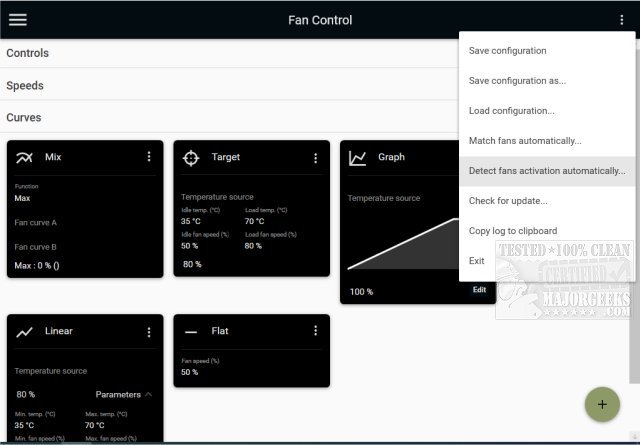
FanControl V257 has been released as an advanced, customizable, and open-source utility for managing GPU and CPU fan speeds on Windows systems. This portable application allows users to take full control of their computer's cooling system, ensuring optimal performance during demanding tasks such as gaming or heavy processing. Its user-friendly interface makes it easy to configure and adjust fan settings and monitor their performance in real-time.
Key Features of FanControl:
- Ability to save, edit, and load multiple fan control profiles.
- Supports multiple temperature sources, including CPU, GPU, motherboard, and hard drives, as well as custom temperature sensors through ".sensor" files.
- Customizable fan curves that allow users to tailor the response of their cooling systems precisely.
- Advanced settings for fine-tuning fan control, including steps, activation percentages, response times, and hysteresis options.
- A modern dashboard-style user interface that can operate in the background with a customizable tray icon.
- Capabilities to mix various curves and sensors for optimal cooling performance.
Fan Curve Types:
- Linear: A straightforward temperature-based linear function.
- Graph: Customizable temperature-based curves.
- Target: Maintains fan speed until a specified temperature target is reached.
- Mix: Combines two different curves using functions like maximum or summation.
- Sync: Syncs with existing control settings.
- Flat: Sets a fixed fan speed percentage.
Graph Fan Curve Editor:
- Users can easily add, remove, and rearrange data points on the graph.
- Options to copy and paste points across different graphs for efficiency.
- The editor also allows fine-tuning of response parameters, such as hysteresis and response times.
Conclusion and Expansion:
FanControl is an essential tool for PC enthusiasts and gamers looking to optimize their systems' thermal management. With its rich feature set, it not only enhances cooling efficiency but also contributes to quieter operation by reducing fan noise during less demanding tasks. As technology evolves, future updates may include enhanced integration with additional hardware sensors, improved user interface elements, and more sophisticated algorithms for predictive fan speed adjustments based on system load and environmental conditions. Overall, FanControl exemplifies a powerful solution for personalized fan management in modern computing environments
Key Features of FanControl:
- Ability to save, edit, and load multiple fan control profiles.
- Supports multiple temperature sources, including CPU, GPU, motherboard, and hard drives, as well as custom temperature sensors through ".sensor" files.
- Customizable fan curves that allow users to tailor the response of their cooling systems precisely.
- Advanced settings for fine-tuning fan control, including steps, activation percentages, response times, and hysteresis options.
- A modern dashboard-style user interface that can operate in the background with a customizable tray icon.
- Capabilities to mix various curves and sensors for optimal cooling performance.
Fan Curve Types:
- Linear: A straightforward temperature-based linear function.
- Graph: Customizable temperature-based curves.
- Target: Maintains fan speed until a specified temperature target is reached.
- Mix: Combines two different curves using functions like maximum or summation.
- Sync: Syncs with existing control settings.
- Flat: Sets a fixed fan speed percentage.
Graph Fan Curve Editor:
- Users can easily add, remove, and rearrange data points on the graph.
- Options to copy and paste points across different graphs for efficiency.
- The editor also allows fine-tuning of response parameters, such as hysteresis and response times.
Conclusion and Expansion:
FanControl is an essential tool for PC enthusiasts and gamers looking to optimize their systems' thermal management. With its rich feature set, it not only enhances cooling efficiency but also contributes to quieter operation by reducing fan noise during less demanding tasks. As technology evolves, future updates may include enhanced integration with additional hardware sensors, improved user interface elements, and more sophisticated algorithms for predictive fan speed adjustments based on system load and environmental conditions. Overall, FanControl exemplifies a powerful solution for personalized fan management in modern computing environments
FanControl V257 released
FanControl is a highly customizable portable Open Source GPU and CPU fan management utility.