EZ Contact Book version 6.1.5.94 has been released, offering users an enhanced experience in managing their contact lists through a user-friendly interface and a suite of intuitive features. This application is tailored to accommodate users of all skill levels, making contact management accessible to everyone.
Getting Started
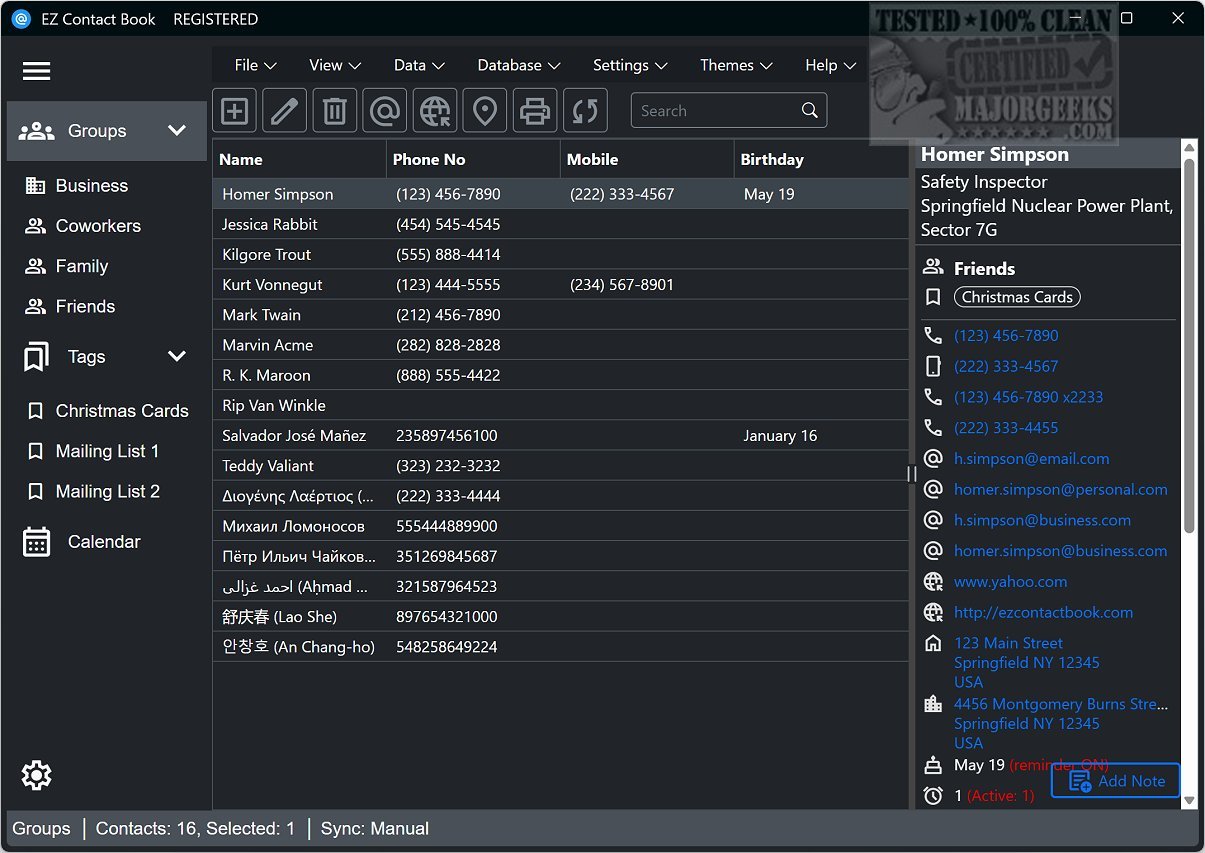
Upon launching EZ Contact Book, users can initiate the organization of their contacts by automatically creating common groups such as Family, Friends, and Business. This feature simplifies the categorization process, allowing for easier access to contacts in the future. The main interface is organized into clear sections that present essential contact information, including names, phone numbers, and notes, ensuring everything needed is readily available at a glance.
Adding Contacts and Data Management
Adding new contacts is straightforward. Users simply input key details such as the individual's name, group designation, personal and business information, notes, and reminders for important events. Beyond basic contact management, the application provides functionalities like editing or deleting contacts, initiating phone calls, and sending emails directly within the app. Users can also rearrange contacts between groups for improved organization. Additional features, such as printing envelopes and locating contacts via Google Maps, significantly enhance the application's usability.
For efficient data retrieval, EZ Contact Book includes a powerful search function that allows users to quickly find specific contacts or information. Users may preview how contacts will appear in printed formats, conceal certain details or groups as needed, and easily import or export data across various formats, including Outlook, CSV, Google CSV, and vCard, ensuring data can be backed up or transferred effortlessly.
Customization Options
EZ Contact Book also offers extensive customization features to enhance the user experience. Users can modify font settings, choose which columns to display in the contact information list, set the application to launch at system startup, activate birthday reminders for tracking, and adjust phone settings for improved functionality.
Conclusion
In summary, EZ Contact Book stands out as an exceptional tool for contact management, merging a user-friendly interface with robust features that cater to a wide demographic of users. It is an ideal solution for anyone looking to streamline their contact organization and enhance their management efficiency. With continuous updates and improvements, EZ Contact Book is positioned to meet the evolving needs of its users, making contact management simpler and more efficient than ever
Getting Started
Upon launching EZ Contact Book, users can initiate the organization of their contacts by automatically creating common groups such as Family, Friends, and Business. This feature simplifies the categorization process, allowing for easier access to contacts in the future. The main interface is organized into clear sections that present essential contact information, including names, phone numbers, and notes, ensuring everything needed is readily available at a glance.
Adding Contacts and Data Management
Adding new contacts is straightforward. Users simply input key details such as the individual's name, group designation, personal and business information, notes, and reminders for important events. Beyond basic contact management, the application provides functionalities like editing or deleting contacts, initiating phone calls, and sending emails directly within the app. Users can also rearrange contacts between groups for improved organization. Additional features, such as printing envelopes and locating contacts via Google Maps, significantly enhance the application's usability.
For efficient data retrieval, EZ Contact Book includes a powerful search function that allows users to quickly find specific contacts or information. Users may preview how contacts will appear in printed formats, conceal certain details or groups as needed, and easily import or export data across various formats, including Outlook, CSV, Google CSV, and vCard, ensuring data can be backed up or transferred effortlessly.
Customization Options
EZ Contact Book also offers extensive customization features to enhance the user experience. Users can modify font settings, choose which columns to display in the contact information list, set the application to launch at system startup, activate birthday reminders for tracking, and adjust phone settings for improved functionality.
Conclusion
In summary, EZ Contact Book stands out as an exceptional tool for contact management, merging a user-friendly interface with robust features that cater to a wide demographic of users. It is an ideal solution for anyone looking to streamline their contact organization and enhance their management efficiency. With continuous updates and improvements, EZ Contact Book is positioned to meet the evolving needs of its users, making contact management simpler and more efficient than ever
EZ Contact Book 6.1.5.94 released
EZ Contact Book is designed to help simplify the management of your contact list through its user-friendly interface and a range of intuitive options suitable for users of all backgrounds and technical abilities.