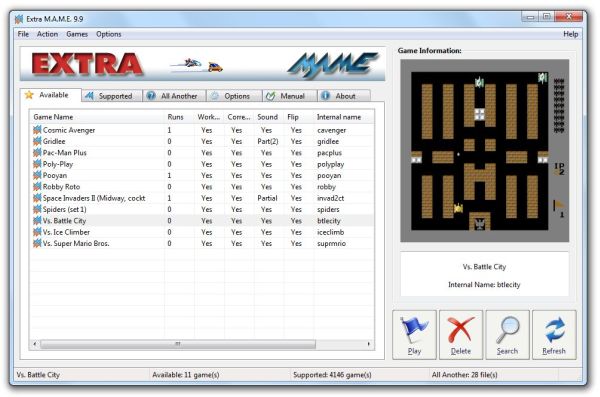
ExtraMAME 25.12 has been released, enhancing the experience of playing classic arcade games on your PC. As a graphical user interface (GUI) for the Multiple Arcade Machine Emulator (M.A.M.E.), ExtraMAME simplifies the process of accessing thousands of retro games.
To get started with ExtraMAME, follow these steps:
1. Download the latest version of the Windows command line binaries for M.A.M.E.
2. Install ExtraMAME in your preferred directory, with the default being C:\Games\ExtraMAME.
3. Place the M.A.M.E. command-line binaries in the folder you just created.
4. Launch ExtraMAME.
Upon launching, ExtraMAME will present two lists: the "supported" list, which includes games compatible with M.A.M.E., and the "available" list, which shows the games currently on your system. Initially, the available list may be empty, as you'll need to download the specific M.A.M.E. game files, which come in the form of "bios" and "ROM" files.
In addition to these features, ExtraMAME 25.12 may include performance enhancements and bug fixes that improve the overall gaming experience. Users can expect a more stable and responsive interface, making it easier to navigate through their game library. Furthermore, the software continues to support a wide array of classic titles, preserving the nostalgia of arcade gaming for both new and veteran players alike.
As gaming enthusiasts seek to relive their childhood memories, ExtraMAME remains a vital tool, bridging the gap between modern technology and classic gaming. Future updates may also introduce new functionalities, such as enhanced graphics options, online multiplayer capabilities, or additional customization features, ensuring that ExtraMAME stays relevant in the ever-evolving gaming landscape
To get started with ExtraMAME, follow these steps:
1. Download the latest version of the Windows command line binaries for M.A.M.E.
2. Install ExtraMAME in your preferred directory, with the default being C:\Games\ExtraMAME.
3. Place the M.A.M.E. command-line binaries in the folder you just created.
4. Launch ExtraMAME.
Upon launching, ExtraMAME will present two lists: the "supported" list, which includes games compatible with M.A.M.E., and the "available" list, which shows the games currently on your system. Initially, the available list may be empty, as you'll need to download the specific M.A.M.E. game files, which come in the form of "bios" and "ROM" files.
In addition to these features, ExtraMAME 25.12 may include performance enhancements and bug fixes that improve the overall gaming experience. Users can expect a more stable and responsive interface, making it easier to navigate through their game library. Furthermore, the software continues to support a wide array of classic titles, preserving the nostalgia of arcade gaming for both new and veteran players alike.
As gaming enthusiasts seek to relive their childhood memories, ExtraMAME remains a vital tool, bridging the gap between modern technology and classic gaming. Future updates may also introduce new functionalities, such as enhanced graphics options, online multiplayer capabilities, or additional customization features, ensuring that ExtraMAME stays relevant in the ever-evolving gaming landscape
ExtraMAME 25.12 released
ExtraMAME is a GUI wrapper for M.A.M.E., the Multiple Arcade Machine Emulator that allows you to play thousands of old-school arcade games on your computer.