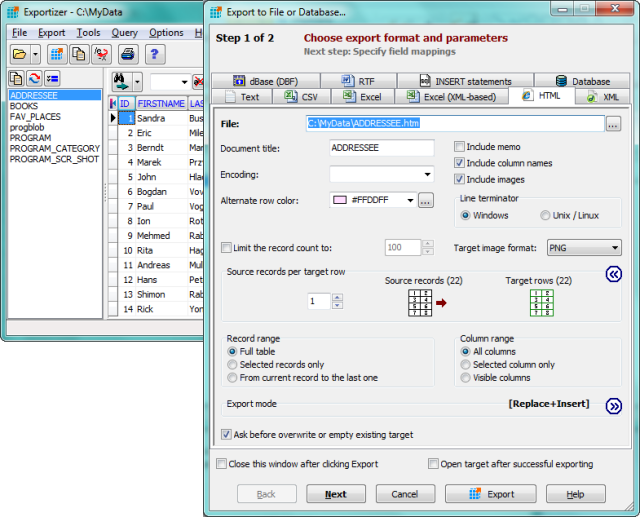
Exportizer version 10.4.0.3118 has been released, providing users with a robust and versatile free database export tool. This software facilitates the export of data to various destinations, including files, clipboards, or directly to printers. It operates through BDE or ADO, enabling the conversion of data from formats such as DB, DBF, and text to other outputs like CSV, XLS, RTF, XML, HTML, and INSERT statements.
One of the key features of Exportizer is its extensive export options, allowing users to customize the output according to their needs. Users can define source-to-target field mappings, ensuring that the data is accurately transferred. Export operations can be executed through the program's graphical user interface (GUI) or via the Command Line, which supports a wide range of parameters. The GUI also allows users to generate the required command line quickly.
Additional capabilities include copying data to the clipboard, printing options, and various utility functions for data manipulation and bookmarking. Exportizer can handle multi-table database files such as XLS, XLSX, XLSM, MDB, and others, enabling simultaneous export from all files in a folder or from all tables within a multi-table data source.
Notable features of Exportizer include:
- The ability to specify a custom increment number for the Increment Field Value function.
- Exporting data to Excel (XML-based) and DATABASE formats.
- Utilizing additional Command Line options, including /Silent, /LogFile, and /CloseOnError.
- Extra export modes like Append and Empty+Insert, enhancing the flexibility of data handling.
With these features, Exportizer serves as an essential tool for users who need efficient and controlled data exportation from various database formats. As database management needs evolve, Exportizer continues to adapt, making it a valuable resource for both individuals and organizations. The latest release not only improves existing functionalities but also expands the capabilities for handling complex database operations with ease
One of the key features of Exportizer is its extensive export options, allowing users to customize the output according to their needs. Users can define source-to-target field mappings, ensuring that the data is accurately transferred. Export operations can be executed through the program's graphical user interface (GUI) or via the Command Line, which supports a wide range of parameters. The GUI also allows users to generate the required command line quickly.
Additional capabilities include copying data to the clipboard, printing options, and various utility functions for data manipulation and bookmarking. Exportizer can handle multi-table database files such as XLS, XLSX, XLSM, MDB, and others, enabling simultaneous export from all files in a folder or from all tables within a multi-table data source.
Notable features of Exportizer include:
- The ability to specify a custom increment number for the Increment Field Value function.
- Exporting data to Excel (XML-based) and DATABASE formats.
- Utilizing additional Command Line options, including /Silent, /LogFile, and /CloseOnError.
- Extra export modes like Append and Empty+Insert, enhancing the flexibility of data handling.
With these features, Exportizer serves as an essential tool for users who need efficient and controlled data exportation from various database formats. As database management needs evolve, Exportizer continues to adapt, making it a valuable resource for both individuals and organizations. The latest release not only improves existing functionalities but also expands the capabilities for handling complex database operations with ease
Exportizer 10.4.0.3118 released
Exportizer is a free database export tool that allows you to export data to a file, clipboard, or printer.