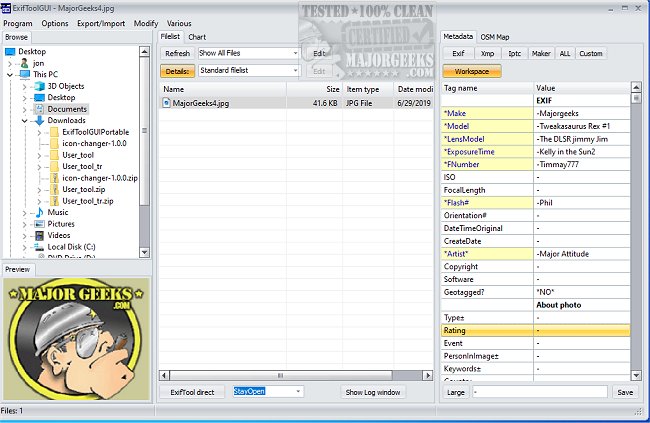
ExifToolGui version 6.3.13 has been released, enhancing the user experience for managing metadata across various file types. Serving as a graphical frontend for the powerful ExifTool, it enables users to read, write, and edit metadata seamlessly. Notably, a portable version is also available for convenience.
The tool supports an extensive range of metadata formats including EXIF, GPS, IPTC, XMP, and various others. It is compatible with maker notes from numerous popular camera brands, encompassing manufacturers like Canon, Nikon, Sony, and many more. Additionally, ExifToolGui integrates functionalities from jhead and jpegtran, enhancing its capability.
One of the standout features of ExifToolGui is its customization and flexibility. Users can choose from multiple output formats such as tab-delimited, HTML, XML, and JSON, and it supports multilingual output. The software also facilitates the extraction of thumbnail and preview images from RAW files, making it easier to manage image content.
Furthermore, ExifToolGui offers geotagging capabilities, allowing users to tag images using GPS track log files, as well as generate track logs from geotagged images. It includes features for fixing timestamps, renaming files, and organizing them by various metadata attributes. Users can also copy or delete metadata between different files, regardless of format, and read/write structured XMP information.
In summary, ExifToolGui is a robust tool for anyone working with digital media and metadata, offering a wide array of features that cater to both casual users and professionals alike. Its continuous updates and user-friendly interface position it as a leading choice for metadata management.
To extend beyond the current features, future updates could potentially include enhanced cloud integration for metadata management across devices, improved AI-driven metadata suggestions, and even more comprehensive support for emerging file formats and camera brands. Additionally, the introduction of user tutorials or community forums could greatly assist users in maximizing the software's capabilities
The tool supports an extensive range of metadata formats including EXIF, GPS, IPTC, XMP, and various others. It is compatible with maker notes from numerous popular camera brands, encompassing manufacturers like Canon, Nikon, Sony, and many more. Additionally, ExifToolGui integrates functionalities from jhead and jpegtran, enhancing its capability.
One of the standout features of ExifToolGui is its customization and flexibility. Users can choose from multiple output formats such as tab-delimited, HTML, XML, and JSON, and it supports multilingual output. The software also facilitates the extraction of thumbnail and preview images from RAW files, making it easier to manage image content.
Furthermore, ExifToolGui offers geotagging capabilities, allowing users to tag images using GPS track log files, as well as generate track logs from geotagged images. It includes features for fixing timestamps, renaming files, and organizing them by various metadata attributes. Users can also copy or delete metadata between different files, regardless of format, and read/write structured XMP information.
In summary, ExifToolGui is a robust tool for anyone working with digital media and metadata, offering a wide array of features that cater to both casual users and professionals alike. Its continuous updates and user-friendly interface position it as a leading choice for metadata management.
To extend beyond the current features, future updates could potentially include enhanced cloud integration for metadata management across devices, improved AI-driven metadata suggestions, and even more comprehensive support for emerging file formats and camera brands. Additionally, the introduction of user tutorials or community forums could greatly assist users in maximizing the software's capabilities
ExifToolGui 6.3.13 released
ExifToolGui provides a frontend for ExifTool that allows for reading, writing, and editing metadata in various files. A Portable version is also available.