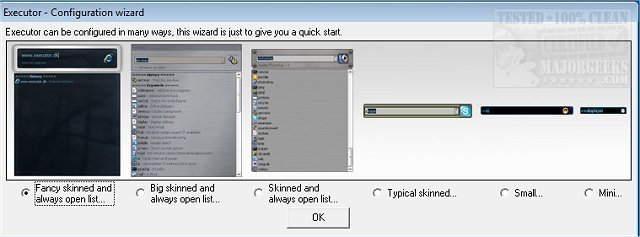
Executor 2.3.8 has been released, offering an enhanced and customizable alternative to the traditional Windows Run feature. This application serves as a multi-purpose launcher designed to streamline the process of finding and launching programs, particularly for users overwhelmed by extensive Start menu listings. By allowing quick access to applications and optimizing workflow, Executor helps users save time and improve productivity.
The program is highly customizable, featuring various skins, layouts, and operation modes. Users can set it up to display keyword-based suggestions and perform quick searches as they type in the app's search area. A simple double-click is all it takes to launch an application, access the Windows context menu, or open a folder, making it a versatile tool for daily tasks. When not actively in use, Executor resides in the system tray for easy access.
Key features of Executor include:
- Keyword Customization: Users can create keywords linked to shortcuts, files, folders, or favorites by dragging and dropping items.
- Auto-Completion: The software provides auto-completion for keywords and file searches, enhancing efficiency.
- URL Detection: Users can enter URLs directly, promoting easy web access.
- Dynamic Suggestions: In addition to user-defined keywords, Executor can suggest relevant Start menu items and Control Panel shortcuts.
- Integration with Services: The application can connect with popular services like Gmail and Twitter, allowing for seamless task management.
- Custom Layouts: Users can personalize the interface, adjusting colors, fonts, dimensions, and transparency for a tailored experience.
- Hotkey Functionality: Each keyword can be assigned a unique hotkey, enabling quick access similar to many hotkey managers.
By configuring Executor to align with individual work habits, it becomes a valuable asset for enhancing productivity and streamlining daily tasks.
In summary, Executor 2.3.8 is not just a launcher but a comprehensive tool that adapts to user preferences, making it an essential addition for anyone looking to optimize their workflow on Windows. For a complete list of features and further details, users can visit the author's website
The program is highly customizable, featuring various skins, layouts, and operation modes. Users can set it up to display keyword-based suggestions and perform quick searches as they type in the app's search area. A simple double-click is all it takes to launch an application, access the Windows context menu, or open a folder, making it a versatile tool for daily tasks. When not actively in use, Executor resides in the system tray for easy access.
Key features of Executor include:
- Keyword Customization: Users can create keywords linked to shortcuts, files, folders, or favorites by dragging and dropping items.
- Auto-Completion: The software provides auto-completion for keywords and file searches, enhancing efficiency.
- URL Detection: Users can enter URLs directly, promoting easy web access.
- Dynamic Suggestions: In addition to user-defined keywords, Executor can suggest relevant Start menu items and Control Panel shortcuts.
- Integration with Services: The application can connect with popular services like Gmail and Twitter, allowing for seamless task management.
- Custom Layouts: Users can personalize the interface, adjusting colors, fonts, dimensions, and transparency for a tailored experience.
- Hotkey Functionality: Each keyword can be assigned a unique hotkey, enabling quick access similar to many hotkey managers.
By configuring Executor to align with individual work habits, it becomes a valuable asset for enhancing productivity and streamlining daily tasks.
In summary, Executor 2.3.8 is not just a launcher but a comprehensive tool that adapts to user preferences, making it an essential addition for anyone looking to optimize their workflow on Windows. For a complete list of features and further details, users can visit the author's website
Executor 2.3.8 released
Executor provides a fully customizable alternative to Windows Run that gives you a personalized multi-purpose launcher and more.