Executor version 2.2.9.0 has been released, offering users a highly customizable alternative to the standard Windows Run feature. Designed to enhance productivity by providing a personalized multi-purpose launcher, Executor simplifies the process of finding and launching applications, especially for users with extensive Start menu items. Instead of scrolling through numerous programs, Executor allows for quick access to applications, thereby streamlining daily workflows.
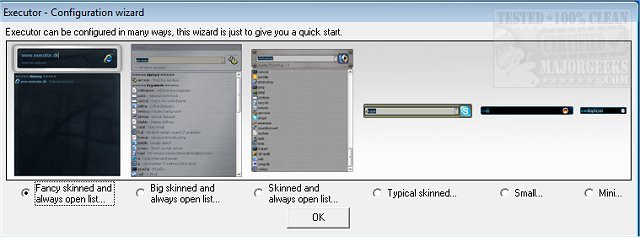
The program can be tailored with various skins, layouts, and operational modes to suit individual preferences. Users can set up keyword-based suggestions and utilize a real-time search feature that filters results as they type. A simple double-click on the desired application can launch it, open folders, or copy paths, while Executor remains conveniently minimized in the system tray for easy access.
Key features of Executor include:
- Customizable keywords that can be linked to shortcuts, files, or folders.
- Auto-completion for keywords, file navigation, and history.
- Direct URL input capability for easy web access.
- Integration with popular services like Gmail and Twitter, allowing users to streamline their interactions with these platforms.
- A variety of customization options, including layout, color, and transparency settings.
- Hotkey assignment for quick command execution, making it akin to a hotkey manager.
With these features, Executor aims to enhance productivity and efficiency for users by reducing the time spent navigating through the Start menu and other applications.
In addition to its impressive features, Executor offers users an active community for support, including forums filled with how-to guides and tips for maximizing the software's capabilities. As the digital workspace continually evolves, tools like Executor provide essential enhancements to help users manage their tasks effectively and efficiently
The program can be tailored with various skins, layouts, and operational modes to suit individual preferences. Users can set up keyword-based suggestions and utilize a real-time search feature that filters results as they type. A simple double-click on the desired application can launch it, open folders, or copy paths, while Executor remains conveniently minimized in the system tray for easy access.
Key features of Executor include:
- Customizable keywords that can be linked to shortcuts, files, or folders.
- Auto-completion for keywords, file navigation, and history.
- Direct URL input capability for easy web access.
- Integration with popular services like Gmail and Twitter, allowing users to streamline their interactions with these platforms.
- A variety of customization options, including layout, color, and transparency settings.
- Hotkey assignment for quick command execution, making it akin to a hotkey manager.
With these features, Executor aims to enhance productivity and efficiency for users by reducing the time spent navigating through the Start menu and other applications.
In addition to its impressive features, Executor offers users an active community for support, including forums filled with how-to guides and tips for maximizing the software's capabilities. As the digital workspace continually evolves, tools like Executor provide essential enhancements to help users manage their tasks effectively and efficiently
Executor 2.2.9.0 released
Executor provides a fully customizable alternative to Windows Run that gives you a personalized multi-purpose launcher and more.