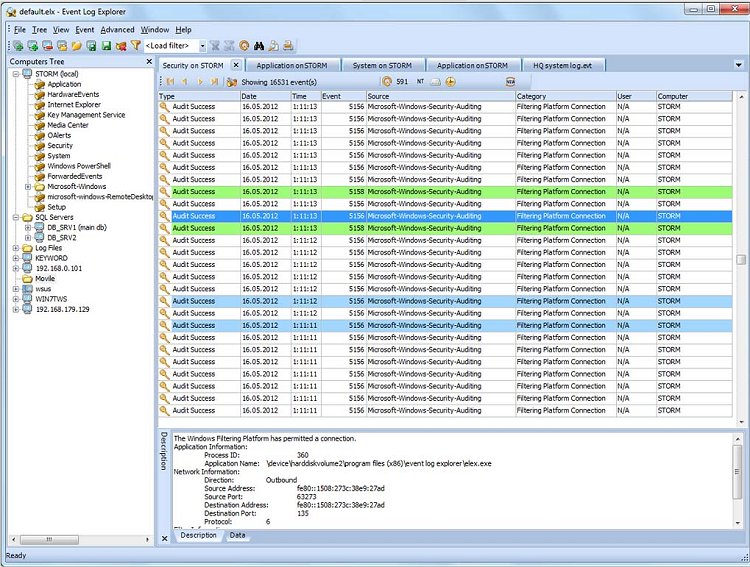
Event Log Explorer has recently released version 5.8, a tool designed to facilitate the diagnosis of issues within Windows environments. With its robust event search and filtering capabilities, users can more efficiently analyze events logged across various Microsoft Windows operating system logs, including Security, System, Application, Directory Service, and DNS logs.
One of the standout features of Event Log Explorer is its ability to filter events based on a variety of criteria, with the added convenience of saving these filters for future use. This significantly streamlines the ongoing process of troubleshooting. Unlike the standard Windows Event Viewer, Event Log Explorer allows for the printing of event logs and individual events, as well as exporting logs to multiple formats such as HTML, Microsoft Excel, and tab-separated text files.
Additionally, the software provides advanced reporting capabilities, including Analytical Reports, which enable users to create summary tables and diagrams for deeper insights into event data. Other noteworthy features include:
- Access to Windows event logs from local and remote servers and workstations
- Support for both classic Windows NT event log format (EVT) and the newer format (EVTX)
- High performance with events loaded into memory or an optimized internal database
- Active monitoring and alerting to notify users of issues in real time
- Consolidation of events from different sources in a single location
- Log loading options to pre-filter event logs
- Manual and automatic backup capabilities for event logs
- Credential manager for enhanced security and access management
In summary, Event Log Explorer 5.8 is a comprehensive solution for users looking to enhance their event log analysis capabilities. It not only simplifies the troubleshooting process but also provides a suite of tools for effective event management and reporting.
Extension:
Given the increasing complexity of IT environments, tools like Event Log Explorer are crucial for system administrators and IT professionals. By centralizing and streamlining event log analysis, it enables quicker responses to potential system failures or security breaches. Users may also benefit from integrating Event Log Explorer with other diagnostic tools, such as the Microsoft Support Diagnostic Tool or Power Efficiency Diagnostic Report Tool, to create a holistic approach to system health monitoring. As organizations continue to prioritize cybersecurity and system reliability, having advanced diagnostic tools will become increasingly important in maintaining operational efficiency and safeguarding sensitive data
One of the standout features of Event Log Explorer is its ability to filter events based on a variety of criteria, with the added convenience of saving these filters for future use. This significantly streamlines the ongoing process of troubleshooting. Unlike the standard Windows Event Viewer, Event Log Explorer allows for the printing of event logs and individual events, as well as exporting logs to multiple formats such as HTML, Microsoft Excel, and tab-separated text files.
Additionally, the software provides advanced reporting capabilities, including Analytical Reports, which enable users to create summary tables and diagrams for deeper insights into event data. Other noteworthy features include:
- Access to Windows event logs from local and remote servers and workstations
- Support for both classic Windows NT event log format (EVT) and the newer format (EVTX)
- High performance with events loaded into memory or an optimized internal database
- Active monitoring and alerting to notify users of issues in real time
- Consolidation of events from different sources in a single location
- Log loading options to pre-filter event logs
- Manual and automatic backup capabilities for event logs
- Credential manager for enhanced security and access management
In summary, Event Log Explorer 5.8 is a comprehensive solution for users looking to enhance their event log analysis capabilities. It not only simplifies the troubleshooting process but also provides a suite of tools for effective event management and reporting.
Extension:
Given the increasing complexity of IT environments, tools like Event Log Explorer are crucial for system administrators and IT professionals. By centralizing and streamlining event log analysis, it enables quicker responses to potential system failures or security breaches. Users may also benefit from integrating Event Log Explorer with other diagnostic tools, such as the Microsoft Support Diagnostic Tool or Power Efficiency Diagnostic Report Tool, to create a holistic approach to system health monitoring. As organizations continue to prioritize cybersecurity and system reliability, having advanced diagnostic tools will become increasingly important in maintaining operational efficiency and safeguarding sensitive data
Event Log Explorer 5.8 released
Event Log Explorer enables you to diagnose any issues generated within Windows quickly.