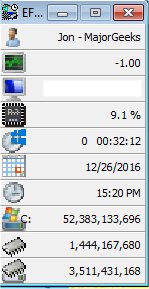
The EF System Monitor 26.10 has been released, offering comprehensive tools for monitoring and recording key information from all computers on a network. This software allows users to track data such as memory space, hard disk usage, date, time, and usernames. Information is readily available upon the program's startup and is presented in a user-friendly manner with graphical histograms and icons.
When operated on Windows platforms (excluding Windows 9x), the EF System Monitor takes advantage of advanced features such as process and thread surveillance, I/O port monitoring, and CPU time tracking. Moreover, the EF System Monitor Server, included in the package, enables users to gather and visualize data from remote computers over a TCP/IP network. The server can be installed on remote machines to facilitate this functionality. In Windows 95/98, the program runs as a straightforward application, while in other versions of Windows, it operates as a service with similar capabilities.
In addition to its monitoring features, the EF System Monitor provides users with a range of related resources and guides, including how to identify hardware components, assess CPU capabilities, and check memory speed and availability.
As technology continues to evolve, the importance of effective monitoring and data management becomes ever more critical. The EF System Monitor not only streamlines this process but also enhances network management efficiency by providing a centralized view of system performance across multiple devices. Future updates may include expanded compatibility with newer operating systems, enhanced user interface design, and additional features for real-time alerts and reporting
When operated on Windows platforms (excluding Windows 9x), the EF System Monitor takes advantage of advanced features such as process and thread surveillance, I/O port monitoring, and CPU time tracking. Moreover, the EF System Monitor Server, included in the package, enables users to gather and visualize data from remote computers over a TCP/IP network. The server can be installed on remote machines to facilitate this functionality. In Windows 95/98, the program runs as a straightforward application, while in other versions of Windows, it operates as a service with similar capabilities.
In addition to its monitoring features, the EF System Monitor provides users with a range of related resources and guides, including how to identify hardware components, assess CPU capabilities, and check memory speed and availability.
As technology continues to evolve, the importance of effective monitoring and data management becomes ever more critical. The EF System Monitor not only streamlines this process but also enhances network management efficiency by providing a centralized view of system performance across multiple devices. Future updates may include expanded compatibility with newer operating systems, enhanced user interface design, and additional features for real-time alerts and reporting
EF System Monitor 26.10 released
EF System Monitor gives you a well-rounded tool that can be used to retrieve a permanent record of information on all your network computers; these records include; memory space, hard disk usage, date, time, and username.