The newly launched Edge Password Manager 4.0 is designed to simplify the process of recovering and managing passwords saved in Microsoft's Edge browser. This tool automatically detects and decrypts saved website login credentials, enabling users to easily access their information. Once the recovery is complete, users can export their password list for backup or future use. Additionally, the application allows for the removal of specific passwords or all stored credentials from the Edge browser, enhancing user control over their personal data.
User-Friendly Interface for Seamless Operation
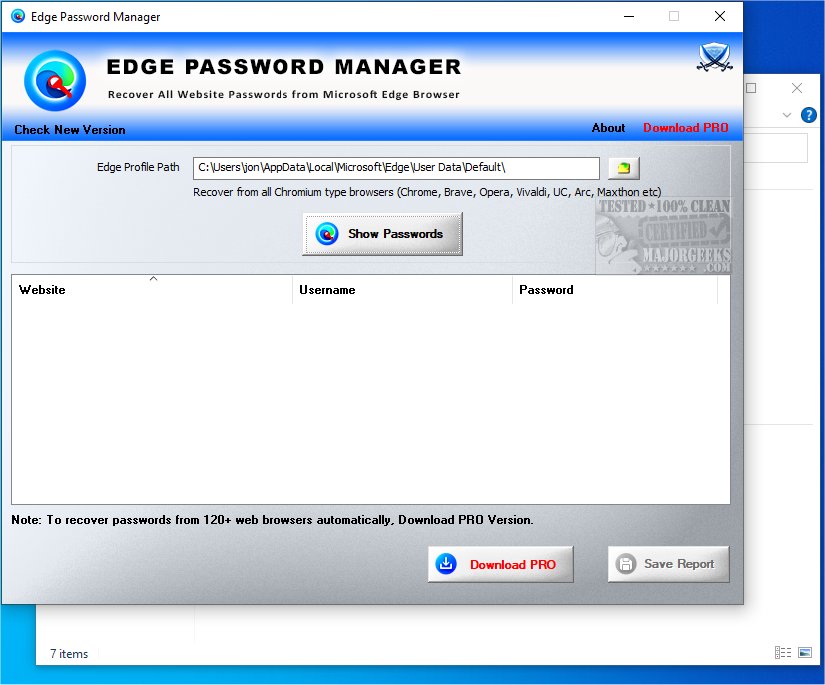
Edge Password Manager boasts a clean and intuitive interface, designed for ease of use. Upon opening the application, users see an empty main window displaying only their username and operating system information. By clicking the "Show Passwords" button, users can activate the password decryptor to retrieve their saved credentials. It's important to note that users can only recover lost or forgotten passwords if they had previously allowed Edge to store them.
Detailed Usage, Results, and Privacy Features
After the application runs, the main window fills with saved password entries, providing details like website URLs, associated usernames, and passwords. Users can conveniently copy data to the clipboard by selecting entries and using the right-click context menu. Moreover, Edge Password Manager enables users to generate reports in various formats, including HTML, TXT, XML, or CSV, by specifying the output directory and filename.
In terms of privacy, the software includes features that allow users to delete individual or multiple entries, ensuring personal information remains secure—especially beneficial for those who share their computers with others.
Final Thoughts: A Must-Have for Windows Users
In summary, Edge Password Manager serves as an essential tool for efficiently recovering and managing passwords saved in the Microsoft Edge browser. With its minimal resource consumption and user-friendly design, this application is perfect for Windows users, particularly those who struggle to remember their browser-stored login credentials. By utilizing Edge Password Manager, users can easily reclaim control over their passwords and prevent the hassle of forgotten credentials from hindering their online experiences.
Additional Resources:
- Instructions on managing saved passwords in Internet Explorer and Microsoft Edge.
- Guide to enabling Windows Defender Application Guard for enhanced security in Microsoft Edge.
- Accessing developer settings and diagnostics in Microsoft Edge.
- Strategies to prevent the installation of extensions in Microsoft Edge.
Overall, Edge Password Manager 4.0 is a powerful ally for anyone looking to streamline their password management process and enhance their online security
User-Friendly Interface for Seamless Operation
Edge Password Manager boasts a clean and intuitive interface, designed for ease of use. Upon opening the application, users see an empty main window displaying only their username and operating system information. By clicking the "Show Passwords" button, users can activate the password decryptor to retrieve their saved credentials. It's important to note that users can only recover lost or forgotten passwords if they had previously allowed Edge to store them.
Detailed Usage, Results, and Privacy Features
After the application runs, the main window fills with saved password entries, providing details like website URLs, associated usernames, and passwords. Users can conveniently copy data to the clipboard by selecting entries and using the right-click context menu. Moreover, Edge Password Manager enables users to generate reports in various formats, including HTML, TXT, XML, or CSV, by specifying the output directory and filename.
In terms of privacy, the software includes features that allow users to delete individual or multiple entries, ensuring personal information remains secure—especially beneficial for those who share their computers with others.
Final Thoughts: A Must-Have for Windows Users
In summary, Edge Password Manager serves as an essential tool for efficiently recovering and managing passwords saved in the Microsoft Edge browser. With its minimal resource consumption and user-friendly design, this application is perfect for Windows users, particularly those who struggle to remember their browser-stored login credentials. By utilizing Edge Password Manager, users can easily reclaim control over their passwords and prevent the hassle of forgotten credentials from hindering their online experiences.
Additional Resources:
- Instructions on managing saved passwords in Internet Explorer and Microsoft Edge.
- Guide to enabling Windows Defender Application Guard for enhanced security in Microsoft Edge.
- Accessing developer settings and diagnostics in Microsoft Edge.
- Strategies to prevent the installation of extensions in Microsoft Edge.
Overall, Edge Password Manager 4.0 is a powerful ally for anyone looking to streamline their password management process and enhance their online security
Edge Password Manager 4.0 released
Edge Password Manager assists in the recovery and removal of passwords saved by Microsoft's Edge browser.