The latest version of Easy System Utility (ESU) has been released, offering users a streamlined and intuitive interface for maintaining their computers. This versatile tool is designed to help users efficiently remove unnecessary files, unlock folders, compress images, and add watermarks, among other features, all from a convenient system tray access point.
Key Features of Easy System Utility:
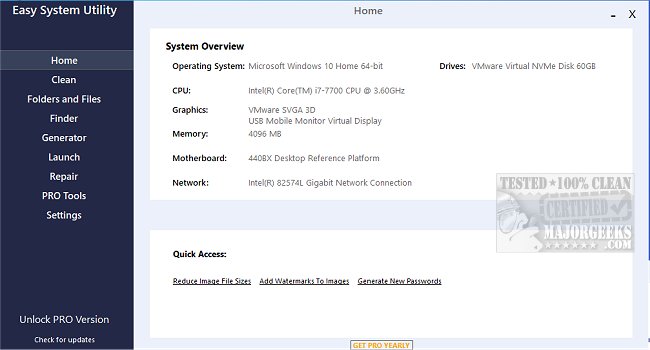
- System Overview: Users can quickly identify their computer's hardware specifications, including the operating system, CPU model, GPU, memory, motherboard, network, and drivers. This centralized view saves time and allows for informed decision-making on system upgrades or troubleshooting.
- Cleaning Capabilities: The Clean tab enables users to analyze and remove junk files and unnecessary Windows software. Options include cleaning DirectX Shader Cache, Prefetch Files, Recycle Bin, Temp files, Thumbnail Cache, and Windows Log Files, helping to free up valuable disk space.
- File and Folder Management: The Folders/Files tab offers tools for unlocking files and folders with permission issues, reducing image sizes, renaming folders, and deleting large folders that may be consuming significant storage.
- Password Management: The Password Generator tab allows users to create secure, random passwords tailored to their preferences, including customizable lengths and character types.
- Quick Launch Feature: Through the Launch tab, users can easily access frequently used files, programs, and folders from the ESU system tray icon, enhancing workflow efficiency.
Important Notes: To ensure all features function correctly, users are required to run Easy System Utility with administrator rights.
Additional Resources: For those seeking alternative solutions, comparisons with other cleaning tools like CCleaner, Wise Disk Cleaner, and PrivaZer are available. There are also guides on using Storage Sense to automate junk file deletion in Windows and backing up or restoring the Windows Registry.
In summary, Easy System Utility 1.1.68.0 is a powerful all-in-one tool for PC maintenance that simplifies cleaning, organizing, and managing files and system specifications. Its user-friendly design and comprehensive features make it an essential utility for anyone looking to optimize their computer's performance
Key Features of Easy System Utility:
- System Overview: Users can quickly identify their computer's hardware specifications, including the operating system, CPU model, GPU, memory, motherboard, network, and drivers. This centralized view saves time and allows for informed decision-making on system upgrades or troubleshooting.
- Cleaning Capabilities: The Clean tab enables users to analyze and remove junk files and unnecessary Windows software. Options include cleaning DirectX Shader Cache, Prefetch Files, Recycle Bin, Temp files, Thumbnail Cache, and Windows Log Files, helping to free up valuable disk space.
- File and Folder Management: The Folders/Files tab offers tools for unlocking files and folders with permission issues, reducing image sizes, renaming folders, and deleting large folders that may be consuming significant storage.
- Password Management: The Password Generator tab allows users to create secure, random passwords tailored to their preferences, including customizable lengths and character types.
- Quick Launch Feature: Through the Launch tab, users can easily access frequently used files, programs, and folders from the ESU system tray icon, enhancing workflow efficiency.
Important Notes: To ensure all features function correctly, users are required to run Easy System Utility with administrator rights.
Additional Resources: For those seeking alternative solutions, comparisons with other cleaning tools like CCleaner, Wise Disk Cleaner, and PrivaZer are available. There are also guides on using Storage Sense to automate junk file deletion in Windows and backing up or restoring the Windows Registry.
In summary, Easy System Utility 1.1.68.0 is a powerful all-in-one tool for PC maintenance that simplifies cleaning, organizing, and managing files and system specifications. Its user-friendly design and comprehensive features make it an essential utility for anyone looking to optimize their computer's performance
Easy System Utility 1.1.68.0 released
Easy System Utility provides an intuitive interface for removing unnecessary files, unlocking folders, compressing images, adding watermarks, launching files and folders from the system tray, and more.