Easy System Utility 1.1.55.0 has been released, offering users a comprehensive solution for managing their computer's performance and storage. This utility features a user-friendly interface designed for various tasks, including removal of unnecessary files, unlocking folders, image compression, watermarking, and quick launching of files and folders directly from the system tray.
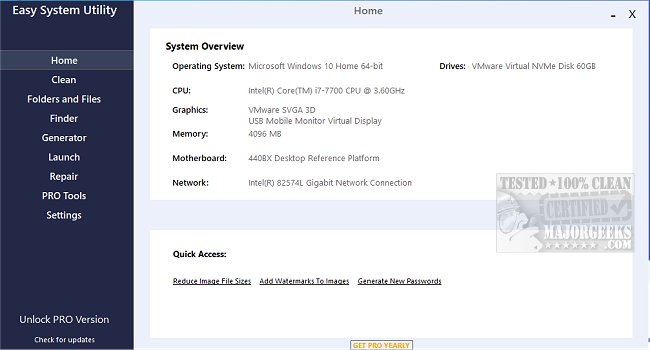
One of the standout features of Easy System Utility is its system overview capability, which consolidates essential hardware specifications into one accessible location. Users can easily check details about their operating system, CPU, GPU, memory, motherboard, network, and drivers, thereby streamlining the process of system management.
The utility is organized with a tabbed menu structure, allowing users to navigate its features effortlessly. The "Clean" tab focuses on identifying and removing junk files and unwanted Windows software, with options to analyze and selectively clean items such as DirectX Shader Cache, temp files, and Windows log files. This functionality not only enhances system performance but also helps in reclaiming valuable disk space.
In addition, the "Folders/Files" tab provides tools for managing files and folders effectively. Users can unlock files and folders with permission issues, resize images, watermark them, rename folders, and delete large folders that consume excessive space.
Moreover, the application includes a "Password Generator" tab that allows users to create secure, random passwords with customizable options for length and character types. This feature enhances security by enabling users to generate robust passwords effortlessly.
The "Launch" tab facilitates quick access to frequently used programs, files, and folders via the ESU system tray icon, minimizing the time spent searching through directories.
It is essential to run Easy System Utility with administrator rights to utilize all its features fully.
Key Features of Easy System Utility:
- View System Specs
- Analyze and Clean Windows Junk Files
- Unlock Files/Folders
- Reduce Image File Sizes and Add Watermarks
- Rename Files/Folders and Delete Large Folders
- Retrieve Windows and WiFi Passwords
- Generate Random Passwords
- Quick Launch of Files/Programs
In conclusion, Easy System Utility 1.1.55.0 serves as a versatile tool for users looking to optimize their PC's performance, manage files efficiently, and enhance security with strong passwords. Its intuitive interface and comprehensive features make it a valuable addition for anyone seeking to streamline their computer management tasks. Future updates may expand on these capabilities, potentially integrating more advanced cleaning algorithms or additional system management features to further assist users in maintaining optimal system performance
One of the standout features of Easy System Utility is its system overview capability, which consolidates essential hardware specifications into one accessible location. Users can easily check details about their operating system, CPU, GPU, memory, motherboard, network, and drivers, thereby streamlining the process of system management.
The utility is organized with a tabbed menu structure, allowing users to navigate its features effortlessly. The "Clean" tab focuses on identifying and removing junk files and unwanted Windows software, with options to analyze and selectively clean items such as DirectX Shader Cache, temp files, and Windows log files. This functionality not only enhances system performance but also helps in reclaiming valuable disk space.
In addition, the "Folders/Files" tab provides tools for managing files and folders effectively. Users can unlock files and folders with permission issues, resize images, watermark them, rename folders, and delete large folders that consume excessive space.
Moreover, the application includes a "Password Generator" tab that allows users to create secure, random passwords with customizable options for length and character types. This feature enhances security by enabling users to generate robust passwords effortlessly.
The "Launch" tab facilitates quick access to frequently used programs, files, and folders via the ESU system tray icon, minimizing the time spent searching through directories.
It is essential to run Easy System Utility with administrator rights to utilize all its features fully.
Key Features of Easy System Utility:
- View System Specs
- Analyze and Clean Windows Junk Files
- Unlock Files/Folders
- Reduce Image File Sizes and Add Watermarks
- Rename Files/Folders and Delete Large Folders
- Retrieve Windows and WiFi Passwords
- Generate Random Passwords
- Quick Launch of Files/Programs
In conclusion, Easy System Utility 1.1.55.0 serves as a versatile tool for users looking to optimize their PC's performance, manage files efficiently, and enhance security with strong passwords. Its intuitive interface and comprehensive features make it a valuable addition for anyone seeking to streamline their computer management tasks. Future updates may expand on these capabilities, potentially integrating more advanced cleaning algorithms or additional system management features to further assist users in maintaining optimal system performance
Easy System Utility 1.1.55.0 released
Easy System Utility provides an intuitive interface for removing unnecessary files, unlocking folders, compressing images, adding watermarks, launching files and folders from the system tray, and more.