Easy System Utility 1.1.51.0 has been released, offering users a comprehensive tool for optimizing their computer's performance and managing files efficiently. The utility features an intuitive interface that allows users to remove unnecessary files, unlock folders, compress images, and add watermarks, all while providing quick access to files and folders from the system tray.
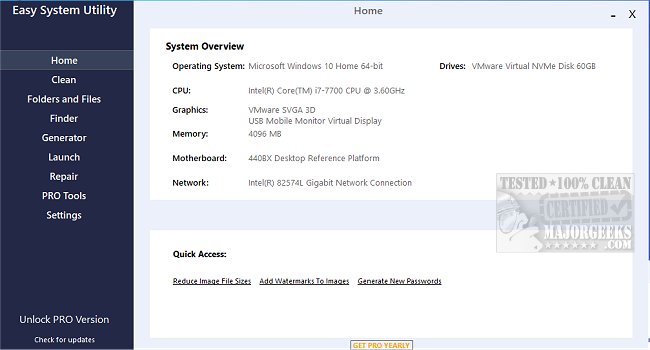
One of the key features of Easy System Utility is its ability to display detailed hardware specifications through a system overview, allowing users to see their operating system, CPU model, GPU, memory, motherboard, network information, and drivers in one convenient location. This feature streamlines the process of understanding computer specifications, saving users valuable time.
The application's organized tab menu provides access to various tools. The Clean tab is particularly useful for identifying and removing unwanted Windows software and junk files. Users can analyze these files before proceeding to clear them, with options to delete items such as DirectX Shader Cache, Prefetch Files, Recycle Bin contents, Temporary files, Thumbnail Cache, and Windows Log Files, ultimately freeing up disk space.
In the Folders/Files tab, users can unlock files and folders that may have permission issues, reduce image sizes, add watermarks to images, rename folders, and delete large folders to reclaim storage space. Additionally, the Password Generator tab allows users to create secure, random passwords with customizable options for length and character types.
The Launch tab enhances user experience by enabling quick access to frequently used programs, files, and folders directly from the Easy System Utility system tray icon, minimizing the need for time-consuming searches.
To utilize all features fully, it is essential to run Easy System Utility with administrator rights. Key features of the utility include:
- Viewing system specifications
- Analyzing and cleaning Windows junk files
- Unlocking files and folders
- Reducing image file sizes and adding watermarks
- Renaming files and folders
- Deleting large folders
- Finding Windows keys and WiFi passwords
- Generating random passwords
- Quick launching of files and programs
With the release of Easy System Utility 1.1.51.0, users have a powerful tool at their disposal to enhance system performance and manage files effectively. Future updates could potentially include features such as automated cleaning schedules, improved user interface customization, and enhanced compatibility with various operating systems. These additions would further solidify Easy System Utility's position as a go-to solution for system optimization
One of the key features of Easy System Utility is its ability to display detailed hardware specifications through a system overview, allowing users to see their operating system, CPU model, GPU, memory, motherboard, network information, and drivers in one convenient location. This feature streamlines the process of understanding computer specifications, saving users valuable time.
The application's organized tab menu provides access to various tools. The Clean tab is particularly useful for identifying and removing unwanted Windows software and junk files. Users can analyze these files before proceeding to clear them, with options to delete items such as DirectX Shader Cache, Prefetch Files, Recycle Bin contents, Temporary files, Thumbnail Cache, and Windows Log Files, ultimately freeing up disk space.
In the Folders/Files tab, users can unlock files and folders that may have permission issues, reduce image sizes, add watermarks to images, rename folders, and delete large folders to reclaim storage space. Additionally, the Password Generator tab allows users to create secure, random passwords with customizable options for length and character types.
The Launch tab enhances user experience by enabling quick access to frequently used programs, files, and folders directly from the Easy System Utility system tray icon, minimizing the need for time-consuming searches.
To utilize all features fully, it is essential to run Easy System Utility with administrator rights. Key features of the utility include:
- Viewing system specifications
- Analyzing and cleaning Windows junk files
- Unlocking files and folders
- Reducing image file sizes and adding watermarks
- Renaming files and folders
- Deleting large folders
- Finding Windows keys and WiFi passwords
- Generating random passwords
- Quick launching of files and programs
With the release of Easy System Utility 1.1.51.0, users have a powerful tool at their disposal to enhance system performance and manage files effectively. Future updates could potentially include features such as automated cleaning schedules, improved user interface customization, and enhanced compatibility with various operating systems. These additions would further solidify Easy System Utility's position as a go-to solution for system optimization
Easy System Utility 1.1.51.0 released
Easy System Utility provides an intuitive interface for removing unnecessary files, unlocking folders, compressing images, adding watermarks, launching files and folders from the system tray, and more.