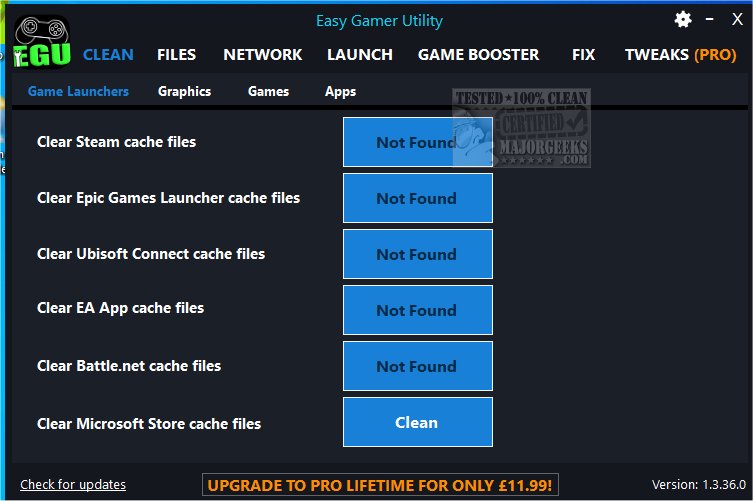
The latest version of Easy Gamer Utility, 1.3.90.0, has been released, providing gamers with a sophisticated tool to optimize their gaming performance. This utility focuses on clearing cache files from game launchers and graphics cards, which can significantly enhance system performance, particularly for those who experience lag or other issues while gaming.
For PC gamers, optimizing system performance is crucial for an enjoyable gaming experience, and Easy Gamer Utility serves as an essential tool in this regard. Its user-friendly interface and compact file size make it accessible for both gaming and standard PCs. With just a single click, users can eliminate game launcher and driver caches, locate game save data and configuration files, and easily navigate to cache folder locations.
Additionally, the utility includes a launch tab that allows users to adjust the priority of game processes on their machines, although features like High Priority and Force High Priority are exclusive to the Pro version. Browsing through game configuration files and saved data is straightforward thanks to the intuitive UI, and the developers are committed to continuously adding features for an enhanced user experience.
Easy Gamer Utility supports a variety of platforms, including Steam, Epic Games Launcher, Ubisoft Connect, EA App, Battle.Net, and supports caches for NVIDIA DirectX, OpenGL, Shader, as well as AMD and Intel Shader.
Users should note that Easy Gamer Utility permanently deletes cache files from their PC. While this process typically does not lead to issues, it is advisable to create a restore point as a precautionary measure.
Extended Overview:
The release of Easy Gamer Utility 1.3.90.0 not only emphasizes the importance of system optimization for gamers but also highlights the increasing need for tools that streamline and enhance the gaming experience. As gaming technology evolves, so does the complexity of managing game files and system performance.
In addition to its existing features, future updates could introduce more advanced functionality, such as automated cache clearing schedules, compatibility with more game launchers, or enhanced user support for troubleshooting common gaming issues. The potential for cloud integration could also be explored, allowing gamers to back up their configurations and save files easily.
Moreover, as gamers face an ever-expanding library of titles, the ability to manage and optimize performance for each game individually will become increasingly valuable. The community-driven feedback could guide developers in implementing features that address specific needs, further solidifying Easy Gamer Utility as an indispensable tool in the modern gamer’s toolkit.
In summary, Easy Gamer Utility 1.3.90.0 is a powerful ally for gamers looking to improve their experience through efficient cache management, and its ongoing development promises to cater to the evolving demands of the gaming community
For PC gamers, optimizing system performance is crucial for an enjoyable gaming experience, and Easy Gamer Utility serves as an essential tool in this regard. Its user-friendly interface and compact file size make it accessible for both gaming and standard PCs. With just a single click, users can eliminate game launcher and driver caches, locate game save data and configuration files, and easily navigate to cache folder locations.
Additionally, the utility includes a launch tab that allows users to adjust the priority of game processes on their machines, although features like High Priority and Force High Priority are exclusive to the Pro version. Browsing through game configuration files and saved data is straightforward thanks to the intuitive UI, and the developers are committed to continuously adding features for an enhanced user experience.
Easy Gamer Utility supports a variety of platforms, including Steam, Epic Games Launcher, Ubisoft Connect, EA App, Battle.Net, and supports caches for NVIDIA DirectX, OpenGL, Shader, as well as AMD and Intel Shader.
Users should note that Easy Gamer Utility permanently deletes cache files from their PC. While this process typically does not lead to issues, it is advisable to create a restore point as a precautionary measure.
Extended Overview:
The release of Easy Gamer Utility 1.3.90.0 not only emphasizes the importance of system optimization for gamers but also highlights the increasing need for tools that streamline and enhance the gaming experience. As gaming technology evolves, so does the complexity of managing game files and system performance.
In addition to its existing features, future updates could introduce more advanced functionality, such as automated cache clearing schedules, compatibility with more game launchers, or enhanced user support for troubleshooting common gaming issues. The potential for cloud integration could also be explored, allowing gamers to back up their configurations and save files easily.
Moreover, as gamers face an ever-expanding library of titles, the ability to manage and optimize performance for each game individually will become increasingly valuable. The community-driven feedback could guide developers in implementing features that address specific needs, further solidifying Easy Gamer Utility as an indispensable tool in the modern gamer’s toolkit.
In summary, Easy Gamer Utility 1.3.90.0 is a powerful ally for gamers looking to improve their experience through efficient cache management, and its ongoing development promises to cater to the evolving demands of the gaming community
Easy Gamer Utility 1.3.90.0 released
Easy Gamer Utility assists in clearing cache files for your game launchers and graphics cards to help improve overall performance.