Dynamic Theme version 1.7.104.0 has been released, offering users the ability to personalize their desktop and lock screen backgrounds. This application allows for various options, including daily updates using Bing or Windows Spotlight images, as well as the selection of personal pictures.
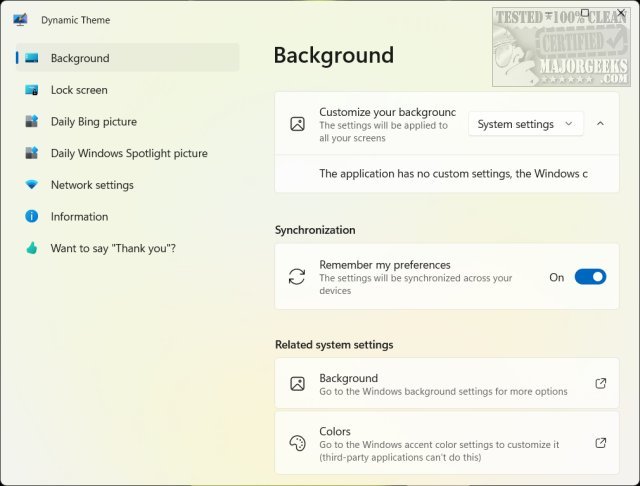
Upon installation from the Microsoft Store, users are greeted with the Dynamic Theme settings menu, which features several categories for customization:
- Background
- Lock screen
- Daily Bing picture
- Daily Windows Spotlight picture
- Network settings
- Information
Each category provides a range of options akin to selecting a new theme in Windows, such as notifications, image size, stretch options, and picture quality adjustments. The network settings feature is particularly useful for those on metered connections, allowing users to disable automatic downloads. Additionally, users can save their settings across multiple devices for consistent personalization.
It’s important to note that while the app utilizes Bing for image sourcing, it does not change the default search engine to Bing; it solely accesses it for downloading pictures.
To further enhance user experience, the release may include bug fixes and performance improvements, ensuring a smoother operation. This update emphasizes the importance of personalization in computer usage, allowing users to create an engaging aesthetic that reflects their preferences.
In summary, Dynamic Theme 1.7.104.0 not only enriches the visual appeal of Windows devices but also offers flexible options for managing background images, making it a valuable tool for users who enjoy a dynamic and personalized interface
Upon installation from the Microsoft Store, users are greeted with the Dynamic Theme settings menu, which features several categories for customization:
- Background
- Lock screen
- Daily Bing picture
- Daily Windows Spotlight picture
- Network settings
- Information
Each category provides a range of options akin to selecting a new theme in Windows, such as notifications, image size, stretch options, and picture quality adjustments. The network settings feature is particularly useful for those on metered connections, allowing users to disable automatic downloads. Additionally, users can save their settings across multiple devices for consistent personalization.
It’s important to note that while the app utilizes Bing for image sourcing, it does not change the default search engine to Bing; it solely accesses it for downloading pictures.
To further enhance user experience, the release may include bug fixes and performance improvements, ensuring a smoother operation. This update emphasizes the importance of personalization in computer usage, allowing users to create an engaging aesthetic that reflects their preferences.
In summary, Dynamic Theme 1.7.104.0 not only enriches the visual appeal of Windows devices but also offers flexible options for managing background images, making it a valuable tool for users who enjoy a dynamic and personalized interface
Dynamic Theme 1.7.104.0 released
Dynamic Theme can change your background or lock screen picture with daily Bing or Windows Spotlight pictures, one Bing or Windows Spotlight picture, or personal pictures.