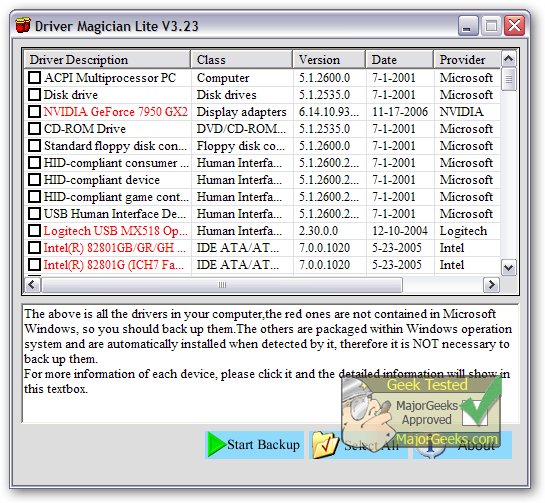
Driver Magician Lite has launched its latest version, 5.80, which provides a comprehensive solution for managing device drivers. This software enables users to backup, restore, update, and remove drivers effectively. It scans the system to identify all hardware components and extracts their drivers from the hard disk, allowing users to back them up to a desired location. This feature proves invaluable when formatting or upgrading an operating system, as it enables users to restore their drivers seamlessly—just like using original driver diskettes. After a simple system reboot, the PC is ready to function with all necessary drivers installed.
In addition to backup and restoration, Driver Magician Lite includes a built-in database that connects to the internet for driver updates. This functionality saves users considerable time in locating the correct drivers, while also enhancing hardware performance through the use of updated drivers. The software comes equipped with a hardware identifier database, which assists in detecting any unknown devices on the computer.
Key Features of Driver Magician Lite:
- Backup device drivers in four different modes.
- One-click restoration of device drivers from backup.
- Driver updates to enhance system performance and stability.
- Uninstallation of device drivers.
- Live updates for both the device identifier database and driver update database.
- Detection of unknown devices.
- Backup of additional items such as My Documents and the Registry.
- Restoration of more items from backup.
- Detailed information on hardware drivers.
- Ability to clone all drivers into an auto-setup package (.EXE) for easy restoration without needing to install Driver Magician.
The software not only simplifies driver management but also provides valuable features that assist users in maintaining a stable and high-performing system.
For individuals seeking further guidance, related resources include articles on downloading the latest drivers for Windows, steps for backing up and restoring drivers, and methods for preventing Windows Updates from automatically downloading drivers on Windows 10 and 11.
Expanded Context:
As technology continues to evolve, keeping drivers up-to-date is crucial for ensuring optimal performance and compatibility with new software and hardware. The release of Driver Magician Lite 5.80 reflects the ongoing commitment to providing users with tools that simplify these processes. Users can benefit from the software’s capabilities not only to maintain their current systems but also to prepare for future upgrades or changes. This proactive approach to driver management can significantly reduce downtime and enhance the overall computing experience
In addition to backup and restoration, Driver Magician Lite includes a built-in database that connects to the internet for driver updates. This functionality saves users considerable time in locating the correct drivers, while also enhancing hardware performance through the use of updated drivers. The software comes equipped with a hardware identifier database, which assists in detecting any unknown devices on the computer.
Key Features of Driver Magician Lite:
- Backup device drivers in four different modes.
- One-click restoration of device drivers from backup.
- Driver updates to enhance system performance and stability.
- Uninstallation of device drivers.
- Live updates for both the device identifier database and driver update database.
- Detection of unknown devices.
- Backup of additional items such as My Documents and the Registry.
- Restoration of more items from backup.
- Detailed information on hardware drivers.
- Ability to clone all drivers into an auto-setup package (.EXE) for easy restoration without needing to install Driver Magician.
The software not only simplifies driver management but also provides valuable features that assist users in maintaining a stable and high-performing system.
For individuals seeking further guidance, related resources include articles on downloading the latest drivers for Windows, steps for backing up and restoring drivers, and methods for preventing Windows Updates from automatically downloading drivers on Windows 10 and 11.
Expanded Context:
As technology continues to evolve, keeping drivers up-to-date is crucial for ensuring optimal performance and compatibility with new software and hardware. The release of Driver Magician Lite 5.80 reflects the ongoing commitment to providing users with tools that simplify these processes. Users can benefit from the software’s capabilities not only to maintain their current systems but also to prepare for future upgrades or changes. This proactive approach to driver management can significantly reduce downtime and enhance the overall computing experience
Driver Magician Lite 5.80 released
Driver Magician Lite offers a professional solution for device driver's backup, restoration, update, and removal.