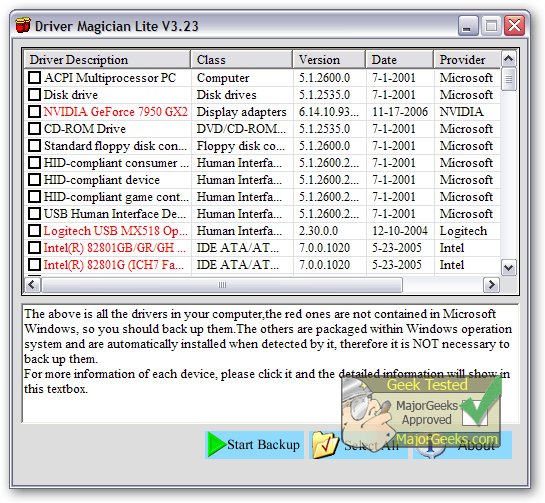
Driver Magician Lite has recently launched its version 5.79, providing users with a robust tool for managing device drivers on their computers. This software simplifies the backup, restoration, updating, and removal of drivers, ensuring an efficient user experience when dealing with hardware components.
With Driver Magician Lite, users can easily identify all hardware in their system. The tool extracts the associated drivers from the hard disk and allows users to back them up to a specified location. This feature is particularly beneficial when users format or upgrade their operating systems, as they can restore the backed-up drivers seamlessly, just as if they were using original driver diskettes. After a single system reboot, users will find their PCs loaded with the necessary hardware drivers, minimizing downtime.
In addition to driver management, Driver Magician Lite boasts a built-in database of the latest drivers that can access the internet for updates. This capability saves users significant time searching for the correct drivers, while also enhancing hardware performance with updated driver versions. The software also includes a hardware identifier database that helps detect unknown devices on a PC, making it easier for users to manage all their hardware.
Key Features of Driver Magician Lite:
- Back up device drivers in four different modes.
- Restore drivers from backup with a single mouse click.
- Update drivers to enhance system performance and stability.
- Uninstall outdated or unnecessary drivers.
- Live update for the device identifier and driver update databases.
- Identify unknown devices on the system.
- Backup additional items like "My Documents" and the Windows Registry.
- Restore various items from backup.
- Access detailed information about hardware drivers.
- Clone all drivers into an auto-setup package (.EXE) for easy restoration without needing to install Driver Magician.
Overall, Driver Magician Lite is an essential tool for anyone looking to maintain optimal driver performance on their Windows systems. Its comprehensive features streamline the process of managing drivers, allowing users to focus on their work without the hassle of driver-related issues.
Additional Resources:
- Learn how to download the latest drivers for Windows.
- Follow step-by-step guides on backing up and restoring your drivers.
- Discover methods to prevent Windows updates from automatically downloading drivers on Windows 10 & 11
With Driver Magician Lite, users can easily identify all hardware in their system. The tool extracts the associated drivers from the hard disk and allows users to back them up to a specified location. This feature is particularly beneficial when users format or upgrade their operating systems, as they can restore the backed-up drivers seamlessly, just as if they were using original driver diskettes. After a single system reboot, users will find their PCs loaded with the necessary hardware drivers, minimizing downtime.
In addition to driver management, Driver Magician Lite boasts a built-in database of the latest drivers that can access the internet for updates. This capability saves users significant time searching for the correct drivers, while also enhancing hardware performance with updated driver versions. The software also includes a hardware identifier database that helps detect unknown devices on a PC, making it easier for users to manage all their hardware.
Key Features of Driver Magician Lite:
- Back up device drivers in four different modes.
- Restore drivers from backup with a single mouse click.
- Update drivers to enhance system performance and stability.
- Uninstall outdated or unnecessary drivers.
- Live update for the device identifier and driver update databases.
- Identify unknown devices on the system.
- Backup additional items like "My Documents" and the Windows Registry.
- Restore various items from backup.
- Access detailed information about hardware drivers.
- Clone all drivers into an auto-setup package (.EXE) for easy restoration without needing to install Driver Magician.
Overall, Driver Magician Lite is an essential tool for anyone looking to maintain optimal driver performance on their Windows systems. Its comprehensive features streamline the process of managing drivers, allowing users to focus on their work without the hassle of driver-related issues.
Additional Resources:
- Learn how to download the latest drivers for Windows.
- Follow step-by-step guides on backing up and restoring your drivers.
- Discover methods to prevent Windows updates from automatically downloading drivers on Windows 10 & 11
Driver Magician Lite 5.79 released
Driver Magician Lite offers a professional solution for device driver's backup, restoration, update, and removal.