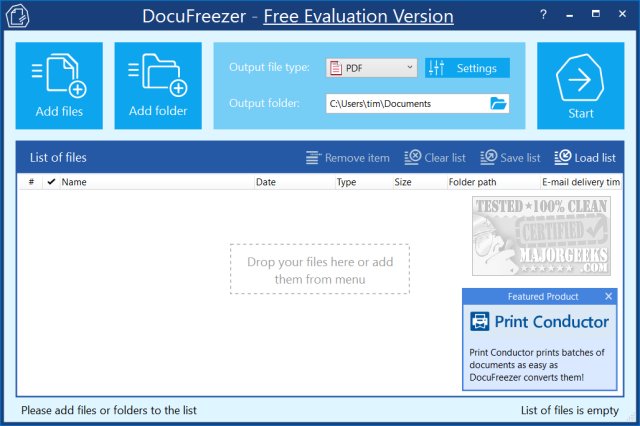
DocuFreezer 7.0.2609 has been released, offering users an efficient way to convert documents and images into various formats including PDF, TXT, JPG, TIFF, and PNG. This application "freezes" the appearance of the original documents, ensuring they remain unchanged regardless of the device used to view them. The user-friendly interface makes it easy to add files via drag-and-drop or by clicking to select them. Users can then choose the desired output format and folder, with a range of additional settings available, although the defaults suffice for most tasks. The conversion process is quick, and users can open their files immediately after completion.
While DocuFreezer is marketed as a free tool, it does leave a small watermark on converted files unless users opt for the paid professional version. This watermark, however, is discreet and often goes unnoticed. Despite this limitation, many users appreciate the functionality and ease of use that DocuFreezer provides.
In addition to its primary function, DocuFreezer may appeal to users needing to preserve document integrity for professional or personal use, such as creating reports or portfolios. Its versatile output options make it suitable for various applications, from academic submissions to digital archiving. Overall, while the watermark may be a drawback for some, the convenience and reliability of DocuFreezer make it a valuable tool for anyone looking to convert and secure their documents.
Moreover, users looking for additional features might consider exploring the professional version, which promises enhanced functionalities without the watermark. As technology continues to evolve, tools like DocuFreezer remain essential for maintaining document fidelity in a digital world
While DocuFreezer is marketed as a free tool, it does leave a small watermark on converted files unless users opt for the paid professional version. This watermark, however, is discreet and often goes unnoticed. Despite this limitation, many users appreciate the functionality and ease of use that DocuFreezer provides.
In addition to its primary function, DocuFreezer may appeal to users needing to preserve document integrity for professional or personal use, such as creating reports or portfolios. Its versatile output options make it suitable for various applications, from academic submissions to digital archiving. Overall, while the watermark may be a drawback for some, the convenience and reliability of DocuFreezer make it a valuable tool for anyone looking to convert and secure their documents.
Moreover, users looking for additional features might consider exploring the professional version, which promises enhanced functionalities without the watermark. As technology continues to evolve, tools like DocuFreezer remain essential for maintaining document fidelity in a digital world
DocuFreezer 7.0.2609 released
DocuFreezer is a free application that converts your documents and images to PDF, TXT, JPG, TIFF, or PNG formats, "freezing" the look of the input documents and protecting them from any amendments.