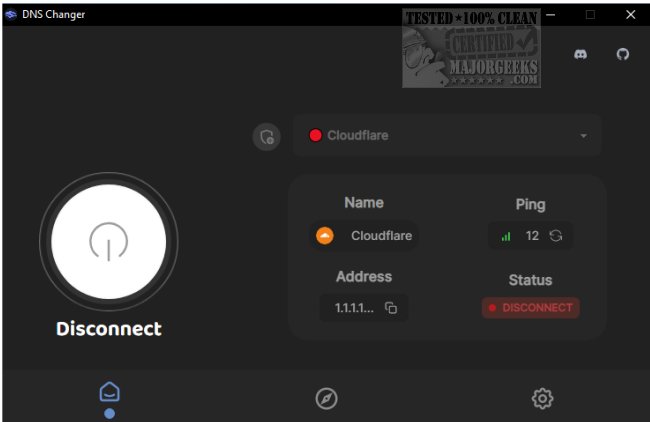
DNS Changer is a versatile tool that provides users with access to a variety of DNS servers from a single, user-friendly interface. This open-source software is compatible with Windows, Mac, and Linux operating systems. While your Internet Service Provider (ISP) typically assigns a DNS address that functions adequately, users may benefit from faster or more secure alternatives, which DNS Changer facilitates.
For those unfamiliar with the manual process of changing DNS settings—particularly on Windows 10—the steps involve navigating to Settings > Network & Internet > Change Adapter Settings, right-clicking on the desired connection, selecting Properties > IPv4 > Properties, and then entering the preferred DNS addresses. However, DNS Changer streamlines this process, allowing users to switch between multiple DNS servers with just a few clicks.
The application features a straightforward user interface that displays essential information such as server addresses, ping times, and connection status, enabling users to make informed choices quickly. Moreover, DNS Changer allows customization by enabling users to add their own DNS servers.
In summary, DNS Changer is a convenient tool for those looking to optimize their DNS settings without the hassle of manual configuration. Its easy navigation and accessible options make it ideal for users desiring enhanced internet performance and security.
Extension: Additional Features and Use Cases for DNS Changer
In addition to its core functionalities, DNS Changer offers several advanced features that can further enhance user experience. For instance, users can save their favorite DNS servers for quick access, ensuring that they can switch between preferred options without searching each time.
Furthermore, DNS Changer can be particularly beneficial for users in regions with restricted internet access, as it allows them to connect to DNS servers that may bypass censorship. This can be essential for individuals who wish to maintain privacy and secure their online activities from potential surveillance.
Another noteworthy aspect is the application’s potential for improving online gaming experiences. By utilizing faster DNS servers, gamers may experience reduced latency and improved connection stability, leading to a more enjoyable gaming session.
Overall, DNS Changer not only simplifies the process of managing DNS settings but also provides users with numerous advantages related to speed, security, and flexibility in their internet usage. Whether for casual browsing, gaming, or maintaining privacy, DNS Changer is a valuable tool in the modern digital landscape
For those unfamiliar with the manual process of changing DNS settings—particularly on Windows 10—the steps involve navigating to Settings > Network & Internet > Change Adapter Settings, right-clicking on the desired connection, selecting Properties > IPv4 > Properties, and then entering the preferred DNS addresses. However, DNS Changer streamlines this process, allowing users to switch between multiple DNS servers with just a few clicks.
The application features a straightforward user interface that displays essential information such as server addresses, ping times, and connection status, enabling users to make informed choices quickly. Moreover, DNS Changer allows customization by enabling users to add their own DNS servers.
In summary, DNS Changer is a convenient tool for those looking to optimize their DNS settings without the hassle of manual configuration. Its easy navigation and accessible options make it ideal for users desiring enhanced internet performance and security.
Extension: Additional Features and Use Cases for DNS Changer
In addition to its core functionalities, DNS Changer offers several advanced features that can further enhance user experience. For instance, users can save their favorite DNS servers for quick access, ensuring that they can switch between preferred options without searching each time.
Furthermore, DNS Changer can be particularly beneficial for users in regions with restricted internet access, as it allows them to connect to DNS servers that may bypass censorship. This can be essential for individuals who wish to maintain privacy and secure their online activities from potential surveillance.
Another noteworthy aspect is the application’s potential for improving online gaming experiences. By utilizing faster DNS servers, gamers may experience reduced latency and improved connection stability, leading to a more enjoyable gaming session.
Overall, DNS Changer not only simplifies the process of managing DNS settings but also provides users with numerous advantages related to speed, security, and flexibility in their internet usage. Whether for casual browsing, gaming, or maintaining privacy, DNS Changer is a valuable tool in the modern digital landscape
DNS Changer 2.3.6 released
DNS Changer gives you access to some of the best DNS servers, all from a central location.