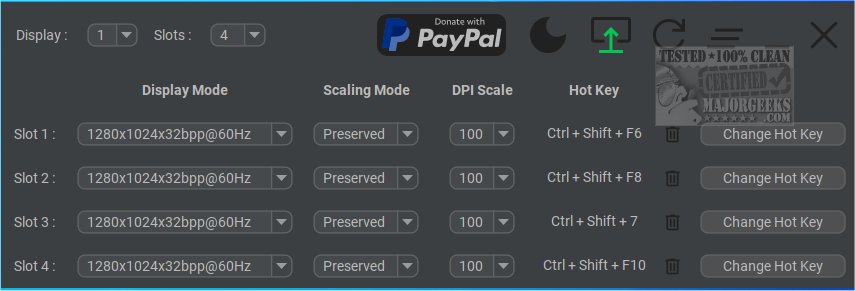
Display Hot Keys is a versatile tool that allows users to effortlessly switch between different display settings using custom hotkeys. This application is particularly useful for those who engage in various activities that require different display modes, such as gaming, video playback, or working on diverse content types. By utilizing Display Hot Keys, users can bypass the tedious process of navigating through menus and settings, enabling a smoother and more efficient viewing experience.
Key Features:
1. User-Friendly Access: Display Hot Keys offers a streamlined way to modify display settings across multiple monitors. Users can assign up to 12 customizable hotkeys for each monitor, allowing for quick adjustments in resolution, bit depth, refresh rate, scaling mode, and DPI. This personalization caters to a wide range of use cases, making it an ideal solution for both casual and professional users.
2. Multi-Monitor Support: The application excels in multi-monitor configurations, providing users with the ability to manage and switch between display modes effortlessly, depending on their current task or activity.
3. Comprehensive Guidance: A detailed usage guide is available on the developer's repository, ensuring that even newer users can navigate the features with ease.
Target Audience: Display Hot Keys is particularly advantageous for individuals who regularly alter their display settings and seek a more efficient method to do so. Its intuitive design makes it accessible to users of all skill levels.
Related Resources: Users may also find value in exploring other resources related to multi-monitor setups, such as guides on how to show or hide the taskbar on multiple monitors or how to remember window locations across different screens in Windows 10/11.
Conclusion: With its release of version 4.0.0, Display Hot Keys continues to be a beneficial tool for anyone looking to enhance their display management experience, especially in multi-monitor setups. The ease of customization and quick access provided by hotkeys stands to significantly improve workflow efficiency and user satisfaction
Key Features:
1. User-Friendly Access: Display Hot Keys offers a streamlined way to modify display settings across multiple monitors. Users can assign up to 12 customizable hotkeys for each monitor, allowing for quick adjustments in resolution, bit depth, refresh rate, scaling mode, and DPI. This personalization caters to a wide range of use cases, making it an ideal solution for both casual and professional users.
2. Multi-Monitor Support: The application excels in multi-monitor configurations, providing users with the ability to manage and switch between display modes effortlessly, depending on their current task or activity.
3. Comprehensive Guidance: A detailed usage guide is available on the developer's repository, ensuring that even newer users can navigate the features with ease.
Target Audience: Display Hot Keys is particularly advantageous for individuals who regularly alter their display settings and seek a more efficient method to do so. Its intuitive design makes it accessible to users of all skill levels.
Related Resources: Users may also find value in exploring other resources related to multi-monitor setups, such as guides on how to show or hide the taskbar on multiple monitors or how to remember window locations across different screens in Windows 10/11.
Conclusion: With its release of version 4.0.0, Display Hot Keys continues to be a beneficial tool for anyone looking to enhance their display management experience, especially in multi-monitor setups. The ease of customization and quick access provided by hotkeys stands to significantly improve workflow efficiency and user satisfaction
Display Hot Keys 4.0.0 released
Display Hot Keys enables quick switching between display settings using custom hotkeys.