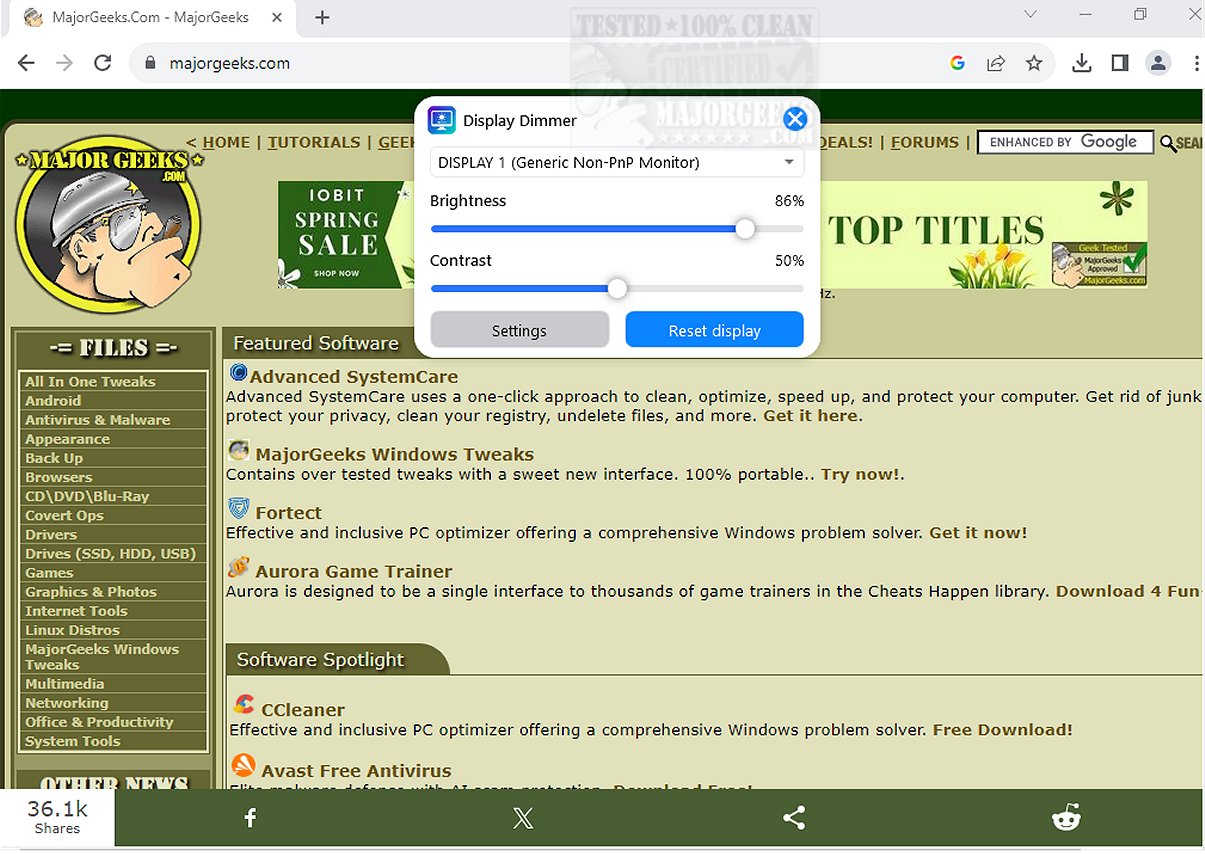
Display Dimmer is a powerful tool that streamlines the process of managing the brightness of all your external monitors from a single interface. The latest version, 2.1.19, continues to enhance user experience by allowing you to easily modify brightness settings for any connected display directly through your Windows operating system. This eliminates the need for awkwardly reaching behind your monitor or navigating through complicated on-screen menus, making adjustments quick and effortless.
Key Features of Display Dimmer:
- Individual brightness and contrast control for each external monitor
- Ideal for multi-monitor setups, including dual or triple screen configurations
- Scheduled brightness adjustments based on time of day
- Custom brightness profiles for different applications
- Remembers your preferred brightness settings for each display
- Convenient tray icon for quick access to settings
- Option to start with Windows and automatically apply saved brightness levels
- Supports both light and dark themes
- Lightweight and responsive native WPF application
Display Dimmer utilizes the Display Data Channel Command Interface (DDC/CI) for monitors that support it, enabling seamless hardware control to adjust brightness levels. For monitors that do not fully support this feature, Display Dimmer provides a fallback option using GPU dimming techniques, ensuring optimal brightness even on less compatible displays. This flexibility not only enhances the viewing experience but also helps minimize eye strain during extended use.
Geek Verdict:
Transform your monitor experience with Display Dimmer, which allows effortless control of brightness and contrast for any connected display from your Windows interface. No more fumbling with difficult menus or reaching behind your screens—enjoy the convenience of adjusting brightness settings with just a few clicks.
Additional Resources:
- Instructions on enabling or disabling adaptive brightness in Windows 10
- Tips on turning off specific monitors on demand
- Guidance for finding and repairing stuck or dead pixels on LCD monitors
In conclusion, Display Dimmer 2.1.19 is an essential application for anyone using multiple monitors, providing a simple yet powerful way to customize your viewing environment for improved comfort and productivity
Key Features of Display Dimmer:
- Individual brightness and contrast control for each external monitor
- Ideal for multi-monitor setups, including dual or triple screen configurations
- Scheduled brightness adjustments based on time of day
- Custom brightness profiles for different applications
- Remembers your preferred brightness settings for each display
- Convenient tray icon for quick access to settings
- Option to start with Windows and automatically apply saved brightness levels
- Supports both light and dark themes
- Lightweight and responsive native WPF application
Display Dimmer utilizes the Display Data Channel Command Interface (DDC/CI) for monitors that support it, enabling seamless hardware control to adjust brightness levels. For monitors that do not fully support this feature, Display Dimmer provides a fallback option using GPU dimming techniques, ensuring optimal brightness even on less compatible displays. This flexibility not only enhances the viewing experience but also helps minimize eye strain during extended use.
Geek Verdict:
Transform your monitor experience with Display Dimmer, which allows effortless control of brightness and contrast for any connected display from your Windows interface. No more fumbling with difficult menus or reaching behind your screens—enjoy the convenience of adjusting brightness settings with just a few clicks.
Additional Resources:
- Instructions on enabling or disabling adaptive brightness in Windows 10
- Tips on turning off specific monitors on demand
- Guidance for finding and repairing stuck or dead pixels on LCD monitors
In conclusion, Display Dimmer 2.1.19 is an essential application for anyone using multiple monitors, providing a simple yet powerful way to customize your viewing environment for improved comfort and productivity
Display Dimmer 2.1.19 released
Display Dimmer enables you to effortlessly control the brightness of all your external monitors from a single location. This user-friendly tool lets you adjust the brightness settings for any connected display directly from your Windows interface.