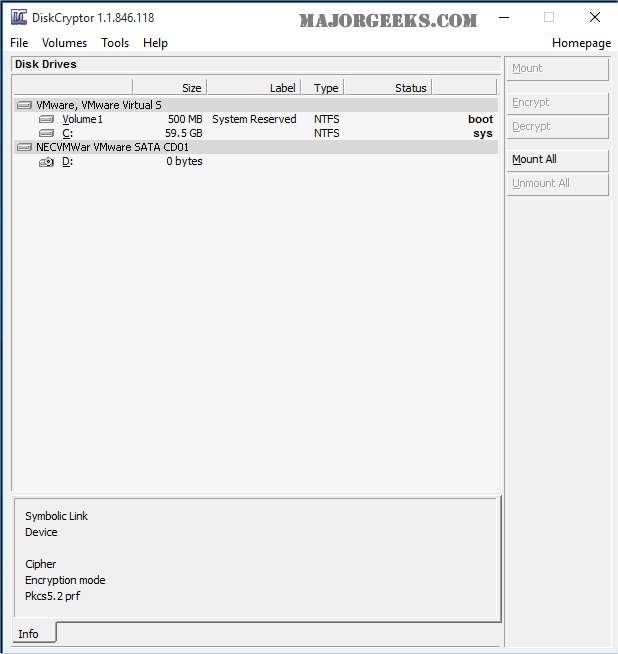
DiskCryptor 1.4.1 Beta has been released, offering users a robust solution for full disk encryption. This free, open-source software enables you to encrypt either an entire hard drive or a single partition, making it a versatile choice for individuals and organizations looking to enhance their data security.
Originally created as an alternative to commercial products like DriveCrypt Plus Pack and PGP Whole Disk Encryption, DiskCryptor stands out due to its completely free and open-source nature. The encryption performance is influenced by the user's hardware configuration and the selected algorithm, which includes AES, Twofish, Serpent, and various combinations of these.
When using DiskCryptor, it is important to note that after installation, a reboot is necessary. For those planning to encrypt their system partition, it is highly advised to create a bootable LiveCD and perform a backup of the volume header post-encryption to safeguard against potential data loss.
Key features of DiskCryptor include:
- Support for multiple encryption algorithms such as AES, Twofish, and Serpent, including combinations of these.
- Transparent encryption capabilities for disk partitions.
- Full support for dynamic disks and disk devices with large sector sizes, which is crucial for hardware RAID setups.
- High performance that rivals the efficiency of non-encrypted systems.
- Compatibility with hardware AES acceleration and various CPU extensions (e.g., AES New Instructions for Intel and AMD CPUs, PadLock extensions for VIA processors).
- Support for the SSD TRIM command, enhancing performance for solid-state drives.
- A range of boot configuration options for encrypted operating systems, including support for UEFI/GPT boot and third-party bootloaders.
- Pre-boot authentication for system partition encryption.
- Options for external bootloaders, key files, and the creation of encrypted CD/DVD disks.
- Full support for external USB storage devices and automatic mounting capabilities.
- User-friendly features like hotkeys and an optional command-line interface (CLI).
As the demand for data protection continues to rise, DiskCryptor remains a strong contender in the realm of disk encryption solutions, catering to both casual users and IT professionals alike. With its continuous updates and community support, users can expect ongoing improvements and additional features in future releases
Originally created as an alternative to commercial products like DriveCrypt Plus Pack and PGP Whole Disk Encryption, DiskCryptor stands out due to its completely free and open-source nature. The encryption performance is influenced by the user's hardware configuration and the selected algorithm, which includes AES, Twofish, Serpent, and various combinations of these.
When using DiskCryptor, it is important to note that after installation, a reboot is necessary. For those planning to encrypt their system partition, it is highly advised to create a bootable LiveCD and perform a backup of the volume header post-encryption to safeguard against potential data loss.
Key features of DiskCryptor include:
- Support for multiple encryption algorithms such as AES, Twofish, and Serpent, including combinations of these.
- Transparent encryption capabilities for disk partitions.
- Full support for dynamic disks and disk devices with large sector sizes, which is crucial for hardware RAID setups.
- High performance that rivals the efficiency of non-encrypted systems.
- Compatibility with hardware AES acceleration and various CPU extensions (e.g., AES New Instructions for Intel and AMD CPUs, PadLock extensions for VIA processors).
- Support for the SSD TRIM command, enhancing performance for solid-state drives.
- A range of boot configuration options for encrypted operating systems, including support for UEFI/GPT boot and third-party bootloaders.
- Pre-boot authentication for system partition encryption.
- Options for external bootloaders, key files, and the creation of encrypted CD/DVD disks.
- Full support for external USB storage devices and automatic mounting capabilities.
- User-friendly features like hotkeys and an optional command-line interface (CLI).
As the demand for data protection continues to rise, DiskCryptor remains a strong contender in the realm of disk encryption solutions, catering to both casual users and IT professionals alike. With its continuous updates and community support, users can expect ongoing improvements and additional features in future releases
DiskCryptor 1.4.1 Beta released
DiskCryptor is a free, Open Source, full disk encryption software that allows you to encrypt an entire hard drive or a single partition.