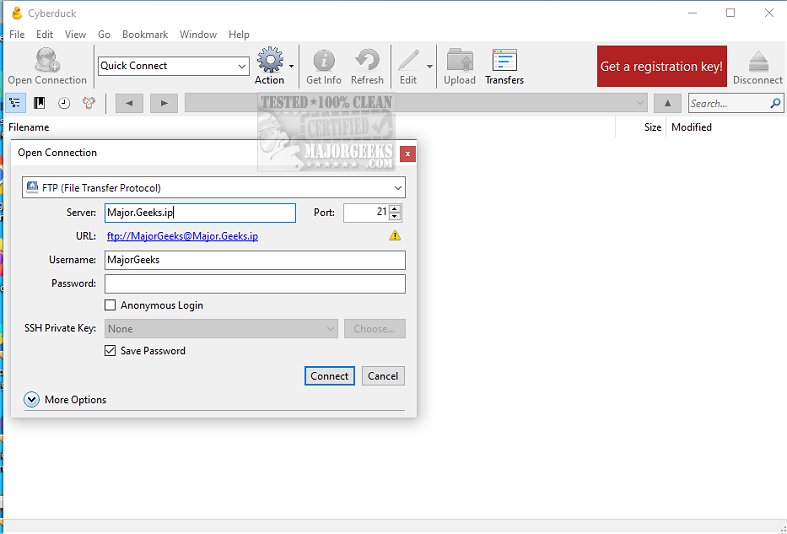
Cyberduck has recently released version 9.6.0.46406, enhancing its status as a powerful, open-source server and cloud storage browser. It supports various file transfer protocols, including FTP, SFTP, and WebDAV, as well as cloud storage services like Amazon S3, Google Drive, Dropbox, and Microsoft Azure, among others.
The user-friendly interface of Cyberduck features a tree-like view that simplifies navigation through directories, making it visually straightforward to browse files on target servers. Enhanced navigation tools, such as integrated search functions and "Back" and "Forward" buttons, allow users to quickly locate specific files and folders. Additionally, Cyberduck facilitates streamlined setup for content delivery networks (CDNs) like Amazon CloudFront and Akamai, making global file sharing easy.
Cyberduck also excels in performance optimization by enabling caching and supporting various character encodings for accurate language displays. Users can manage file transfers efficiently by controlling simultaneous uploads and downloads, utilizing regular expression filtering for precise file searches, and resuming interrupted transfers seamlessly. The capability to transfer entire directories recursively simplifies large data migrations.
One notable feature of Cyberduck is its ability to run multiple instances simultaneously, allowing users to connect to and manage files on different servers at the same time. The application includes a bookmark manager for easy access to frequently used connections and maintains a history of previous connections for convenience.
Additionally, Cyberduck boasts impressive transfer speeds and provides a dedicated Transfer window for real-time monitoring of file transfers. Users can pause, resume, or cancel transfers, giving them enhanced control over their file management tasks.
Cyberduck also offers advanced features such as robust permissions management, allowing users to set access rights for collaborators, and file versioning, which helps keep track of changes and retrieve previous versions when necessary.
In summary, Cyberduck combines robust functionalities with an intuitive interface, making it a leading choice for both casual users and professionals requiring secure and efficient file management solutions. It stands as a trusted tool for navigating cloud storage and managing file transfers seamlessly in various environments.
As a potential extension, Cyberduck could explore integrating more advanced collaborative tools, such as real-time file editing and enhanced synchronization features for teams working on shared projects, further solidifying its utility in professional settings
The user-friendly interface of Cyberduck features a tree-like view that simplifies navigation through directories, making it visually straightforward to browse files on target servers. Enhanced navigation tools, such as integrated search functions and "Back" and "Forward" buttons, allow users to quickly locate specific files and folders. Additionally, Cyberduck facilitates streamlined setup for content delivery networks (CDNs) like Amazon CloudFront and Akamai, making global file sharing easy.
Cyberduck also excels in performance optimization by enabling caching and supporting various character encodings for accurate language displays. Users can manage file transfers efficiently by controlling simultaneous uploads and downloads, utilizing regular expression filtering for precise file searches, and resuming interrupted transfers seamlessly. The capability to transfer entire directories recursively simplifies large data migrations.
One notable feature of Cyberduck is its ability to run multiple instances simultaneously, allowing users to connect to and manage files on different servers at the same time. The application includes a bookmark manager for easy access to frequently used connections and maintains a history of previous connections for convenience.
Additionally, Cyberduck boasts impressive transfer speeds and provides a dedicated Transfer window for real-time monitoring of file transfers. Users can pause, resume, or cancel transfers, giving them enhanced control over their file management tasks.
Cyberduck also offers advanced features such as robust permissions management, allowing users to set access rights for collaborators, and file versioning, which helps keep track of changes and retrieve previous versions when necessary.
In summary, Cyberduck combines robust functionalities with an intuitive interface, making it a leading choice for both casual users and professionals requiring secure and efficient file management solutions. It stands as a trusted tool for navigating cloud storage and managing file transfers seamlessly in various environments.
As a potential extension, Cyberduck could explore integrating more advanced collaborative tools, such as real-time file editing and enhanced synchronization features for teams working on shared projects, further solidifying its utility in professional settings
Cyberduck 9.6.0.46406 released
Cyberduck is a Libre server/cloud storage browser with FTP, SFTP, WebDAV, Amazon S3, OpenStack Swift, Backblaze B2, Microsoft Azure & OneDrive, Google Drive, and Dropbox support.