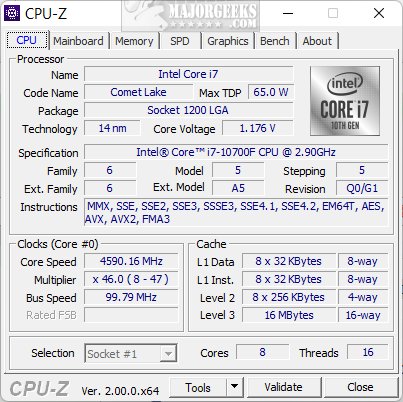
CPU-Z is a free utility developed by CPUID that provides comprehensive details about computer hardware. It's designed for everyone from casual users to advanced tech enthusiasts, offering insights into various system components without requiring physical disassembly of the machine.
Why CPU-Z is Essential
CPU-Z serves multiple purposes: it helps users identify the specifications of their CPU, RAM, motherboard, and graphics card, making it an invaluable tool for troubleshooting, upgrading, or overclocking. With a simple launch, users can view critical information regarding:
- Processor: Detailed specs including name, cores, threads, clock speeds, and more.
- Motherboard: Identifies the manufacturer, model, chipset, and BIOS version.
- Memory (RAM): Provides details on type, size, speed, and latency.
- Graphics Card (GPU): Displays basic specs about integrated or discrete GPUs.
- Real-Time Stats: Monitors core frequencies, voltages, and overall utilization.
- Benchmarks: Tests CPU performance in various tasks for comparison purposes.
- Report Generation: Allows users to export data for sharing or archiving.
Portability and Customization
CPU-Z is portable, requiring no installation, and is compatible with both Windows and Android platforms, although it does not support Mac. Users can customize settings such as font sizes and colors, and the “ghost mode” feature allows for data saving without displaying the interface.
Problem-Solving Capabilities
The utility excels in various scenarios:
- For Hardware Upgrades: Quickly identifies necessary specifications for new components.
- For Overclocking: Monitors real-time performance to ensure stability during tweaks.
- For Troubleshooting: Helps diagnose issues by providing detailed hardware diagnostics.
- For Documentation: Enables easy sharing of system reports for tech support or upgrade planning.
Why You Should Download CPU-Z
For anyone looking to understand or optimize their PC, CPU-Z is indispensable. Its accuracy, ease of use, and resource efficiency make it suitable for a wide audience, from tech novices to hardware aficionados.
Conclusion
In conclusion, whether you're diagnosing performance issues, planning upgrades, or simply curious about your system’s capabilities, CPU-Z is a powerful tool that enhances your computing experience. Try it today and see the difference it can make in your understanding and management of computer hardware.
Further Reading: Explore related articles on finding motherboard details, understanding CPU cores, identifying Intel processors, checking RAM speed, and more to further enhance your tech knowledge
Why CPU-Z is Essential
CPU-Z serves multiple purposes: it helps users identify the specifications of their CPU, RAM, motherboard, and graphics card, making it an invaluable tool for troubleshooting, upgrading, or overclocking. With a simple launch, users can view critical information regarding:
- Processor: Detailed specs including name, cores, threads, clock speeds, and more.
- Motherboard: Identifies the manufacturer, model, chipset, and BIOS version.
- Memory (RAM): Provides details on type, size, speed, and latency.
- Graphics Card (GPU): Displays basic specs about integrated or discrete GPUs.
- Real-Time Stats: Monitors core frequencies, voltages, and overall utilization.
- Benchmarks: Tests CPU performance in various tasks for comparison purposes.
- Report Generation: Allows users to export data for sharing or archiving.
Portability and Customization
CPU-Z is portable, requiring no installation, and is compatible with both Windows and Android platforms, although it does not support Mac. Users can customize settings such as font sizes and colors, and the “ghost mode” feature allows for data saving without displaying the interface.
Problem-Solving Capabilities
The utility excels in various scenarios:
- For Hardware Upgrades: Quickly identifies necessary specifications for new components.
- For Overclocking: Monitors real-time performance to ensure stability during tweaks.
- For Troubleshooting: Helps diagnose issues by providing detailed hardware diagnostics.
- For Documentation: Enables easy sharing of system reports for tech support or upgrade planning.
Why You Should Download CPU-Z
For anyone looking to understand or optimize their PC, CPU-Z is indispensable. Its accuracy, ease of use, and resource efficiency make it suitable for a wide audience, from tech novices to hardware aficionados.
Conclusion
In conclusion, whether you're diagnosing performance issues, planning upgrades, or simply curious about your system’s capabilities, CPU-Z is a powerful tool that enhances your computing experience. Try it today and see the difference it can make in your understanding and management of computer hardware.
Further Reading: Explore related articles on finding motherboard details, understanding CPU cores, identifying Intel processors, checking RAM speed, and more to further enhance your tech knowledge
CPU-Z 2.18 released
CPU-Z is a free utility from CPUID that provides detailed information about your computer's hardware.