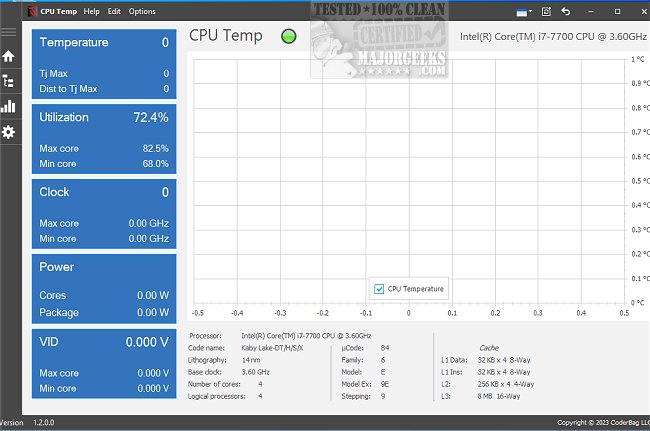
The latest version of CPU Temp, now available, provides users with a comprehensive tool for monitoring critical CPU metrics such as temperature, utilization, clock speed, and power consumption in real time. This application is designed with user experience in mind, featuring an intuitive interface that is highly customizable, allowing individuals to choose from over 40 different UI themes and color palettes. This personalization ensures that users can select an appearance that aligns with their preferences, creating a more engaging monitoring experience.
The layout of CPU Temp is user-friendly, with a navigation bar located on the left side of the screen that organizes various functionalities into distinct menu items. Users can easily monitor their CPU's temperature by launching the application, where they will find a dedicated "CPU Temperature" tile along with a corresponding temperature chart. For those interested in additional metrics, clicking on other tiles such as Utilization, Clock, and CPU Temperature will provide access to graphical representations of specific sensor data.
The application presents a variety of essential parameters, which may vary depending on the CPU model being monitored. Key metrics typically include:
- CPU package temperature
- TJ Max temperature (maximum safe temperature)
- Distance to TJ Max for the CPU and individual cores
- Temperature readings for each CPU core
- CPU temperature distribution across cores
- CPU thermal state indicator
Monitoring these parameters is crucial for maintaining optimal CPU performance and preventing overheating, which can lead to potential hardware issues.
Extended Features and Importance of CPU Monitoring
In addition to the above features, CPU Temp also aims to educate users on important aspects of CPU health and performance. For instance, the application could include tips on how to optimize CPU cooling solutions, such as ensuring proper airflow in the computer case and regularly cleaning dust from components. Furthermore, the app might offer alerts or notifications when CPU temperatures exceed safe thresholds, enabling users to take immediate action.
Moreover, as technology evolves, future versions of CPU Temp could integrate more advanced features like predictive analytics, which assess historical temperature data to forecast potential overheating trends. This could empower users to proactively manage their system's temperature, extending the lifespan of their hardware.
Overall, CPU Temp 1.9.0.0 is not just a tool for monitoring; it is an essential companion for anyone looking to maintain the health and efficiency of their CPU in an ever-demanding digital environment. Users are encouraged to stay informed about their CPU's performance to ensure a smooth and efficient computing experience
The layout of CPU Temp is user-friendly, with a navigation bar located on the left side of the screen that organizes various functionalities into distinct menu items. Users can easily monitor their CPU's temperature by launching the application, where they will find a dedicated "CPU Temperature" tile along with a corresponding temperature chart. For those interested in additional metrics, clicking on other tiles such as Utilization, Clock, and CPU Temperature will provide access to graphical representations of specific sensor data.
The application presents a variety of essential parameters, which may vary depending on the CPU model being monitored. Key metrics typically include:
- CPU package temperature
- TJ Max temperature (maximum safe temperature)
- Distance to TJ Max for the CPU and individual cores
- Temperature readings for each CPU core
- CPU temperature distribution across cores
- CPU thermal state indicator
Monitoring these parameters is crucial for maintaining optimal CPU performance and preventing overheating, which can lead to potential hardware issues.
Extended Features and Importance of CPU Monitoring
In addition to the above features, CPU Temp also aims to educate users on important aspects of CPU health and performance. For instance, the application could include tips on how to optimize CPU cooling solutions, such as ensuring proper airflow in the computer case and regularly cleaning dust from components. Furthermore, the app might offer alerts or notifications when CPU temperatures exceed safe thresholds, enabling users to take immediate action.
Moreover, as technology evolves, future versions of CPU Temp could integrate more advanced features like predictive analytics, which assess historical temperature data to forecast potential overheating trends. This could empower users to proactively manage their system's temperature, extending the lifespan of their hardware.
Overall, CPU Temp 1.9.0.0 is not just a tool for monitoring; it is an essential companion for anyone looking to maintain the health and efficiency of their CPU in an ever-demanding digital environment. Users are encouraged to stay informed about their CPU's performance to ensure a smooth and efficient computing experience
CPU Temp 1.9.0.0 released
CPU Temp monitors CPU temperature, utilization, clock speed, power consumption, and other essential parameters in real time.