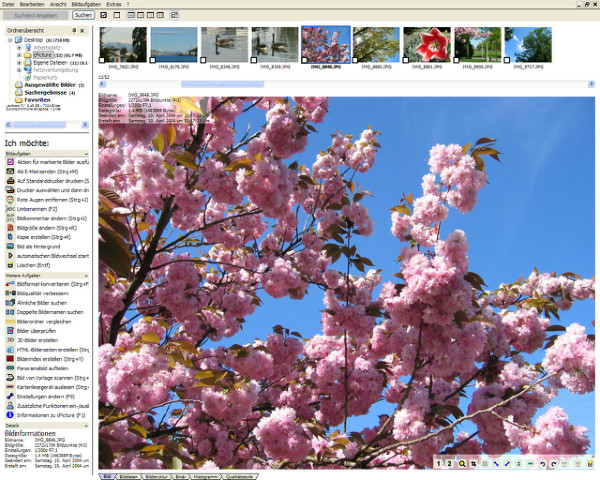
cPicture LE 4.11 has been released as an innovative all-in-one software suite designed to streamline your digital picture workflow. This user-friendly program operates without the need for a database or complicated installation processes, making it accessible for users of all skill levels. Notably, cPicture does not require additional picture or RAW libraries, ensuring seamless compatibility with other installed applications.
This software is particularly acclaimed for its lossless cropping capabilities for JPEG images, allowing users to edit their photos without losing quality. cPicture also features universal index prints for easy review, fast search functions, the ability to add comments, and a straightforward browsing experience for your images. Furthermore, it enables users to enjoy their movies in a cinematic 16:9 aspect ratio.
To get started with cPicture, simply copy the latest version of the application onto your device. This simplicity is complemented by a range of helpful resources, such as guides on restoring Windows Photo Viewer, managing folders in the Windows Photos app, and modifying notification settings for enhanced user experience.
In summary, cPicture LE 4.11 stands out as a versatile tool for anyone looking to enhance their digital photo management and editing capabilities, all while maintaining ease of use and compatibility with existing software. Future updates may continue to expand its features, further solidifying its position in the digital imaging landscape
This software is particularly acclaimed for its lossless cropping capabilities for JPEG images, allowing users to edit their photos without losing quality. cPicture also features universal index prints for easy review, fast search functions, the ability to add comments, and a straightforward browsing experience for your images. Furthermore, it enables users to enjoy their movies in a cinematic 16:9 aspect ratio.
To get started with cPicture, simply copy the latest version of the application onto your device. This simplicity is complemented by a range of helpful resources, such as guides on restoring Windows Photo Viewer, managing folders in the Windows Photos app, and modifying notification settings for enhanced user experience.
In summary, cPicture LE 4.11 stands out as a versatile tool for anyone looking to enhance their digital photo management and editing capabilities, all while maintaining ease of use and compatibility with existing software. Future updates may continue to expand its features, further solidifying its position in the digital imaging landscape
cPicture LE 4.11 released
cPicture is a modern all-in-one software suite to support your digital picture workflow. Very easy and without a database or installation.