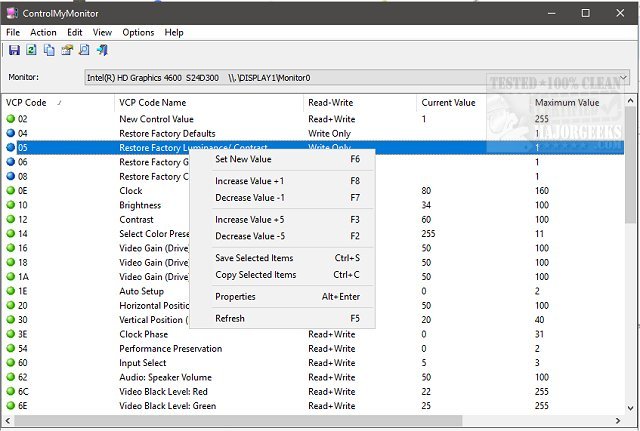
ControlMyMonitor version 1.40 has been released, offering users a free and efficient tool for managing their monitor display settings. This utility allows users to easily view and modify key settings such as brightness, contrast, sharpness, and color balance (red, green, blue) through both a graphical user interface (GUI) and a command line, catering to different user preferences.
One of the standout features of ControlMyMonitor is its compatibility with multiple monitors, allowing users to switch between different displays seamlessly via a drop-down menu in the main window. The GUI is user-friendly; users can modify settings by selecting an attribute and either pressing F6 or double-clicking to access the modification menu. Additionally, the software integrates into the right-click context menu for quick access.
Another significant advantage of ControlMyMonitor is its ability to export monitor settings to a configuration file. This feature allows users to save and later load specific configurations, which can be particularly useful for those who switch between different settings for activities like gaming and regular desktop use.
In summary, ControlMyMonitor 1.40 is a versatile and practical tool for anyone looking to enhance their monitor management experience, whether for gaming, professional work, or general use. Future updates could potentially include additional features such as personalized profiles for different applications, enhanced graphical representations of settings, or improved support for newer display technologies
One of the standout features of ControlMyMonitor is its compatibility with multiple monitors, allowing users to switch between different displays seamlessly via a drop-down menu in the main window. The GUI is user-friendly; users can modify settings by selecting an attribute and either pressing F6 or double-clicking to access the modification menu. Additionally, the software integrates into the right-click context menu for quick access.
Another significant advantage of ControlMyMonitor is its ability to export monitor settings to a configuration file. This feature allows users to save and later load specific configurations, which can be particularly useful for those who switch between different settings for activities like gaming and regular desktop use.
In summary, ControlMyMonitor 1.40 is a versatile and practical tool for anyone looking to enhance their monitor management experience, whether for gaming, professional work, or general use. Future updates could potentially include additional features such as personalized profiles for different applications, enhanced graphical representations of settings, or improved support for newer display technologies
ControlMyMonitor 1.40 released
ControlMyMonitor is a freeware monitor utility that provides a simple way to view and modify your monitor's display settings.