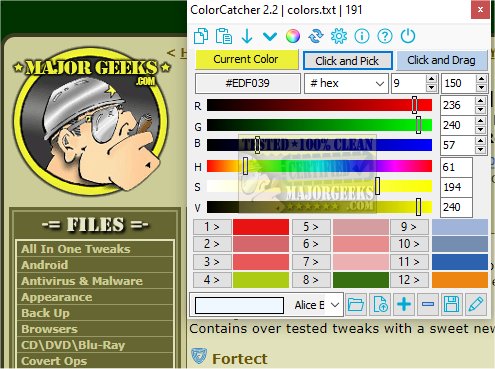
ColorCatcher 5.0 is a free and lightweight color picker application designed to simplify the process of extracting and identifying colors from your screen. With its built-in magnifier, users can easily capture precise colors by pointing to any area on their display. The app supports various color formats, including Hex, Decimal, RGB, HSV, and Integer values, allowing users to save and manage their color selections for future use.
One of the standout features of ColorCatcher is its ability to create custom color lists. Users can add up to 12 colors to their stack, easily modify the order via drag-and-drop, and remove colors as needed. This color management system enhances efficiency, especially for web designers and graphic artists who require organized access to their color palettes.
ColorCatcher offers two primary functions: Click & Pick and Click & Drag. The Click & Pick function serves as a general color picker, while Click & Drag provides a more precise selection tool, complete with an integrated magnifier for those moments when accuracy is paramount. Once a color is selected, it is displayed clearly for easy reference.
Moreover, the Color Lists feature allows users to organize their color selections effectively, making it easier to manage color stacks for specific projects. Users can create multiple lists and load them through the app's interface whenever necessary.
ColorCatcher is offered in both installer and portable formats, making it a convenient tool for on-the-go use. Its innovative design prioritizes simplicity while maintaining essential functionalities, making it an excellent choice for professionals in fields that require precise color matching.
In summary, ColorCatcher 5.0 streamlines color management, offering versatile tools for both casual users and professionals, enhancing workflow efficiency in creative tasks. This release reflects a commitment to user-friendly design while incorporating powerful features that cater to a variety of color-related needs.
Extension: Future Enhancements and Use Cases
Looking ahead, future updates to ColorCatcher could include features such as enhanced color harmony tools, integration with design software, and user feedback options for further customization. Possible use cases extend beyond web design to include interior design, fashion, and digital art, where color accuracy plays a crucial role in the final outcome. By continuously updating and expanding its capabilities, ColorCatcher can remain a vital resource for anyone working with color
One of the standout features of ColorCatcher is its ability to create custom color lists. Users can add up to 12 colors to their stack, easily modify the order via drag-and-drop, and remove colors as needed. This color management system enhances efficiency, especially for web designers and graphic artists who require organized access to their color palettes.
ColorCatcher offers two primary functions: Click & Pick and Click & Drag. The Click & Pick function serves as a general color picker, while Click & Drag provides a more precise selection tool, complete with an integrated magnifier for those moments when accuracy is paramount. Once a color is selected, it is displayed clearly for easy reference.
Moreover, the Color Lists feature allows users to organize their color selections effectively, making it easier to manage color stacks for specific projects. Users can create multiple lists and load them through the app's interface whenever necessary.
ColorCatcher is offered in both installer and portable formats, making it a convenient tool for on-the-go use. Its innovative design prioritizes simplicity while maintaining essential functionalities, making it an excellent choice for professionals in fields that require precise color matching.
In summary, ColorCatcher 5.0 streamlines color management, offering versatile tools for both casual users and professionals, enhancing workflow efficiency in creative tasks. This release reflects a commitment to user-friendly design while incorporating powerful features that cater to a variety of color-related needs.
Extension: Future Enhancements and Use Cases
Looking ahead, future updates to ColorCatcher could include features such as enhanced color harmony tools, integration with design software, and user feedback options for further customization. Possible use cases extend beyond web design to include interior design, fashion, and digital art, where color accuracy plays a crucial role in the final outcome. By continuously updating and expanding its capabilities, ColorCatcher can remain a vital resource for anyone working with color
ColorCatcher 5.0 released
ColorCatcher is a lightweight, free color picker app that allows you to extract colors easily from your screen via the built-in magnifier to capture and identify colors precisely wherever you point it on your screen.