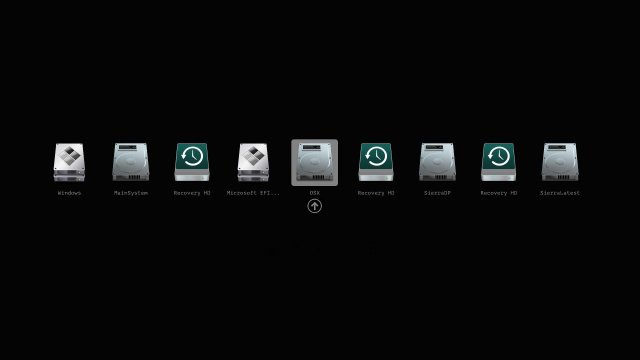
The Clover EFI Bootloader has recently released version 5171, which enhances the booting capabilities for various operating systems including OS X, Windows, and Linux on both Mac and PC platforms with UEFI or BIOS firmware. This bootloader supports both UEFI and legacy modes, allowing for a versatile booting experience.
Key features of Clover EFI Bootloader 5171 include:
- Direct booting using UEFI firmware or CloverEFI UEFI firmware emulation.
- A customizable graphical user interface (GUI) that allows users to personalize themes, icons, fonts, background images, animations, and mouse pointers.
- Access to a theme database and a theme manager for further customization.
- Native screen resolution support in the GUI, with options to change the resolution using Page Up or Page Down keys.
- Multilingual help available with F1, and various functionalities such as saving logs and DSDT patching using dedicated function keys.
- The ability to create and manage custom boot entries, including adding support for additional operating systems.
- Options for saving graphics firmware and taking screenshots directly from the GUI.
- A feature that allows the GUI to refresh upon CD/DVD insertion and the ability to eject media using F12.
The Clover EFI Bootloader also provides options for users to create Clover boot entries in NVRAM and access an EFI command shell from the GUI, enhancing the overall user experience and functionality.
In summary, Clover EFI Bootloader 5171 is a robust tool for users looking to manage their boot options across multiple operating systems on various hardware platforms, with a strong emphasis on customization and user-friendliness.
As technology continues to evolve, it will be interesting to see how future updates to Clover EFI Bootloader further enhance its capabilities, possibly integrating support for newer operating systems and hardware, improving user interface designs, and offering advanced features for system diagnostics and management
Key features of Clover EFI Bootloader 5171 include:
- Direct booting using UEFI firmware or CloverEFI UEFI firmware emulation.
- A customizable graphical user interface (GUI) that allows users to personalize themes, icons, fonts, background images, animations, and mouse pointers.
- Access to a theme database and a theme manager for further customization.
- Native screen resolution support in the GUI, with options to change the resolution using Page Up or Page Down keys.
- Multilingual help available with F1, and various functionalities such as saving logs and DSDT patching using dedicated function keys.
- The ability to create and manage custom boot entries, including adding support for additional operating systems.
- Options for saving graphics firmware and taking screenshots directly from the GUI.
- A feature that allows the GUI to refresh upon CD/DVD insertion and the ability to eject media using F12.
The Clover EFI Bootloader also provides options for users to create Clover boot entries in NVRAM and access an EFI command shell from the GUI, enhancing the overall user experience and functionality.
In summary, Clover EFI Bootloader 5171 is a robust tool for users looking to manage their boot options across multiple operating systems on various hardware platforms, with a strong emphasis on customization and user-friendliness.
As technology continues to evolve, it will be interesting to see how future updates to Clover EFI Bootloader further enhance its capabilities, possibly integrating support for newer operating systems and hardware, improving user interface designs, and offering advanced features for system diagnostics and management
Clover EFI Bootloader 5171 released
Clover EFI Bootloader can boot OS X, Windows, and Linux on Mac or PC with UEFI or BIOS firmware.