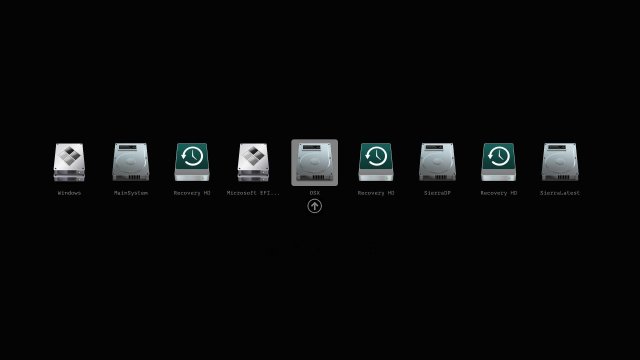
The Clover EFI Bootloader version 5168 has been released, providing enhanced capabilities for booting various operating systems including OS X, Windows, and Linux on both Mac and PC platforms equipped with UEFI or BIOS firmware. This bootloader supports both UEFI and legacy modes, offering flexibility in system configurations.
Key features of Clover EFI Bootloader include:
- The ability to boot directly using UEFI firmware or through CloverEFI's UEFI firmware emulation.
- A highly customizable graphical user interface (GUI) that allows users to personalize themes, icons, fonts, background images, animations, and mouse pointers.
- Access to a comprehensive theme database available at https://clover-wiki.zetam.org/Theme-database and a theme manager at https://sourceforge.net/p/cloverefiboot/themes/.
- Support for native screen resolutions in the GUI, with options to adjust resolution using Page Up and Page Down keys.
- Multilingual help accessible through the F1 key, with content dependent on the user's language settings.
- Various functionality shortcuts including F2 for saving preboot logs, F4 for retrieving original ACPI tables, F5 for testing DSDT patching, F6 for saving graphics firmware, F10 for taking screenshots, and F12 for ejecting CD/DVDs.
- The GUI is designed to refresh automatically upon CD/DVD insertion.
- Users can boot a previously selected entry after a default timeout, and a scroll feature is available for boot entries if the screen resolution is limited.
- The option to create custom boot entries for personalized configurations and to support additional operating systems.
- A tool is included in the GUI for creating Clover boot entries in NVRAM and launching an EFI command shell.
In addition to these features, Clover EFI Bootloader continues to offer extensive support and community resources, enabling users to optimize their boot experiences and troubleshoot common issues like BIOS resets, version checks, and boot device errors. The release of version 5168 further solidifies Clover's position as a versatile tool for users looking to enhance their multi-booting capabilities on diverse hardware setups
Key features of Clover EFI Bootloader include:
- The ability to boot directly using UEFI firmware or through CloverEFI's UEFI firmware emulation.
- A highly customizable graphical user interface (GUI) that allows users to personalize themes, icons, fonts, background images, animations, and mouse pointers.
- Access to a comprehensive theme database available at https://clover-wiki.zetam.org/Theme-database and a theme manager at https://sourceforge.net/p/cloverefiboot/themes/.
- Support for native screen resolutions in the GUI, with options to adjust resolution using Page Up and Page Down keys.
- Multilingual help accessible through the F1 key, with content dependent on the user's language settings.
- Various functionality shortcuts including F2 for saving preboot logs, F4 for retrieving original ACPI tables, F5 for testing DSDT patching, F6 for saving graphics firmware, F10 for taking screenshots, and F12 for ejecting CD/DVDs.
- The GUI is designed to refresh automatically upon CD/DVD insertion.
- Users can boot a previously selected entry after a default timeout, and a scroll feature is available for boot entries if the screen resolution is limited.
- The option to create custom boot entries for personalized configurations and to support additional operating systems.
- A tool is included in the GUI for creating Clover boot entries in NVRAM and launching an EFI command shell.
In addition to these features, Clover EFI Bootloader continues to offer extensive support and community resources, enabling users to optimize their boot experiences and troubleshoot common issues like BIOS resets, version checks, and boot device errors. The release of version 5168 further solidifies Clover's position as a versatile tool for users looking to enhance their multi-booting capabilities on diverse hardware setups
Clover EFI Bootloader 5168 released
Clover EFI Bootloader can boot OS X, Windows, and Linux on Mac or PC with UEFI or BIOS firmware.