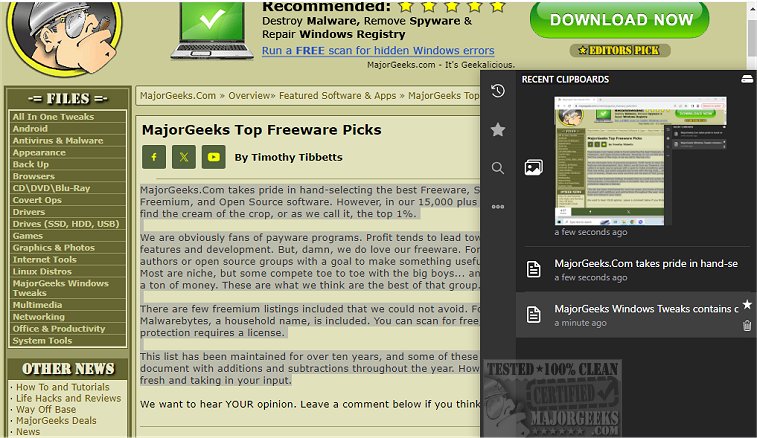
Clippy version 1.4.7 has been released, offering users a dedicated clipboard manager that serves as a robust alternative to the default Windows clipboard manager. This tool is specifically designed to meticulously track all copied text and images, enabling users to search through their clipboard history effortlessly when they need to retrieve important information.
With a simple hotkey, Clippy can be summoned near the system tray, allowing for quick access to all clipboard-stored items. It continuously records every copy event, maintaining these records locally to prioritize user privacy. Users can enhance their experience by marking important clipboard entries as favorites or starred items for easier retrieval.
Clippy offers significant customization options, including setting personalized hotkeys for quick access to recent and starred clipboard items, as well as the full clipboard history. Additionally, it provides features for backing up clipboard data to a cloud service and synchronizing clipboard history directly from the app.
In summary, Clippy is a feature-rich, user-friendly tool that significantly enhances clipboard management for individuals seeking efficiency and organization.
Clippy Features:
- Option to display/hide clipboard items with ctrl+y or ctrl+d (configurable in settings)
- Ability to type out clipboard content using ctrl+b, useful in restricted pasting scenarios
- Support for both text and image copying
- Customizable key bindings for all functions
- Option to add favorite clipboard entries
- Smart search functionality for links, colors, images, and hex codes
- Instant search capability
- Ability to change database location
- Dark mode and light mode options
Related Topics:
- Instructions on copying file or folder paths to the clipboard
- Methods for clearing clipboard history using shortcuts
- Guidance on disabling clipboard history in Windows 10 and 11
As Clippy continues to evolve, future updates may introduce even more features to improve user experience and functionality, such as enhanced security measures, integration with additional cloud services, or advanced organizational tools for managing clipboard contents
With a simple hotkey, Clippy can be summoned near the system tray, allowing for quick access to all clipboard-stored items. It continuously records every copy event, maintaining these records locally to prioritize user privacy. Users can enhance their experience by marking important clipboard entries as favorites or starred items for easier retrieval.
Clippy offers significant customization options, including setting personalized hotkeys for quick access to recent and starred clipboard items, as well as the full clipboard history. Additionally, it provides features for backing up clipboard data to a cloud service and synchronizing clipboard history directly from the app.
In summary, Clippy is a feature-rich, user-friendly tool that significantly enhances clipboard management for individuals seeking efficiency and organization.
Clippy Features:
- Option to display/hide clipboard items with ctrl+y or ctrl+d (configurable in settings)
- Ability to type out clipboard content using ctrl+b, useful in restricted pasting scenarios
- Support for both text and image copying
- Customizable key bindings for all functions
- Option to add favorite clipboard entries
- Smart search functionality for links, colors, images, and hex codes
- Instant search capability
- Ability to change database location
- Dark mode and light mode options
Related Topics:
- Instructions on copying file or folder paths to the clipboard
- Methods for clearing clipboard history using shortcuts
- Guidance on disabling clipboard history in Windows 10 and 11
As Clippy continues to evolve, future updates may introduce even more features to improve user experience and functionality, such as enhanced security measures, integration with additional cloud services, or advanced organizational tools for managing clipboard contents
clippy 1.4.7 released
clippy provides a dedicated clipboard manager, a solid alternative to the default Windows manager.