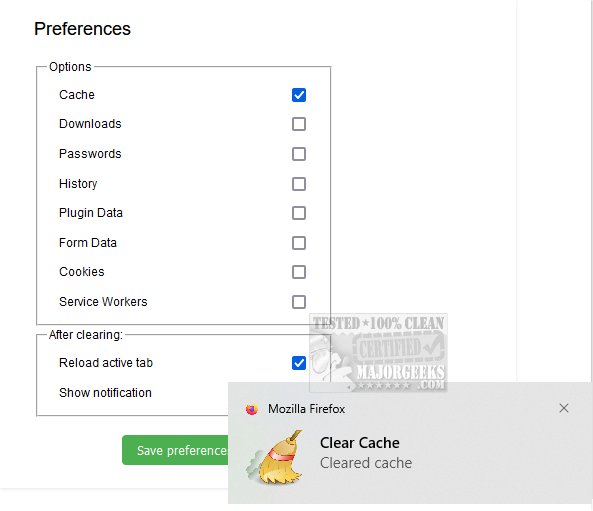
The latest version of Clear Cache for Firefox has been launched, providing users with a simple and efficient way to clear both disk and RAM cache with just a single click or via keyboard shortcuts. For users on Windows and Linux, the shortcut is F9, while macOS users can press fn + F9. This functionality is essential for ensuring that the browser operates smoothly by removing stored data that could impede performance or display outdated versions of web pages.
Functionality and Benefits
Clear Cache for Firefox not only allows users to erase the cache but also facilitates the deletion of all historical data accumulated by the browser. This includes various data types such as downloads, saved passwords, complete browsing history, cached plugin data, form entries, cookies, and service workers.
For everyday users, this feature enhances privacy and security by eliminating traces of online activity and optimizing browsing performance by removing unnecessary residual information that may slow down speeds.
For app developers, this capability is particularly advantageous during the testing and development phases. By ensuring each session starts without any cached data, developers can effectively troubleshoot issues and verify the functionality of their applications and web platforms. This leads to a more reliable and seamless user experience.
Conclusion
Overall, the ability to clear cache in Firefox is vital for maintaining both performance efficiency and software reliability. Clear Cache for Firefox emerges as a highly effective tool for decluttering the browsing experience, and its straightforward implementation can significantly enhance performance and privacy while surfing the web.
Future Extensions
To further enhance user experience and performance, future versions of Clear Cache could include features such as scheduled cache clearing, customizable settings for specific data types to be cleared, and integration with other privacy-focused tools. Additionally, offering real-time feedback on cache size before and after clearing could help users understand the impact of their actions. As browsing habits evolve, continuous updates to maintain compatibility with the latest Firefox versions and web standards will ensure that Clear Cache remains a valuable asset for all types of users
Functionality and Benefits
Clear Cache for Firefox not only allows users to erase the cache but also facilitates the deletion of all historical data accumulated by the browser. This includes various data types such as downloads, saved passwords, complete browsing history, cached plugin data, form entries, cookies, and service workers.
For everyday users, this feature enhances privacy and security by eliminating traces of online activity and optimizing browsing performance by removing unnecessary residual information that may slow down speeds.
For app developers, this capability is particularly advantageous during the testing and development phases. By ensuring each session starts without any cached data, developers can effectively troubleshoot issues and verify the functionality of their applications and web platforms. This leads to a more reliable and seamless user experience.
Conclusion
Overall, the ability to clear cache in Firefox is vital for maintaining both performance efficiency and software reliability. Clear Cache for Firefox emerges as a highly effective tool for decluttering the browsing experience, and its straightforward implementation can significantly enhance performance and privacy while surfing the web.
Future Extensions
To further enhance user experience and performance, future versions of Clear Cache could include features such as scheduled cache clearing, customizable settings for specific data types to be cleared, and integration with other privacy-focused tools. Additionally, offering real-time feedback on cache size before and after clearing could help users understand the impact of their actions. As browsing habits evolve, continuous updates to maintain compatibility with the latest Firefox versions and web standards will ensure that Clear Cache remains a valuable asset for all types of users
Clear Cache for Firefox 4.9 released
Clear Cache for Firefox lets you clear the cache, efficiently removing both disk and RAM cache by utilizing a single button click or using convenient keyboard shortcuts.