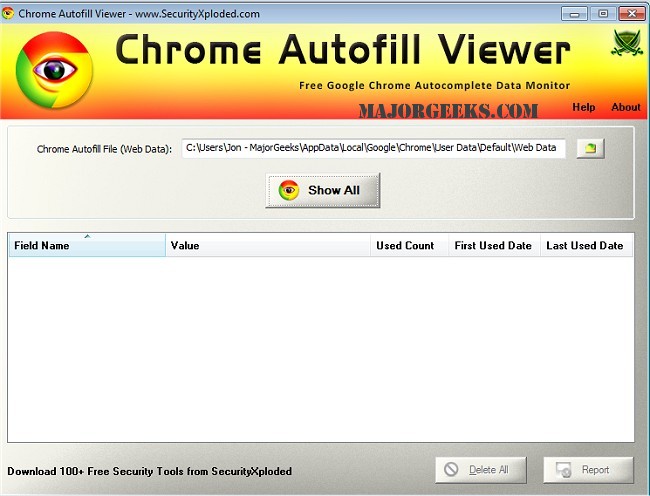
The Chrome Autofill Viewer 3.5 has been released, providing users with a convenient tool to access and manage their autocomplete data stored in the Google Chrome browser. This software allows users to view and delete Autofill entries, which may include sensitive information such as usernames, passwords, email addresses, phone numbers, and credit card details, all of which are stored in Chrome's internal database.
Key features of Chrome Autofill Viewer include:
- Comprehensive Data Viewing: Users can see all their Autofill history, including details such as field names, values, total usage count, first used date, and last used date.
- Cross-User Accessibility: The tool enables users to view Autofill history from other users' accounts on the same or remote systems.
- One-Click Deletion: Users can easily delete all displayed Autofill data with a single click.
- Auto Detection: Upon startup, the software automatically detects the Autofill file from Chrome's default profile location.
- Sorting Functionality: A sorting feature allows users to arrange Autofill entries in various orders for easier searching through potentially hundreds of entries.
- Export Options: Users can save the displayed Autofill list in multiple formats, including HTML, XML, TEXT, or CSV.
- User-Friendly Interface: The software boasts an enhanced graphical user interface that is easier and faster to navigate.
- Portability: It is fully portable and does not require additional third-party components like JAVA or .NET for operation.
- Local Installation: The application supports straightforward local installation and uninstallation.
In summary, Chrome Autofill Viewer 3.5 is a powerful tool for managing Autofill data, ensuring users can maintain their privacy by controlling what information is stored in their browsers. The combination of comprehensive features and an intuitive interface makes it an essential utility for anyone concerned about their online security and data management. As internet privacy becomes increasingly important, tools like Chrome Autofill Viewer help users take proactive measures to protect their personal information
Key features of Chrome Autofill Viewer include:
- Comprehensive Data Viewing: Users can see all their Autofill history, including details such as field names, values, total usage count, first used date, and last used date.
- Cross-User Accessibility: The tool enables users to view Autofill history from other users' accounts on the same or remote systems.
- One-Click Deletion: Users can easily delete all displayed Autofill data with a single click.
- Auto Detection: Upon startup, the software automatically detects the Autofill file from Chrome's default profile location.
- Sorting Functionality: A sorting feature allows users to arrange Autofill entries in various orders for easier searching through potentially hundreds of entries.
- Export Options: Users can save the displayed Autofill list in multiple formats, including HTML, XML, TEXT, or CSV.
- User-Friendly Interface: The software boasts an enhanced graphical user interface that is easier and faster to navigate.
- Portability: It is fully portable and does not require additional third-party components like JAVA or .NET for operation.
- Local Installation: The application supports straightforward local installation and uninstallation.
In summary, Chrome Autofill Viewer 3.5 is a powerful tool for managing Autofill data, ensuring users can maintain their privacy by controlling what information is stored in their browsers. The combination of comprehensive features and an intuitive interface makes it an essential utility for anyone concerned about their online security and data management. As internet privacy becomes increasingly important, tools like Chrome Autofill Viewer help users take proactive measures to protect their personal information
Chrome Autofill Viewer 3.5 released
Chrome Autofill Viewer will easily see and delete all your autocomplete data from Google Chrome browser.